
[visualstudio][cpp][UE5]UE5 Logic Nightで話題になったイベントディスパッチャーとデリゲートに関する調べものvol.02エンジンソースで見つけたUnrealEngine C++のデリゲート Oculus の例

.h

D:\Program Files\Epic Games\UE_5.3\Engine\Plugins\Online\OnlineSubsystemOculus\Source\Classes\OculusFindSessionsCallbackProxy.h

ヘッダーでデリゲート変数の型指定してる

FOnFindSessionsCompleteDelegate Delegate; これがデリゲート変数の型指定

ヘッダーでデリゲートハンドルの型指定してる。

//登録された OnFindSessionsComplete デリゲートへのハンドル
FDelegateHandle DelegateHandle;

というのは・・・・

D:\Program Files\Epic Games\UE_5.3\Engine\Plugins\Online\OnlineSubsystem\Source\Public\Interfaces\OnlineSessionDelegates.h

でこのように定義されている

OnlineSessionDelegates.hでの FOnFindSessionsCompleteDelegate の定義

  • オンライン セッションの検索が完了したときに呼び出されるデリゲート
  • @param bWasSuccessful 非同期アクションがエラーなしで完了した場合は true、エラーがあった場合は false

    DECLARE_MULTICAST_DELEGATE_OneParam(FOnFindSessionsComplete, bool);
    typedef FOnFindSessionsComplete::FDelegate FOnFindSessionsCompleteDelegate;

.h 全文

// Copyright Epic Games, Inc. All Rights Reserved.

#pragma once

#include "UObject/Object.h"
#include "Net/OnlineBlueprintCallProxyBase.h"
#include "Interfaces/OnlineSessionInterface.h"
#include "FindSessionsCallbackProxy.h"
#include "OculusFindSessionsCallbackProxy.generated.h"

/**
 * Exposes FindSession of the Platform SDK for blueprint use.
 */
UCLASS(MinimalAPI)
class UOculusFindSessionsCallbackProxy : public UOnlineBlueprintCallProxyBase
{
	GENERATED_UCLASS_BODY()

	// Called when there is a successful query
	UPROPERTY(BlueprintAssignable)
	FBlueprintFindSessionsResultDelegate OnSuccess;

	// Called when there is an unsuccessful query
	UPROPERTY(BlueprintAssignable)
	FBlueprintFindSessionsResultDelegate OnFailure;

	// Searches for matchmaking room sessions with the oculus online subsystem
	UFUNCTION(BlueprintCallable, Category = "Oculus|Session", meta = (BlueprintInternalUseOnly = "true"))
	static UOculusFindSessionsCallbackProxy* FindMatchmakingSessions(int32 MaxResults, FString OculusMatchmakingPool);

	// Searches for moderated room sessions with the oculus online subsystem
	UFUNCTION(BlueprintCallable, Category = "Oculus|Session", meta = (BlueprintInternalUseOnly = "true"))
	static UOculusFindSessionsCallbackProxy* FindModeratedSessions(int32 MaxResults);

	// UOnlineBlueprintCallProxyBase interface
	virtual void Activate() override;
	// End of UOnlineBlueprintCallProxyBase interface

private:
	// Internal callback when the session search completes, calls out to the public success/failure callbacks
	void OnCompleted(bool bSuccess);

private:

	// The delegate executed by the online subsystem
	FOnFindSessionsCompleteDelegate Delegate;//デリゲート宣言

	// Handle to the registered OnFindSessionsComplete delegate
	FDelegateHandle DelegateHandle;//デリゲートハンドル宣言

	// Object to track search results
	TSharedPtr<FOnlineSessionSearch> SearchObject;

	// Maximum number of results to return
	int MaxResults;

	// Optional: if searching within a matchmaking pool
	FString OculusPool;

	bool bSearchModeratedRoomsOnly;
};

CPP

D:\Program Files\Epic Games\UE_5.3\Engine\Plugins\Online\OnlineSubsystemOculus\Source\Private\OculusFindSessionsCallbackProxy.cpp では

デリゲートにOnComplitedをバインドしてる

Super(ObjectInitializer) のあと

Delegate(FOnFindSessionsCompleteDelegate::CreateUObject(this, &ThisClass::OnCompleted))

デリゲートハンドルにDelegateを渡してる。(コールしてる)

if (OculusSessionInterface.IsValid()) のタイミングで

DelegateHandle = OculusSessionInterface->AddOnFindSessionsCompleteDelegate_Handle(Delegate);

// Copyright Epic Games, Inc. All Rights Reserved.

#include "OculusFindSessionsCallbackProxy.h"
#include "OnlineSubsystemOculusPrivate.h"
#include "Online.h"
#include "OnlineSessionInterfaceOculus.h"
#include "OnlineSubsystemOculusPrivate.h"

UOculusFindSessionsCallbackProxy::UOculusFindSessionsCallbackProxy(const FObjectInitializer& ObjectInitializer)
	: Super(ObjectInitializer)
	  , Delegate(FOnFindSessionsCompleteDelegate::CreateUObject(this, &ThisClass::OnCompleted))
	  , MaxResults(0)
	  , bSearchModeratedRoomsOnly(false)
{
//デリゲートにOnComplitedをバインド
}

UOculusFindSessionsCallbackProxy* UOculusFindSessionsCallbackProxy::FindMatchmakingSessions(int32 MaxResults, FString OculusMatchmakingPool)
{
	UOculusFindSessionsCallbackProxy* Proxy = NewObject<UOculusFindSessionsCallbackProxy>();
	Proxy->SetFlags(RF_StrongRefOnFrame);
	Proxy->MaxResults = MaxResults;
	Proxy->OculusPool = MoveTemp(OculusMatchmakingPool);
	Proxy->bSearchModeratedRoomsOnly = false;
	return Proxy;
}

UOculusFindSessionsCallbackProxy* UOculusFindSessionsCallbackProxy::FindModeratedSessions(int32 MaxResults)
{
	UOculusFindSessionsCallbackProxy* Proxy = NewObject<UOculusFindSessionsCallbackProxy>();
	Proxy->SetFlags(RF_StrongRefOnFrame);
	Proxy->MaxResults = MaxResults;
	Proxy->bSearchModeratedRoomsOnly = true;
	return Proxy;
}

void UOculusFindSessionsCallbackProxy::Activate()
{
PRAGMA_DISABLE_DEPRECATION_WARNINGS
	auto OculusSessionInterface = Online::GetSessionInterface(OCULUS_SUBSYSTEM);
PRAGMA_ENABLE_DEPRECATION_WARNINGS

	if (OculusSessionInterface.IsValid())
	{
        //デリゲートハンドルにDelegateを渡してる。(コールしてる)
		DelegateHandle = OculusSessionInterface->AddOnFindSessionsCompleteDelegate_Handle(Delegate);

		SearchObject = MakeShareable(new FOnlineSessionSearch);
		SearchObject->MaxSearchResults = MaxResults;
		SearchObject->QuerySettings.Set(SEARCH_OCULUS_MODERATED_ROOMS_ONLY, bSearchModeratedRoomsOnly, EOnlineComparisonOp::Equals);

		if (!OculusPool.IsEmpty())
		{
			SearchObject->QuerySettings.Set(SETTING_OCULUS_POOL, OculusPool, EOnlineComparisonOp::Equals);
		}

		OculusSessionInterface->FindSessions(0, SearchObject.ToSharedRef());
	}
	else
	{
		UE_LOG_ONLINE_SESSION(Error, TEXT("Oculus platform service not available. Skipping FindSessions."));
		TArray<FBlueprintSessionResult> Results;
		OnFailure.Broadcast(Results);
	}
}

void UOculusFindSessionsCallbackProxy::OnCompleted(bool bSuccess)
{
PRAGMA_DISABLE_DEPRECATION_WARNINGS
	auto OculusSessionInterface = Online::GetSessionInterface(OCULUS_SUBSYSTEM);
PRAGMA_ENABLE_DEPRECATION_WARNINGS

	if (OculusSessionInterface.IsValid())
	{
		OculusSessionInterface->ClearOnFindSessionsCompleteDelegate_Handle(DelegateHandle);
	}

	TArray<FBlueprintSessionResult> Results;

	if (bSuccess && SearchObject.IsValid())
	{
		for (auto& Result : SearchObject->SearchResults)
		{
			FBlueprintSessionResult BPResult;
			BPResult.OnlineResult = Result;
			Results.Add(BPResult);
		}

		OnSuccess.Broadcast(Results);
	}
	else
	{
		OnFailure.Broadcast(Results);
	}
}

ちょっと複雑すぎてちょと何言ってるかわからない感じもする。が

まとめ4つを同じように見つけることができた。

1、デリゲート宣言

FOnFindSessionsCompleteDelegate Delegate;

2、ハンドル初期化

FDelegateHandle DelegateHandle;

3,バインド

Delegate(FOnFindSessionsCompleteDelegate::CreateUObject(this, &ThisClass::OnCompleted))

4タイミングでコール呼び出し

DelegateHandle = OculusSessionInterface->AddOnFindSessionsCompleteDelegate_Handle(Delegate);

自信がないので間違っていたら連絡してほしいです。

[visualstudio][cpp][UE5]UE5 Logic Nightで話題になったイベントディスパッチャーとデリゲートに関する調べものvol.01キーボードまたはUIボタンイベント時

UE5のEventDispatcher はこれだけ レベルブループリントのでキーボードイベント受けられるので これだけ

C++のデリゲートはこれだけ! 

#include "pch.h"
#include "MainPage.xaml.h"

using namespace UseDelegate;

using namespace Platform;
using namespace Windows::Foundation;
using namespace Windows::Foundation::Collections;
using namespace Windows::UI::Xaml;
using namespace Windows::UI::Xaml::Controls;
using namespace Windows::UI::Xaml::Controls::Primitives;
using namespace Windows::UI::Xaml::Data;
using namespace Windows::UI::Xaml::Input;
using namespace Windows::UI::Xaml::Media;
using namespace Windows::UI::Xaml::Navigation;

MainPage::MainPage()
{
    InitializeComponent();
}

// デリゲートの宣言
delegate void SampleDelegate(); // ---------デリゲートの宣言

ref class ClsA
{
public:
    void Disp()
    {
        Windows::UI::Popups::MessageDialog^ md =
            ref new Windows::UI::Popups::MessageDialog(
                L"ClsAのDisp()メソッドを実行しました\n");
        md->ShowAsync();
    }
};
void UseDelegate::MainPage::Button1_Click(
    Platform::Object^ sender, Windows::UI::Xaml::RoutedEventArgs^ e)
{
    ClsA^ obj = ref new ClsA(); // ----(イベント)ハンドラ
    //メソッドをバインド
    SampleDelegate^ sd = ref new SampleDelegate(obj, &ClsA::Disp); 
    sd(); // ---------------------------コールと同義
}

個人的結論:どちらも指定したタイミングで実行したいイベントを登録しておくもの!

関連URL

ポジTAさんありがとうございます。

https://zenn.dev/posita33/books/ue5_starter_cpp_and_bp_001/viewer/chap_02_bp-event_dispatcher

C++参考 Visual C++2022パーフェクトマスターより

UE5 Logic Night

https://t.co/AovVDgpXMT

[UE5.3.2][VisualStudio][Cpp]UnrealEngineのCPPプラグインからOpenAI(ChatGPT4o)を呼んで返り値jsonからパースしてPython部分を抜き出して実行!!できた!!!

今回も以下の続き

furcraeaUEOpenAIBPLibrary.h

#pragma once

#include "CoreMinimal.h"
#include "Kismet/BlueprintFunctionLibrary.h"
#include "HttpModule.h"
#include "Interfaces/IHttpRequest.h"
#include "Interfaces/IHttpResponse.h"
#include "furcraeaUEOpenAIBPLibrary.generated.h"

UCLASS()
class UfurcraeaUEOpenAIBPLibrary : public UBlueprintFunctionLibrary
{
    GENERATED_BODY()

public:
    UfurcraeaUEOpenAIBPLibrary(const FObjectInitializer& ObjectInitializer);

    UFUNCTION(BlueprintCallable, Category = "furcraeaUEOpenAI")
    static FString furcraeaUEOpenAISampleFunction(FString Param);

private:
    static FString SendChatCompletionRequest(FString UserMessage);
    static void OnResponseReceived(FHttpRequestPtr Request, FHttpResponsePtr Response, bool bWasSuccessful);

    static void ResponseMessageToPythonCode(FString ResponseMessage);

    static bool RunMyPython(int32& ProcessId,
        FString FullPathOfProgramToRun, TArray<FString> CommandlineArgs, bool Hidden);
};

furcraeaUEOpenAIBPLibrary.cpp

#include "furcraeaUEOpenAIBPLibrary.h"
#include "HttpModule.h"
#include "Interfaces/IHttpRequest.h"
#include "Interfaces/IHttpResponse.h"
#include "Json.h"
#include "JsonUtilities.h"
#include "String.h"
#include "Misc/FileHelper.h"
#include "Misc/Paths.h"
#include "Engine/Engine.h"
#include "PythonBridge.h"


//IMPLEMENT_GAME_MODULE(FDefaultGameModuleImpl, furcraeaUEOpenAIBPLibrary);

UfurcraeaUEOpenAIBPLibrary::UfurcraeaUEOpenAIBPLibrary(const FObjectInitializer& ObjectInitializer)
    : Super(ObjectInitializer)
{
    UE_LOG(LogTemp, Warning, TEXT("Hello World! UfurcraeaUEOpenAIBPLibrary ObjectInitializer"));
}

FString UfurcraeaUEOpenAIBPLibrary::furcraeaUEOpenAISampleFunction(FString Param)
{
    FString UserMessage = Param;
    FString ResponseMessage = TEXT("");
    UE_LOG(LogTemp, Warning, TEXT("Hello World! furcraeaUEOpenAISampleFunction"));
    
	ResponseMessage= SendChatCompletionRequest(UserMessage);
    return ResponseMessage;
}

FString UfurcraeaUEOpenAIBPLibrary::SendChatCompletionRequest(FString UserMessage)
{
    FString ApiKey = TEXT("sk-から始まるキー");

    if (!FModuleManager::Get().IsModuleLoaded("Http"))
    {
        FModuleManager::Get().LoadModule("Http");
    }

    FHttpModule* Http = &FHttpModule::Get();
    if (!Http)
    {
        UE_LOG(LogTemp, Error, TEXT("Failed to get FHttpModule instance"));
        return FString();
    }

    TSharedRef<IHttpRequest, ESPMode::ThreadSafe> HttpRequest = Http->CreateRequest();
    HttpRequest->SetURL("https://api.openai.com/v1/chat/completions");
    HttpRequest->SetVerb("POST");
    HttpRequest->SetHeader("Content-Type", "application/json");
    HttpRequest->SetHeader("Authorization", "Bearer " + ApiKey);

    FString Content = FString::Printf(TEXT(R"(
    {
        "model": "gpt-4o-mini",
        "messages": [{"role": "user", "content": "%s"}],
        "temperature": 0.7
    }
    )"), *UserMessage);

    HttpRequest->SetContentAsString(Content);

    //HttpRequest->OnProcessRequestComplete().BindUObject(this, &UfurcraeaUEOpenAIBPLibrary::OnResponseReceived);
    HttpRequest->OnProcessRequestComplete().BindLambda([](FHttpRequestPtr Request, FHttpResponsePtr Response, bool bWasSuccessful)
        {
            OnResponseReceived(Request, Response, bWasSuccessful);
        });
    HttpRequest->ProcessRequest();

    return FString();
}

void UfurcraeaUEOpenAIBPLibrary::OnResponseReceived(FHttpRequestPtr Request, FHttpResponsePtr Response, bool bWasSuccessful)
{
    if (bWasSuccessful && Response.IsValid())
    {
        FString ResponseContent = Response->GetContentAsString();
        TSharedPtr<FJsonObject> JsonObject;
        TSharedRef<TJsonReader<>> Reader = TJsonReaderFactory<>::Create(ResponseContent);

        if (FJsonSerializer::Deserialize(Reader, JsonObject) && JsonObject.IsValid())
        {
            FString MessageContent = JsonObject->GetArrayField("choices")[0]->AsObject()->GetObjectField("message")->GetStringField("content");
            UE_LOG(LogTemp, Warning, TEXT("OnResponseReceived() Response Message: %s"), *MessageContent);
            ResponseMessageToPythonCode(MessageContent);
        }
        else
        {
            UE_LOG(LogTemp, Error, TEXT("Failed to parse JSON response"));
        }
    }
    else
    {
        UE_LOG(LogTemp, Error, TEXT("Request failed"));
    }
}


static std::string replaceOtherStr(std::string& replacedStr, std::string from, std::string to) {
    const unsigned int pos = replacedStr.find(from);
    const int len = from.length();

    if (pos == std::string::npos || from.empty()) {
        return replacedStr;
    }

    return replacedStr.replace(pos, len, to);
}


void UfurcraeaUEOpenAIBPLibrary::ResponseMessageToPythonCode(FString ResponseMessage)
{
    //ResponseMessage の文字列から「```python」で始まり「```」で終わるまでの文字列を抜き出して


        // FString から標準文字列に変換
        FString aFString= ResponseMessage;
        std::string aString = TCHAR_TO_ANSI(*aFString);
        long aStartIndex = aString.find("```python");
        
        long aEndIndex = aString.rfind("```");

		long aLength = aEndIndex - aStartIndex;
        std::string aPythonCode =aString.substr(aStartIndex+9, aLength-9);

        replaceOtherStr(aPythonCode, "?", "//");
		// 標準文字列から FString に変換
		FString PythonCode = FString(aPythonCode.c_str());
        

        UE_LOG(LogTemp, Warning, TEXT("ResponseMessageToPythonCode() StartIndex: %u"), aStartIndex);
        UE_LOG(LogTemp, Warning, TEXT("ResponseMessageToPythonCode() EndIndex: %u"), aEndIndex);

        if (aStartIndex != 0 && aEndIndex != 0)
        {


            //FString PythonCode2 = ResponseMessage.Mid(StartIndex + 1, PythonCodeLength);
            UE_LOG(LogTemp, Warning, TEXT("ResponseMessageToPythonCode() 1 PythonCode: %s"), *PythonCode);
            //UE_LOG(LogTemp, Warning, TEXT("ResponseMessageToPythonCode() 2 PythonCode2: %s"), *PythonCode2);
            
             // Define the file path in the Saved directory
            FString FilePath = FPaths::ProjectSavedDir() / TEXT("ExtractedPythonCode.py");

            // Save the Python code to the file
            if (FFileHelper::SaveStringToFile(PythonCode, *FilePath))
            {
                UE_LOG(LogTemp, Warning, TEXT("Python code saved to: %s"), *FilePath);

                // Ensure the file path is correctly formatted for the exec command
                FString RelativeFilePath = FPaths::ConvertRelativePathToFull(FilePath);
                FString Command = FString::Printf(TEXT("py \"%s\""), *RelativeFilePath);
                //FString Command = FString::Printf(TEXT("\"%s\""), *RelativeFilePath);
				//GEngine->Exec(nullptr, *Command);

                UPythonBridge* bridge = UPythonBridge::Get();
                bridge->FunctionImplementedInPython();
                bridge->ExecuteCommand(RelativeFilePath);
            }
            else
            {
                UE_LOG(LogTemp, Error, TEXT("Failed to save Python code to file"));
            }


        }
        else 
        {
            UE_LOG(LogTemp, Warning, TEXT("ResponseMessageToPythonCode() PythonCode: in None"));
        }

    
}


PythonBridge.h (https://forums.unrealengine.com/t/running-a-python-script-with-c/114117/4)

// Fill out your copyright notice in the Description page of Project Settings.

#pragma once

#include "CoreMinimal.h"
#include "Engine.h"
#include "UObject/NoExportTypes.h"
#include "PythonBridge.generated.h"

/**
 * 
 */
UCLASS(Blueprintable)
class FURCRAEAUEOPENAI_API UPythonBridge : public UObject
{
	GENERATED_BODY()

public:
    UFUNCTION(BlueprintCallable, Category = Python)
    static UPythonBridge* Get();

    UFUNCTION(BlueprintImplementableEvent, Category = Python)
    void FunctionImplementedInPython() const;

    UFUNCTION(BlueprintImplementableEvent, Category = Python)
    void ExecuteCommand(const FString& CommandName) const;
};

PythonBridge.cpp

// Fill out your copyright notice in the Description page of Project Settings.


#include "PythonBridge.h"

UPythonBridge* UPythonBridge::Get()
{
    TArray<UClass*> PythonBridgeClasses;
    GetDerivedClasses(UPythonBridge::StaticClass(), PythonBridgeClasses);
    int32 NumClasses = PythonBridgeClasses.Num();
    if (NumClasses > 0)
    {
        return Cast<UPythonBridge>(PythonBridgeClasses[NumClasses - 1]->GetDefaultObject());
    }
	return nullptr;
}
/*
void UPythonBridge::FunctionImplementedInPython() const
{
    UE_LOG(LogTemp, Warning, TEXT("Hello World! FunctionImplementedInPython"));
}

void UPythonBridge::ExecuteCommand(const FString& CommandName) const
{
    UE_LOG(LogTemp, Warning, TEXT("Hello World! ExecuteCommand"));
}
*/

Project/Content/Python/init_unreal.py

import unreal
@unreal.uclass()
class PythonBridgeImplementation(unreal.PythonBridge):
    @unreal.ufunction(override=True)
    def function_implemented_in_python(self):
        print("function_implemented_in_python")
    @unreal.ufunction(override=True)
    def execute_command(self, command_name):
        print("execute_command  command_name="+command_name)
        exec(open(command_name).read())

で完成!! Cubeがちゃんと並ぶかは五分五分です。

AIのコマンド

https://dev.epicgames.com/documentation/en-us/unreal-engine/python-api/?application_version=5.3に乗ってるpythonでpep8に準拠してunrealengine5.3のpythonでレベルにcubeを10個並べて

出力されたpython


import unreal

def spawn_cubes(num_cubes=10, spacing=200.0):
    # //??????????
    actor_spawned = []
    world = unreal.EditorLevelLibrary.get_editor_world()

    # ??????????????????
    cube_mesh = unreal.EditorAssetLibrary.load_asset('/Engine/BasicShapes/Cube')

    for i in range(num_cubes):
        # ??????????????
        spawn_location = unreal.Vector(i * spacing, 0, 0)

        # ?????????
        cube_actor = unreal.EditorLevelLibrary.spawn_actor_from_object(cube_mesh, spawn_location)
        actor_spawned.append(cube_actor)

    return actor_spawned

# ?????10????
spawned_cubes = spawn_cubes()

管理用

https://drive.google.com/file/d/1qjtYztc1AuBDFLBygc1z_0taEzsa0Y4Q/view?usp=sharing

参考URL

https://forums.unrealengine.com/t/running-a-python-script-with-c/114117/4

[UE5.7][VisualStudio][Cpp]UnrealEngineのCPPプラグインからOpenAI(ChatGPT4o)を呼んでみるのできた。2025/12/15再更新

プラグインの作り方はこの記事から

https://furcraea.verse.jp/wp/2024/09/28/ue5-3-how-to-create-a-cpp-plugin

furcraeaUEOpenAI ってプラグイン作って

D:\Sandbox\UE53CratePlugin\UE53CreatePlugin\Plugins\furcraeaUEOpenAI\Source\furcraeaUEOpenAI\furcraeaUEOpenAI.Build.cs のPublicDependencyModuleNames

“HTTP”, “Json”,

を追加

furcraeaUEOpenAI.Build.cs

// Some copyright should be here...

using UnrealBuildTool;

public class furcraeaUEOpenAI : ModuleRules
{
	public furcraeaUEOpenAI(ReadOnlyTargetRules Target) : base(Target)
	{
		PCHUsage = ModuleRules.PCHUsageMode.UseExplicitOrSharedPCHs;
		
		PublicIncludePaths.AddRange(
			new string[] {
				// ... add public include paths required here ...
			}
			);
				
		
		PrivateIncludePaths.AddRange(
			new string[] {
				// ... add other private include paths required here ...
			}
			);
			
		
		PublicDependencyModuleNames.AddRange(
			new string[]
			{
				"Core","HTTP", "Json", 
				// ... add other public dependencies that you statically link with here ...
			}
			);
			
		
		PrivateDependencyModuleNames.AddRange(
			new string[]
			{
				"CoreUObject",
				"Engine",
				"Slate",
				"SlateCore",
				// ... add private dependencies that you statically link with here ...	
			}
			);
		
		
		DynamicallyLoadedModuleNames.AddRange(
			new string[]
			{
				// ... add any modules that your module loads dynamically here ...
			}
			);
	}
}

furcraeaOpenAILib2BPLibrary.h

// Copyright Epic Games, Inc. All Rights Reserved.

#pragma once

#include "Kismet/BlueprintFunctionLibrary.h"
#include "furcraeaOpenAILib2BPLibrary.generated.h"

/* 
*	Function library class.
*	Each function in it is expected to be static and represents blueprint node that can be called in any blueprint.
*
*	When declaring function you can define metadata for the node. Key function specifiers will be BlueprintPure and BlueprintCallable.
*	BlueprintPure - means the function does not affect the owning object in any way and thus creates a node without Exec pins.
*	BlueprintCallable - makes a function which can be executed in Blueprints - Thus it has Exec pins.
*	DisplayName - full name of the node, shown when you mouse over the node and in the blueprint drop down menu.
*				Its lets you name the node using characters not allowed in C++ function names.
*	CompactNodeTitle - the word(s) that appear on the node.
*	Keywords -	the list of keywords that helps you to find node when you search for it using Blueprint drop-down menu. 
*				Good example is "Print String" node which you can find also by using keyword "log".
*	Category -	the category your node will be under in the Blueprint drop-down menu.
*
*	For more info on custom blueprint nodes visit documentation:
*	https://wiki.unrealengine.com/Custom_Blueprint_Node_Creation
*/
UCLASS()
class UfurcraeaOpenAILib2BPLibrary : public UBlueprintFunctionLibrary
{
	GENERATED_UCLASS_BODY()

public:
	UFUNCTION(BlueprintCallable, meta = (DisplayName = "Sample Function", Keywords = "furcraeaOpenAILib2 sample"), Category = "furcraeaOpenAILib2")
	static float furcraeaOpenAILib2SampleFunction(float Param);

	UFUNCTION(BlueprintCallable, meta = (DisplayName = "Curl Send Request 4", Keywords = "furcraeaOpenAILib2 curl http request openai"), Category = "furcraeaOpenAILib2")
	static void CurlSendRequest4();
};

furcraeaOpenAILib2BPLibrary.cpp

// Copyright Epic Games, Inc. All Rights Reserved.

#include "furcraeaOpenAILib2BPLibrary.h"
#include "furcraeaOpenAILib2.h"
#include "HttpModule.h"
#include "Interfaces/IHttpRequest.h"
#include "Interfaces/IHttpResponse.h"

UfurcraeaOpenAILib2BPLibrary::UfurcraeaOpenAILib2BPLibrary(const FObjectInitializer& ObjectInitializer)
: Super(ObjectInitializer)
{

}

float UfurcraeaOpenAILib2BPLibrary::furcraeaOpenAILib2SampleFunction(float Param)
{
	return -1;
}


void UfurcraeaOpenAILib2BPLibrary::CurlSendRequest4()
{
	FString ApiKey = TEXT("sk-からはじまるKEY");

	TSharedRef<IHttpRequest, ESPMode::ThreadSafe> HttpRequest = FHttpModule::Get().CreateRequest();
	HttpRequest->SetURL("https://api.openai.com/v1/chat/completions");

	HttpRequest->SetVerb("POST");
	HttpRequest->SetHeader("Content-Type", "application/json");
	HttpRequest->SetHeader("Authorization", "Bearer " + ApiKey);

	// JSON Body
	FString Content = TEXT(R"(
    {
        "model": "gpt-4o-mini",
        "messages": [{"role": "user", "content": "Say this is a test!"}],
        "temperature": 0.7
    }
    )");

	HttpRequest->SetContentAsString(Content);
	//
	HttpRequest->OnProcessRequestComplete().BindLambda([](FHttpRequestPtr Request, FHttpResponsePtr Response, bool bWasSuccessful)
		{
			if (bWasSuccessful && Response.IsValid())
			{
				FString ResponseContent = Response->GetContentAsString();
				UE_LOG(LogTemp, Warning, TEXT("%s"), *ResponseContent);
			}
			else
			{
				UE_LOG(LogTemp, Error, TEXT("Request failed"));
			}
		});
	HttpRequest->ProcessRequest();
}

VSでbuild.

新規ブループリントから Widget BluePrint >User Widgetで作成 WBP_ApiTest

ボタン配置

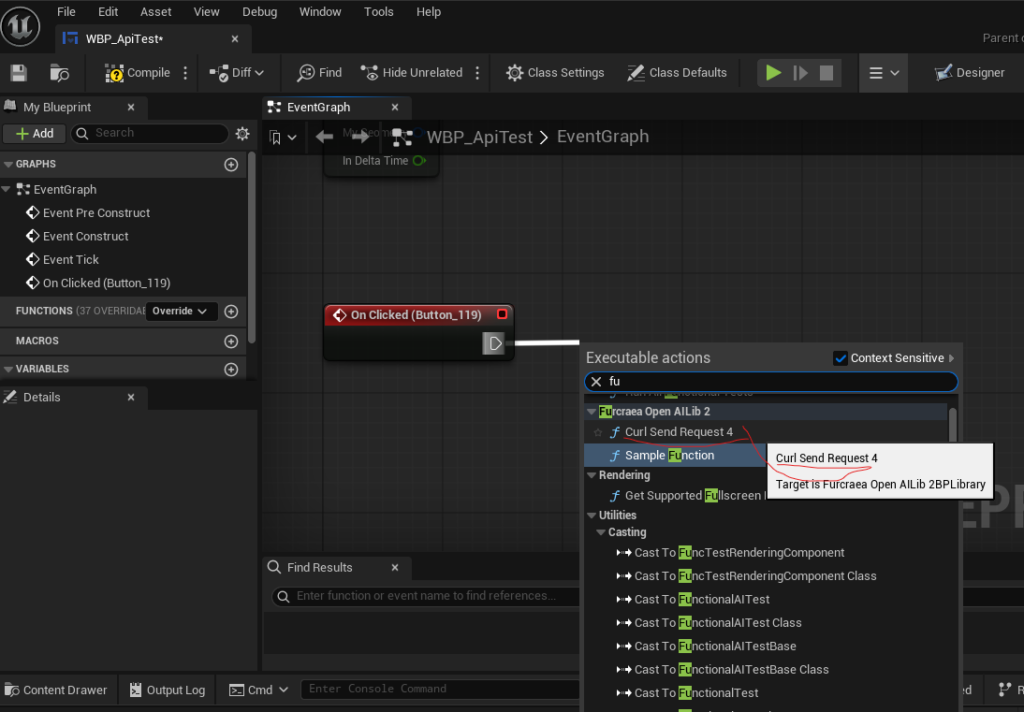
ボタンに下記ノード作成

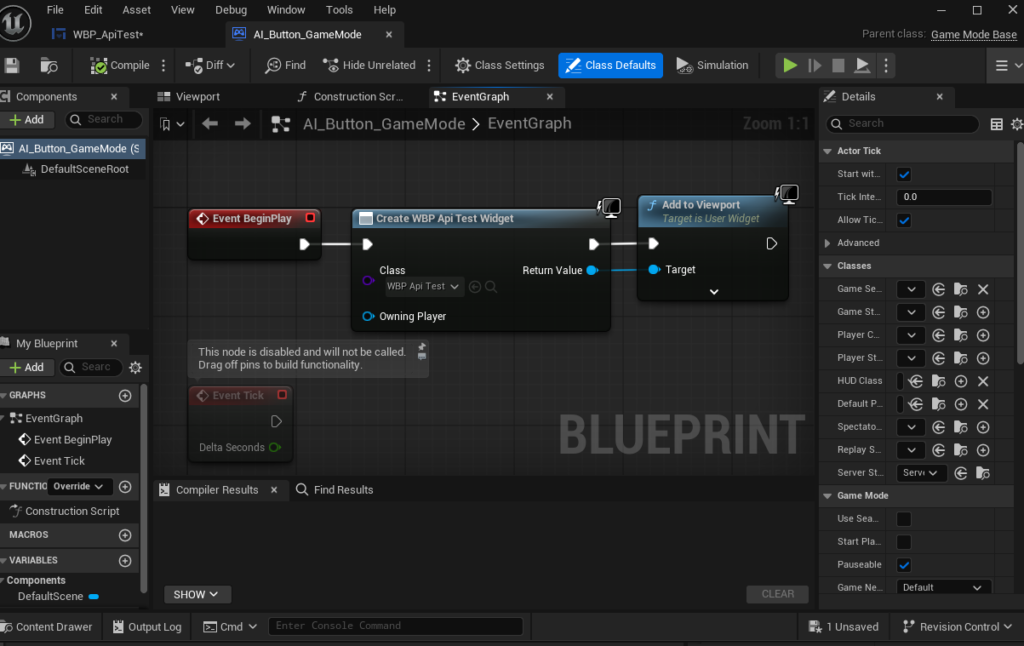
新規ブループリントから GameModeBase の  名前 AI_Button_GameModeで作成した

Create WBP からWBP Api Testを選びAdd Viewport

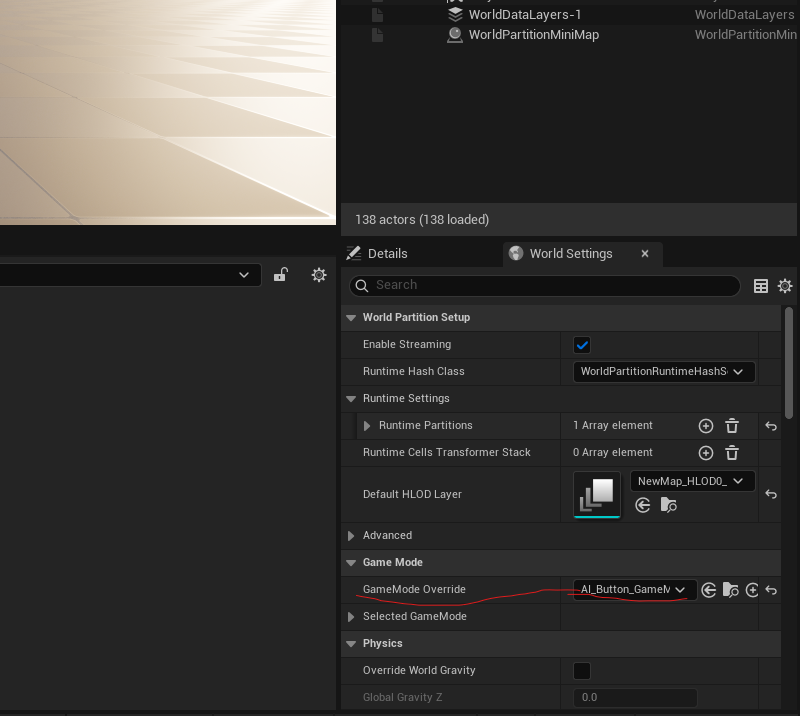
GameMode OverrideにAI_Button_GameMode選ぶ

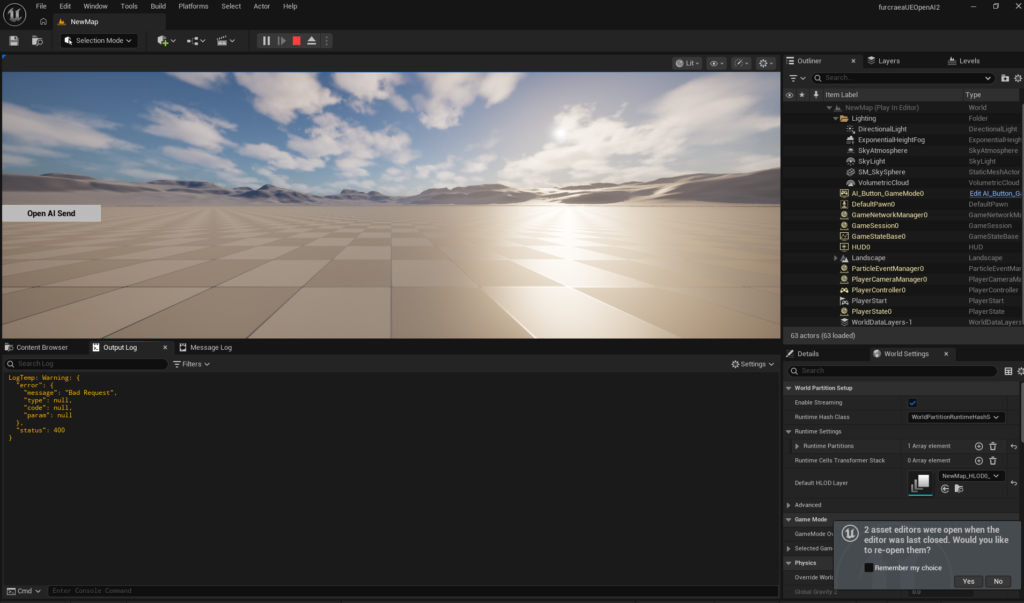
で再生

作ったボタンおしてみると!応答が返ってきた!!

[VS2022][UE5]Azure Dev OpsでUE5プロジェクトをGitで管理する

ここ

https://historia.co.jp/archives/12245

でVS2022だと画面が違うのでキャプチャを張りなおします。

Azure DevOpsからVSへ接続しながらクローンします。

VS で View > TeamExplorer

コマンドプロンプトは見つからなかったので

Explorer 右クリックして その他のオプションを確認 > Open Git Bash here します。

git lfs install します。

git lfs install

git lfs track “*.uasset” します。

git lfs track "*.uasset"

.gitattributes が生成されます。

VS にもどって Git Changes

Commit And Push します。

UEProjectName/Content/BP_GitLFSTestActor.assetというファイルを作成し、

ファイルに 123456789 //1byte以上ないと git lfs ls-files 反応しない を書き込みますl。

123456789 //1byte以上ないと git lfs ls-files 反応しない

チームエクスプローラーからリモートリポジトリにPushします。

git lfs ls-filesで確認します。

git lfs ls-files

15e2b0d3c3 * ActionCombat/Content/BP_GitLFSTestActor.uasset が出てくればOKです

最後に.gitattributesファイル内を以下にして   Commit And Push します。

#以下のサイトを参考に作成
#https://historia.co.jp/archives/12245/

*.uasset filter=lfs diff=lfs merge=lfs -text
*.umap filter=lfs diff=lfs merge=lfs -text
*.bmp filter=lfs diff=lfs merge=lfs -text
*.float filter=lfs diff=lfs merge=lfs -text
*.pcx filter=lfs diff=lfs merge=lfs -text
*.png filter=lfs diff=lfs merge=lfs -text
*.psd filter=lfs diff=lfs merge=lfs -text
*.tga filter=lfs diff=lfs merge=lfs -text
*.jpg filter=lfs diff=lfs merge=lfs -text
*.exr filter=lfs diff=lfs merge=lfs -text
*.dds filter=lfs diff=lfs merge=lfs -text
*.hdr filter=lfs diff=lfs merge=lfs -text
*.wav filter=lfs diff=lfs merge=lfs -text
*.mp4 filter=lfs diff=lfs merge=lfs -text
*.obj filter=lfs diff=lfs merge=lfs -text
*.fbx filter=lfs diff=lfs merge=lfs -text
*.zip filter=lfs diff=lfs merge=lfs -text
*.xlsx filter=lfs diff=lfs merge=lfs -text
*.docx filter=lfs diff=lfs merge=lfs -text
*.pptx filter=lfs diff=lfs merge=lfs -text

VS2022UE5_ProjectBase2.zip

https://drive.google.com/file/d/1wQLoI0ESbsJF_K172fo8lcMZWwSWCxz-/view?usp=sharing

[ue5.3.2]最適化用 debug shader 重い、Texture重いとか 最適化UE5night デバッグ&チューニングナイトのメモ

ライティングあり>最適化ビューモード>シェーダー複雑度

level選択してサイズマップすれば重い原因がわかる。

マップの中で重いテクスチャなどを見つける Level>サイズマップ
詳細はこちら↓

https://dev.epicgames.com/documentation/ja-jp/unreal-engine/cooking-content-and-creating-chunks-in-unreal-engine

Niniteは雑にStaticMeshアセットに全部使ってしまった方が軽いらしい。

: プロジェクト設定->入力->Console->Console Keysでキーを追加。
デフォルトで「`」が割り当たっているが、日本語キーボードだと打つことが出来ないため、「@」キーを追加しておく。

@stat anim でどの処理が何秒つかってるかが見れる

他コマンドはこちら

https://historia.co.jp/archives/1342

@fpsでstat FPSを選ぶとFPSが表示できる

Build Configurationの内容DevelopmentやShippingなどを判別して毎のEventを取得できる。

テクスチャ>アセットアクション>プロパティマトリクスでMaximam Texture Sizeと検索して1024してみたりとか。

フレームレートを固定する。

プロジェクト設定>検索>FrameRate

こんな設定にしたら40FPSでかつキャラクタきれいに見えた

最終的に選んだ設定これだけ贅沢にして24FPS 

マテリアル品質もやりようある。

#UE5night デバッグ&チューニングナイトを開催してくださったぽちおさんならびに沢山の解答をくださった方々に感謝です。

関連

Unreal Engine 5: How To Fix “Video Memory Has Been Exhausted” (Temporary Fix For Development)

https://dev.epicgames.com/community/learning/tutorials/yrl7/unreal-engine-5-how-to-fix-video-memory-has-been-exhausted-temporary-fix-for-development

https://qiita.com/UENight/items/f75c48acd3794edcd7da

[UE5.3.2]Widgetを表示したり消したりしてshippingでは2重に表示されたりをどうにか解決したメモ。

基本はサチナシさんの教えてくれたこの二つのブログ

なんだけど結局どっちもやんなきゃ解決しなかったよ

変数初期化+ガベージコレクション+ブールでの判断

どこからでも呼べるようにGameModeにかいてるんだけど、こんなかんじで大丈夫だった。

ちなみに中身はあんまり関係ないけど乗せておく

WBP_NextText

イベントグラフ1

イベントグラフ2

イベントグラフ3

関数 If AnimSHow Hide

関数 Talker to Anim

関数 Set Text Function

おわり。

[ue5.3.2]キーボードイベントが反応しない場合の処置

今回はキー押してカメラを切り替えたい

レベルブループリント使ってキーは拾えるけど、レベルはバージョンアップで壊れがちなのでBPにしておきたい。

今回の場合はBP_CameraManagerなどを作ってレベルに配置することでカメラをコントロール可能にした

Auto Receive Input 「Player 0」などにしておくとキーイベントが使える。

どっちもきくようになった

[UE5.3.2]パッケージ化 292Wrapped by AutomationException: Cook failed. UE5

LogScript: Error: Script Msg: /Game/0_furcraeaTokyo/13_matahuman_UQ5motion/MF_Idle_MHUQ5 : アニメーション アセット (/Game/0_furcraeaTokyo/13_matahuman_UQ5motion/MF_Idle_MHUQ5.MF_Idle_MHUQ5) のターゲット USkeleton を取得できません
LogScript: Error: Script Msg: /Game/0_furcraeaTokyo/13_matahuman_UQ5motion/MF_Idle_MHUQ5 : 指定された USkeleton が無効

出力をよく見ているとが赤い文字の行がみつかりました。

MF_Idle_MHUQ5を検索して削除したらなおりました。

赤い文字の行を直していけば治るエラーでした。

参考URL

https://forums.unrealengine.com/t/unknown-cook-failure-cookcommand-automation-cs-249-wrapped-by-automationexception-cook-failed/138364/13

[UE5.3.2]パッケージ化エラーcompiling-cusers-username-appdata-local-temp-uatf-programfiles-epicgames-ue_5-3-rules-uat-rules-39638434eaa19de5f144482d776d2f34-dll-assembly-does-not-existの解決方法

Project contains multiple Game targets (UE53PuciCo2024G2, UE53PuciCo22G3) but no DefaultGameTarget is set in the [/Script/BuildSettings.BuildSettings] section of DefaultEngine.ini
UATHelper: パッケージ化 (Windows): (see C:\Users\notsuka\AppData\Roaming\Unreal Engine\AutomationTool\Logs\F+Program+Files+Epic+Games+UE_5.3\Log.txt for full exception trace)

Compiling C:\Users\UserName\AppData\Local\Temp\UAT\F+Program+Files+Epic+Games+UE_5.3\Rules\UATRules-39638434eaa19de5f144482d776d2f34.dll: Assembly does not exist

AIによると

  • アセンブリの問題 エラー「UATRules-39638434eaa19de5f144482d776d2f34.dll: Assembly does not exist」は、指定されたアセンブリが見つからない場合に発生します。この問題は、特に異なるプラットフォーム間でのビルド時に一般的です。source
  • 📋 確認すべき点 まず、DLLファイルがプロジェクトに正しく参照されているか、または適切な場所に存在するか確認してください。また、リモートビルド時には、WindowsとMac間でファイルが同期されているかも重要です。source
  • 💡 解決策 一部のユーザーは、必要なDLLを再インポートし、ライブラリフォルダーを手動で削除することで問題を解決しました。このプロセスで、ビルドキャッシュをクリアすることが役立つ場合があります。source

UE5のパッケージメニューの下の強制的 SDK 更新をする。

UE再起動 するもだめで

https://zenn.dev/posita33/books/ue5_starter_cpp_and_bp_001/viewer/chap_01_vs2022_setup

でwindows11SDKが入ってないことに気づいた

ファイル>からZIP圧縮したプロジェクトを

これだけの状態から開いたらクックが走るようになった!

パッケージ化完了