


まず全体全体(おすすめ)
A.別途REST(非ストリーミング)で完了させる
- UE → AIサーバへHTTP POST
- AI → 問題JSON
- UE → UIに反映(UMG)
メリット:実装が簡単/デバッグしやすいプレイ
:とにかくが長いと立つが出る
自宅AI側:エンドポイントの考え方
あなたが今 OpenWebUI を使っているなら、内部のモデル実体はおそらくOllama。
- Ollamaの代表的なAPI(例)
- 生成:
POST /api/generate - チャット:
POST /api/chat
- 生成:
UEからは「どのURLに投げるか」だけ差し替えできるようにしておくのが正解。
UE5プラグイン設計(ほぼこれを入れる)
1) 設定(プロジェクトの設定を出す)
- ベースURL(例:
http://192.168.1.23:11434) - モデル名(例:
llama3.1) - タイムアウト秒
- オプション: API Key(OpenAI互換を使う場合)
UDeveloperSettingsを使うと綺麗。
実装:UE5 C++(RESTで会話させる最小セット)
(1) ビルド.cs
"HTTP"、、"Json"を"JsonUtilities"追加
(2) 送信受信用の構造体(JSON)
- リクエスト: モデル / プロンプト(またはメッセージ)
- 応答: 応答(または選択肢)
(3) ブループリント非同期ノード化(UIに優しい)
UBlueprintAsyncActionBaseでOnSuccessOnError
を吐く
作った全コード
furcraHomeAIServerChat2.Build.cs
// Some copyright should be here...

using UnrealBuildTool;

public class furcraHomeAIServerChat2 : ModuleRules
{
	public furcraHomeAIServerChat2(ReadOnlyTargetRules Target) : base(Target)
	{
		PCHUsage = ModuleRules.PCHUsageMode.UseExplicitOrSharedPCHs;

		PublicIncludePaths.AddRange(
			new string[] {
				// ... add public include paths required here ...
			}
			);


		PrivateIncludePaths.AddRange(
			new string[] {
				// ... add other private include paths required here ...
			}
			);


		PublicDependencyModuleNames.AddRange(
			new string[]
			{
                "Core", "CoreUObject", "Engine", "UMG","HTTP", "Json", "JsonUtilities"
				// ... add other public dependencies that you statically link with here ...
			}
			);


		PrivateDependencyModuleNames.AddRange(
			new string[]
			{
				"CoreUObject",
				"Engine",
				"Slate",
				"SlateCore",
				"DeveloperSettings",
				// ... add private dependencies that you statically link with here ...
			}
			);


		DynamicallyLoadedModuleNames.AddRange(
			new string[]
			{
				// ... add any modules that your module loads dynamically here ...
			}
			);
	}
}
AiChatTypes.h
// Fill out your copyright notice in the Description page of Project Settings.

#pragma once

#include "CoreMinimal.h"

/**
 *
 */
class FURCRAHOMEAISERVERCHAT2_API AiChatTypes
{
public:
	AiChatTypes();
	~AiChatTypes();
};


#include "AiChatTypes.generated.h"

USTRUCT(BlueprintType)
struct FAiChatMessage
{
	GENERATED_BODY()

	// "system" | "user" | "assistant"
	UPROPERTY(BlueprintReadWrite, EditAnywhere) FString role;
	UPROPERTY(BlueprintReadWrite, EditAnywhere) FString content;
};

USTRUCT()
struct FOllamaChatRequest
{
	GENERATED_BODY()

	UPROPERTY() FString model;
	UPROPERTY() TArray<FAiChatMessage> messages;
	UPROPERTY() bool stream = false;
};

USTRUCT()
struct FOllamaChatMessage
{
	GENERATED_BODY()

	UPROPERTY() FString role;
	UPROPERTY() FString content;
};

USTRUCT()
struct FOllamaChatResponse
{
	GENERATED_BODY()

	UPROPERTY() FOllamaChatMessage message;
	UPROPERTY() bool done = false;
};
AiChatTypes.cpp
// Fill out your copyright notice in the Description page of Project Settings.


#include "AiChatTypes.h"

AiChatTypes::AiChatTypes()
{
}

AiChatTypes::~AiChatTypes()
{
}
AiLinkAsyncChat.h
// Fill out your copyright notice in the Description page of Project Settings.

#pragma once

#include "CoreMinimal.h"
#include "Kismet/BlueprintAsyncActionBase.h"
#include "AiChatTypes.h"
#include "AiLinkAsyncChat.generated.h"

// Forward declarations for HTTP interfaces to avoid including HTTP headers in this public header
class IHttpRequest;
class IHttpResponse;

using FHttpRequestPtr = TSharedPtr<IHttpRequest, ESPMode::ThreadSafe>;
using FHttpResponsePtr = TSharedPtr<IHttpResponse, ESPMode::ThreadSafe>;

DECLARE_DYNAMIC_MULTICAST_DELEGATE_OneParam(FAiChatSuccess, const FString&, AssistantText);
DECLARE_DYNAMIC_MULTICAST_DELEGATE_OneParam(FAiChatError, const FString&, Error);

UCLASS()
class FURCRAHOMEAISERVERCHAT2_API UAiLinkAsyncChat : public UBlueprintAsyncActionBase
{
	GENERATED_BODY()
public:
	UPROPERTY(BlueprintAssignable) FAiChatSuccess OnSuccess;
	UPROPERTY(BlueprintAssignable) FAiChatError OnError;

	// Messagesは「system + 履歴 + 今回のuser」を含めて渡す
	UFUNCTION(BlueprintCallable, meta = (BlueprintInternalUseOnly = "true"))
	static UAiLinkAsyncChat* SendChat(const TArray<FAiChatMessage>& Messages);

	virtual void Activate() override;

private:
	TArray<FAiChatMessage> MessagesInternal;
	void HandleResponse(FHttpRequestPtr Req, FHttpResponsePtr Resp, bool bOk);
};
AiLinkAsyncChat.cpp
// Fill out your copyright notice in the Description page of Project Settings.


#include "AiLinkAsyncChat.h"

#include "UAiLinkSettings.h"
#include "HttpModule.h"
#include "Interfaces/IHttpRequest.h"
#include "Interfaces/IHttpResponse.h"
#include "JsonObjectConverter.h"

UAiLinkAsyncChat* UAiLinkAsyncChat::SendChat(const TArray<FAiChatMessage>& Messages)
{
	auto* Node = NewObject<UAiLinkAsyncChat>();
	Node->MessagesInternal = Messages;
	return Node;
}

void UAiLinkAsyncChat::Activate()
{
	const UAiLinkSettings* S = GetDefault<UAiLinkSettings>();
	if (!S)
	{
		OnError.Broadcast(TEXT("Settings not found"));
		return;
	}

	const FString Url = S->BaseUrl / TEXT("api/chat");

	FOllamaChatRequest Body;
	Body.model = S->Model;
	Body.messages = MessagesInternal;
	Body.stream = false;

	FString JsonStr;
	if (!FJsonObjectConverter::UStructToJsonObjectString(Body, JsonStr))
	{
		OnError.Broadcast(TEXT("Failed to serialize request JSON"));
		return;
	}

	TSharedRef<IHttpRequest, ESPMode::ThreadSafe> Req = FHttpModule::Get().CreateRequest();
	Req->SetURL(Url);
	Req->SetVerb(TEXT("POST"));
	Req->SetHeader(TEXT("Content-Type"), TEXT("application/json; charset=utf-8"));
	Req->SetTimeout(S->TimeoutSeconds);
	Req->SetContentAsString(JsonStr);

	Req->OnProcessRequestComplete().BindUObject(this, &UAiLinkAsyncChat::HandleResponse);
	Req->ProcessRequest();

	UE_LOG(LogTemp, Warning, TEXT("[AI] Activate() called"));
	UE_LOG(LogTemp, Warning, TEXT("[AI] URL: %s"), *Req->GetURL());
	UE_LOG(LogTemp, Warning, TEXT("[AI] Payload: %s"), *JsonStr);
}

void UAiLinkAsyncChat::HandleResponse(FHttpRequestPtr Req, FHttpResponsePtr Resp, bool bOk)
{
	if (!bOk || !Resp.IsValid())
	{
		OnError.Broadcast(TEXT("HTTP request failed (no response)"));
		return;
	}

	const int32 Code = Resp->GetResponseCode();
	const FString Content = Resp->GetContentAsString();
	UE_LOG(LogTemp, Warning, TEXT("[AI] HTTP %d"), Code);
	UE_LOG(LogTemp, Warning, TEXT("[AI] Body: %s"), *Content);

	UE_LOG(LogTemp, Warning, TEXT("[AI] HandleResponse() called. bOk=%d RespValid=%d"),
		bOk ? 1 : 0, Resp.IsValid() ? 1 : 0);

	if (Resp.IsValid())
	{
		UE_LOG(LogTemp, Warning, TEXT("[AI] HTTP %d"), Resp->GetResponseCode());
		UE_LOG(LogTemp, Warning, TEXT("[AI] Body: %s"), *Resp->GetContentAsString());
	}


	if (Code < 200 || Code >= 300)
	{
		OnError.Broadcast(FString::Printf(TEXT("HTTP %d: %s"), Code, *Content));
		return;
	}

	FOllamaChatResponse Parsed;
	if (!FJsonObjectConverter::JsonObjectStringToUStruct(Content, &Parsed, 0, 0))
	{
		OnError.Broadcast(FString::Printf(TEXT("Failed to parse JSON: %s"), *Content));
		return;
	}

	UE_LOG(LogTemp, Warning, TEXT("[AI] Broadcasting Success: %s"), *Parsed.message.content);
	OnSuccess.Broadcast(Parsed.message.content);

}
AiLinkAsyncGenerate.h
// Fill out your copyright notice in the Description page of Project Settings.

#pragma once

#include "CoreMinimal.h"
#include "Kismet/BlueprintAsyncActionBase.h"
#include "AiLinkRequestTypes.h"
#include "AiLinkAsyncGenerate.generated.h"

// Forward declarations for HTTP interfaces to avoid including HTTP headers in this public header
class IHttpRequest;
class IHttpResponse;

using FHttpRequestPtr = TSharedPtr<IHttpRequest, ESPMode::ThreadSafe>;
using FHttpResponsePtr = TSharedPtr<IHttpResponse, ESPMode::ThreadSafe>;

DECLARE_DYNAMIC_MULTICAST_DELEGATE_OneParam(FAiGenerateSuccess, const FString&, Text);
DECLARE_DYNAMIC_MULTICAST_DELEGATE_OneParam(FAiGenerateError, const FString&, Error);

UCLASS()
class FURCRAHOMEAISERVERCHAT2_API UAiLinkAsyncGenerate : public UBlueprintAsyncActionBase
{
	GENERATED_BODY()
public:
	UPROPERTY(BlueprintAssignable) FAiGenerateSuccess OnSuccess;
	UPROPERTY(BlueprintAssignable) FAiGenerateError OnError;

	UFUNCTION(BlueprintCallable, meta = (BlueprintInternalUseOnly = "true"))
	static UAiLinkAsyncGenerate* GenerateText(const FString& Prompt);

	virtual void Activate() override;

private:
	FString PromptInternal;
	void HandleResponse(FHttpRequestPtr Req, FHttpResponsePtr Resp, bool bOk);
};
AiLinkAsyncGenerate.cpp
// Fill out your copyright notice in the Description page of Project Settings.


#include "AiLinkAsyncGenerate.h"

#include "UAiLinkSettings.h"
#include "HttpModule.h"
#include "Interfaces/IHttpRequest.h"
#include "Interfaces/IHttpResponse.h"
#include "JsonObjectConverter.h"

UAiLinkAsyncGenerate* UAiLinkAsyncGenerate::GenerateText(const FString& Prompt)
{
	auto* Node = NewObject<UAiLinkAsyncGenerate>();
	Node->PromptInternal = Prompt;
	return Node;
}

void UAiLinkAsyncGenerate::Activate()
{
	const UAiLinkSettings* S = GetDefault<UAiLinkSettings>();
	if (!S)
	{
		OnError.Broadcast(TEXT("Settings not found"));
		return;
	}

	const FString Url = S->BaseUrl / TEXT("api/generate");

	FOllamaGenerateRequest Body;
	Body.model = S->Model;
	Body.prompt = PromptInternal;
	Body.stream = false;

	FString JsonStr;
	if (!FJsonObjectConverter::UStructToJsonObjectString(Body, JsonStr))
	{
		OnError.Broadcast(TEXT("Failed to serialize request JSON"));
		return;
	}

	TSharedRef<IHttpRequest, ESPMode::ThreadSafe> Req = FHttpModule::Get().CreateRequest();
	Req->SetURL(Url);
	Req->SetVerb(TEXT("POST"));
	Req->SetHeader(TEXT("Content-Type"), TEXT("application/json; charset=utf-8"));
	Req->SetTimeout(S->TimeoutSeconds);
	Req->SetContentAsString(JsonStr);

	Req->OnProcessRequestComplete().BindUObject(this, &UAiLinkAsyncGenerate::HandleResponse);
	Req->ProcessRequest();
}

void UAiLinkAsyncGenerate::HandleResponse(FHttpRequestPtr Req, FHttpResponsePtr Resp, bool bOk)
{
	if (!bOk || !Resp.IsValid())
	{
		OnError.Broadcast(TEXT("HTTP request failed (no response)"));
		return;
	}

	const int32 Code = Resp->GetResponseCode();
	const FString Content = Resp->GetContentAsString();

	if (Code < 200 || Code >= 300)
	{
		OnError.Broadcast(FString::Printf(TEXT("HTTP %d: %s"), Code, *Content));
		return;
	}

	FOllamaGenerateResponse Parsed;
	if (!FJsonObjectConverter::JsonObjectStringToUStruct(Content, &Parsed, 0, 0))
	{
		OnError.Broadcast(FString::Printf(TEXT("Failed to parse JSON: %s"), *Content));
		return;
	}

	OnSuccess.Broadcast(Parsed.response);
}
AiLinkRequestTypes.h
// Fill out your copyright notice in the Description page of Project Settings.

#pragma once

#include "CoreMinimal.h"

/**
 *
 */
class FURCRAHOMEAISERVERCHAT2_API AiLinkRequestTypes
{
public:
	AiLinkRequestTypes();
	~AiLinkRequestTypes();
};


//#pragma once
//#include "CoreMinimal.h"
#include "AiLinkRequestTypes.generated.h"

USTRUCT()
struct FOllamaGenerateRequest
{
	GENERATED_BODY()

	UPROPERTY() FString model;
	UPROPERTY() FString prompt;
	UPROPERTY() bool stream = false;
};

USTRUCT()
struct FOllamaGenerateResponse
{
	GENERATED_BODY()

	UPROPERTY() FString response;
	UPROPERTY() bool done = false;
};
AiLinkRequestTypes.cpp
// Fill out your copyright notice in the Description page of Project Settings.


#include "AiLinkRequestTypes.h"

AiLinkRequestTypes::AiLinkRequestTypes()
{
}

AiLinkRequestTypes::~AiLinkRequestTypes()
{
}
UAiLinkSettings.h
// Fill out your copyright notice in the Description page of Project Settings.

#pragma once

#include "CoreMinimal.h"
#include "Engine/DeveloperSettings.h"
#include "UAiLinkSettings.generated.h"

UCLASS(Config = Game, DefaultConfig, meta = (DisplayName = "Home AI Chat"))
class FURCRAHOMEAISERVERCHAT2_API UAiLinkSettings : public UDeveloperSettings
{
	GENERATED_BODY()

public:
	UPROPERTY(Config, EditAnywhere, Category = "AI")
	FString BaseUrl = TEXT("http://192.168.1.23:11434");

	UPROPERTY(Config, EditAnywhere, Category = "AI")
	//FString Model = TEXT("llama3.1");
	//FString Model = TEXT("deepseek-r1:32b");llama3.1:8b
	//FString Model = TEXT("llama3.1:70b");//llama3.1:8b
	FString Model = TEXT("llama3.1:8b");//
	UPROPERTY(Config, EditAnywhere, Category = "AI")
	float TimeoutSeconds = 120.0f;

	// 例: "You are NPC assistant in my game..."
	UPROPERTY(Config, EditAnywhere, Category = "AI")
	FString SystemPrompt = TEXT("You are a helpful in-game NPC. Keep replies concise.");
};
UAiLinkSettings.cpp
// Fill out your copyright notice in the Description page of Project Settings.


#include "UAiLinkSettings.h"
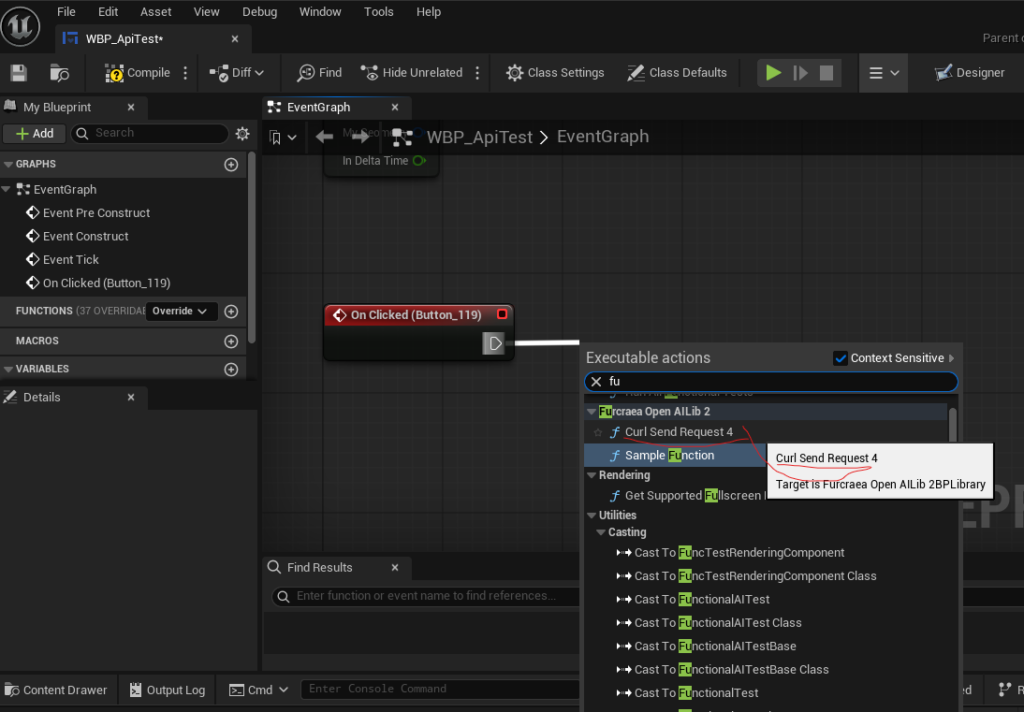
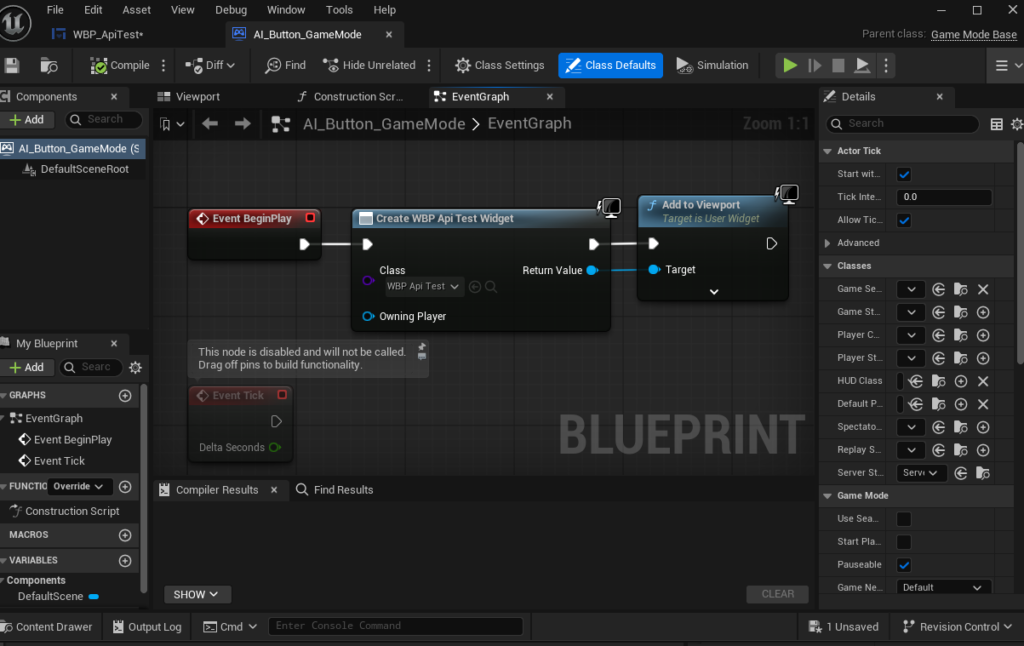
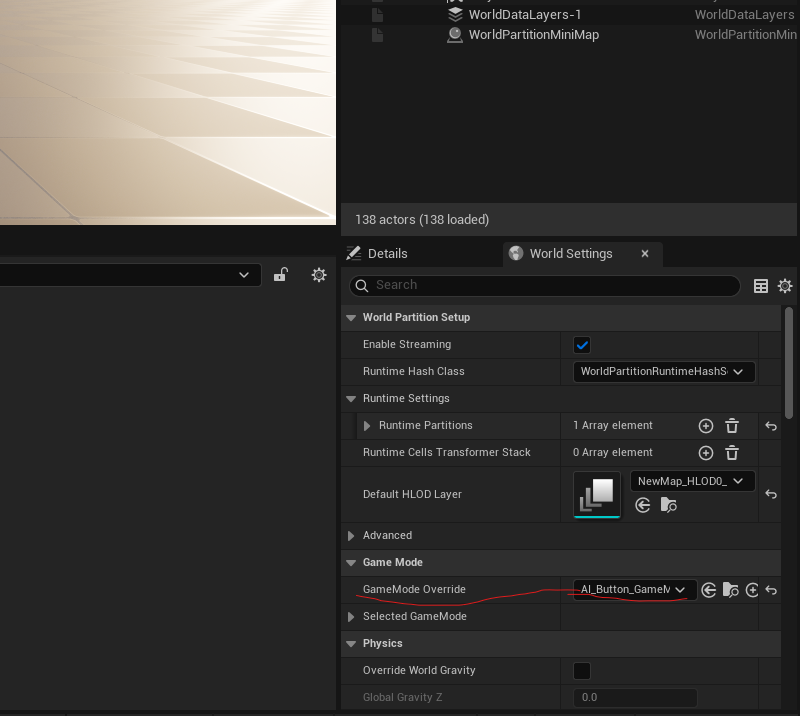
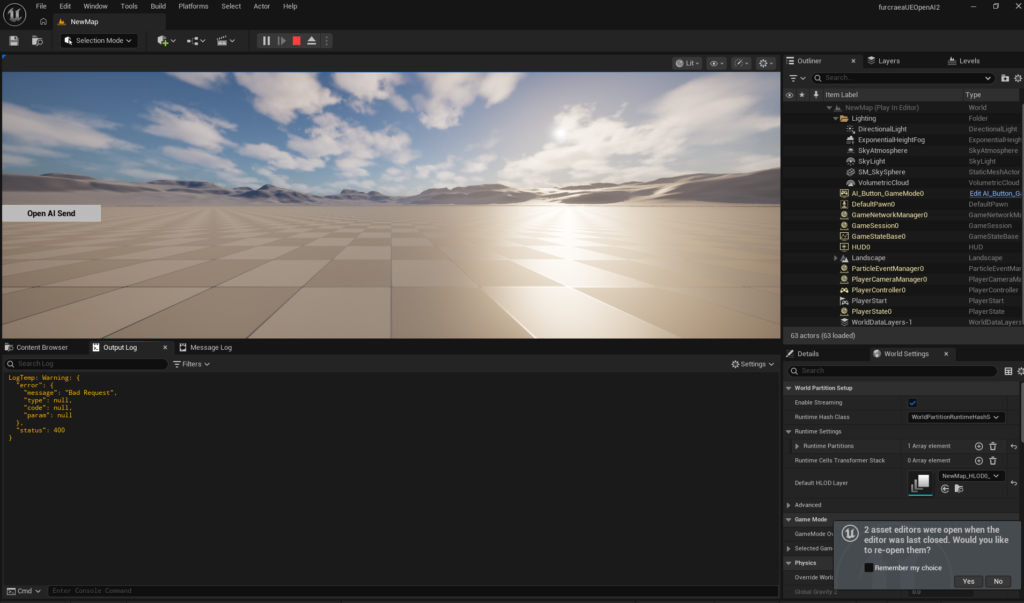
BluePrintはこんなかんじ

以上。