Unreal Engine C++ Developer: Learn C++ and Make Video Games | Udemy UE4.25 Simple Shooterで自分なりに理解したこと。01100 ~AIコントローラーを作成してセットアップ~

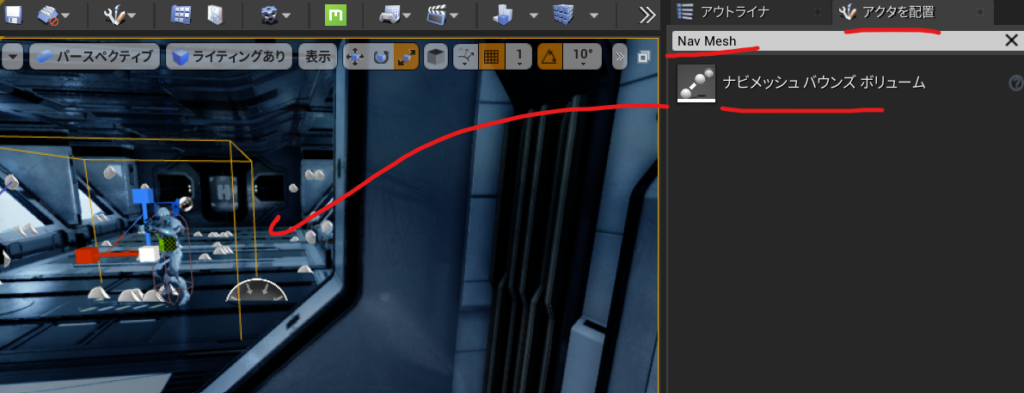
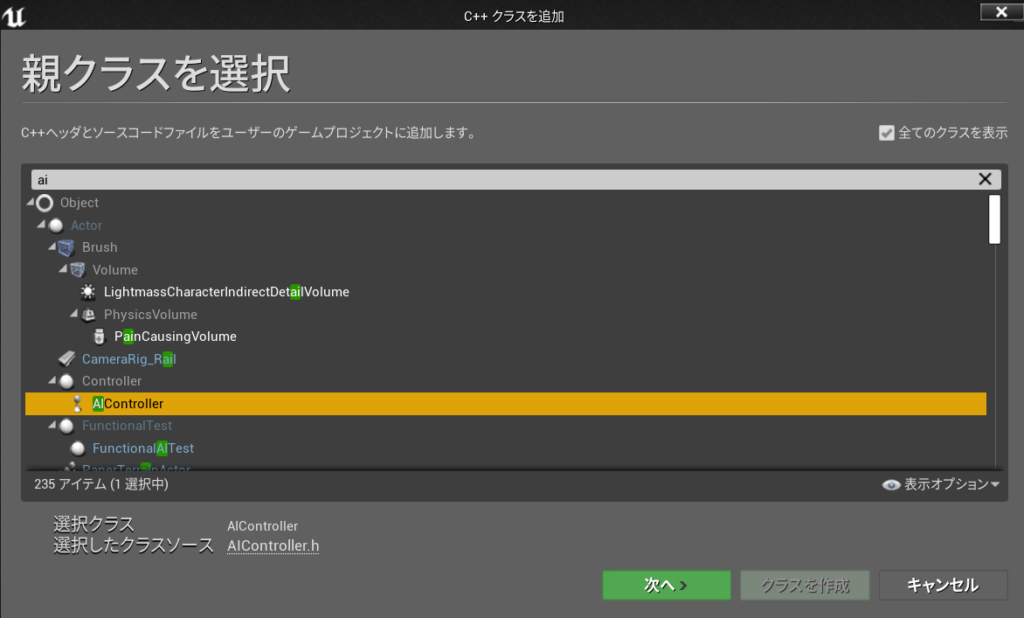
新規C++クラスを作る 親クラスにAIコントローラーを選ぶ

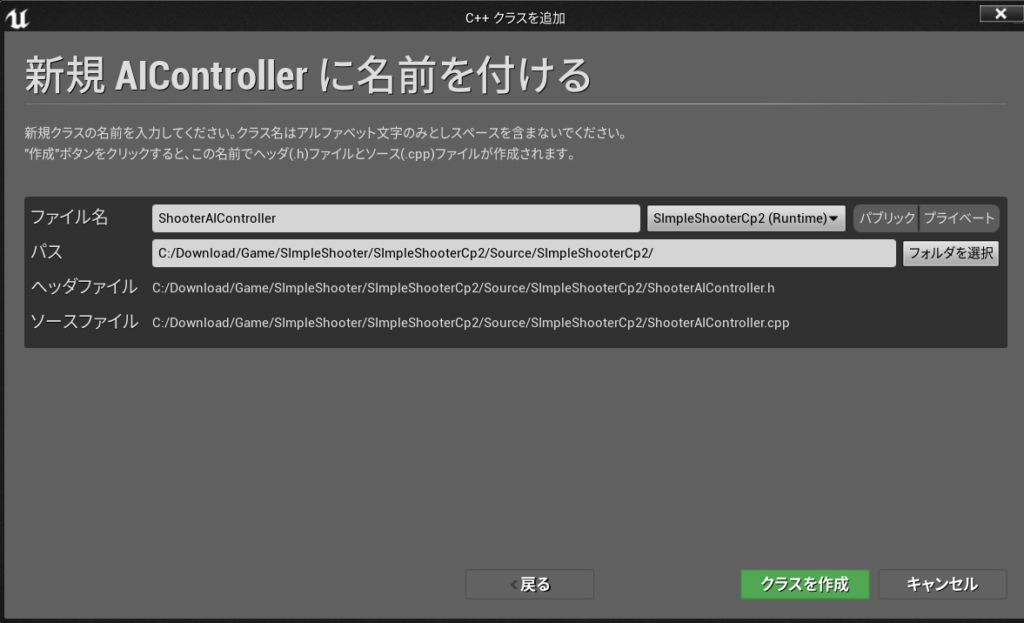
名前は ShooterAIController

このクラスを使ってブループリントクラスを作る

名前を BP_ShooterAIController

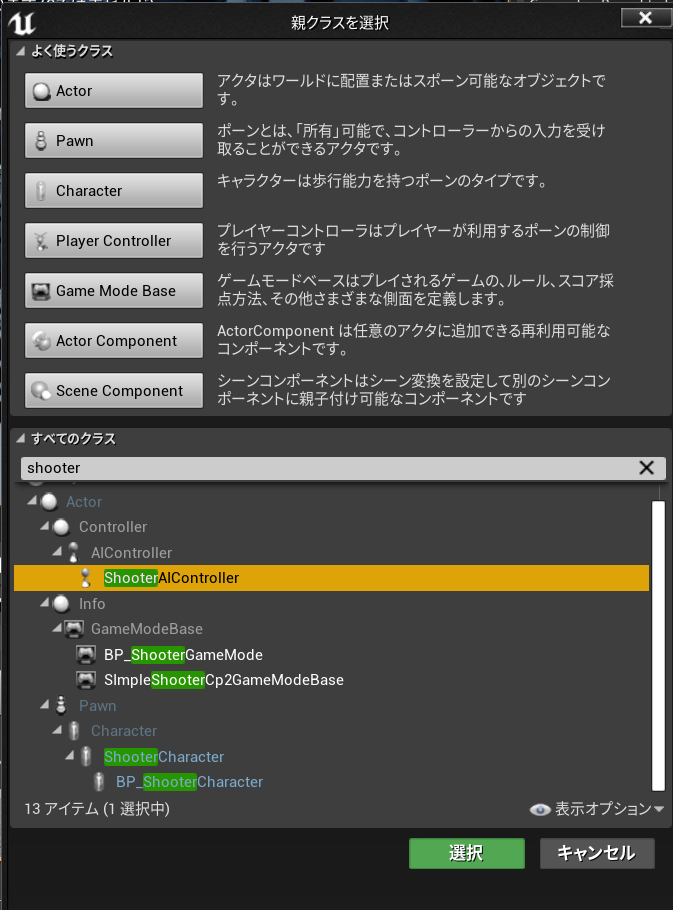
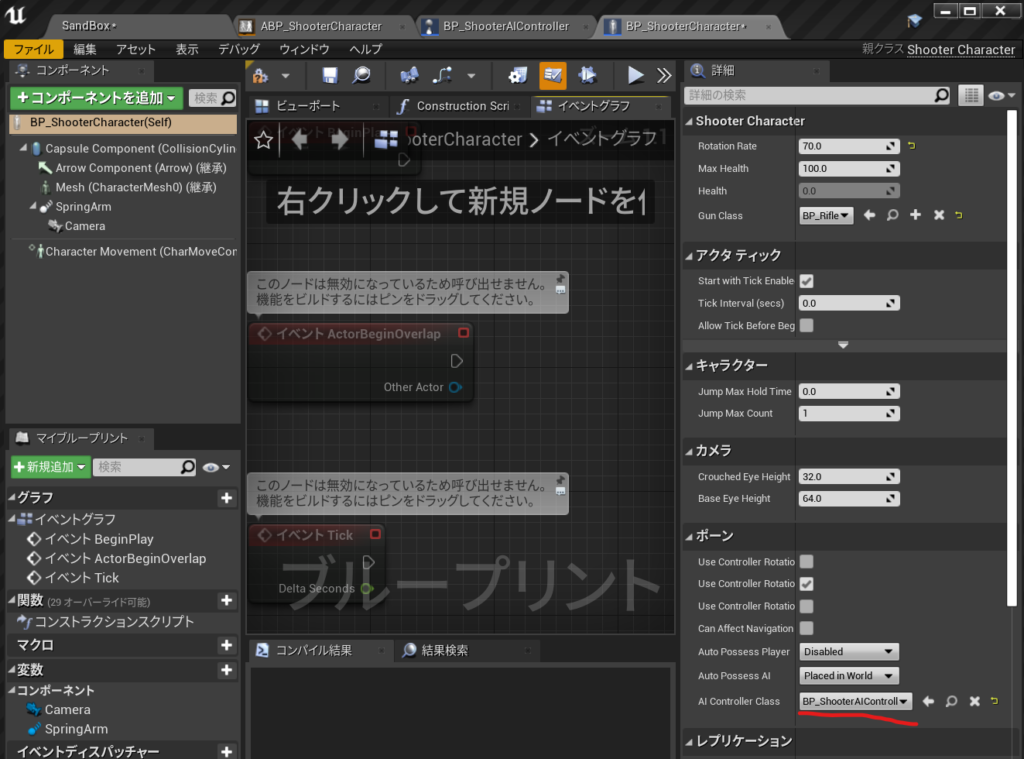
BP_ShooterCharacterを開いて ポーンのAI ContrallerClassにBP_ShooterAIControllerを設定

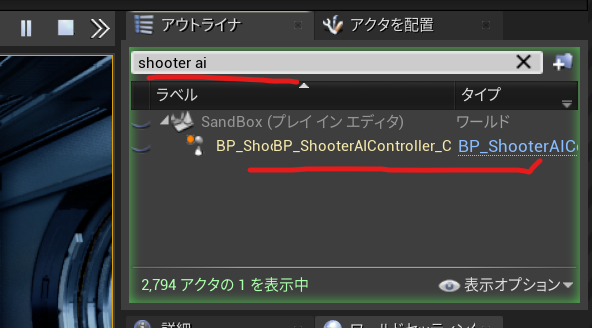
実行してBP_ShooterAIControllerがポーンされてるか確認する。

#UE4 #UE4Study #UE5 #UE5Study #UnrealEngineのPythonScriptPluginのpython3へのPyside2のインストール方法

Pyside2はpipを使ってインストールするのが基本です。

https://forums.unrealengine.com/t/fyi-ue4-switching-to-python-3-7-7-by-default-4-26/151803

より

C:\Program Files\Epic Games\UE_4.26\Engine\Plugins\Experimental\PythonScriptPlugin\Source\PythonScriptPluginPreload\PythonScriptPluginPreload.Build.csで

// Copyright Epic Games, Inc. All Rights Reserved.
using UnrealBuildTool;

namespace UnrealBuildTool.Rules
{
	public class PythonScriptPluginPreload : ModuleRules
	{
		public PythonScriptPluginPreload(ReadOnlyTargetRules Target) : base(Target)
		{
			PublicDependencyModuleNames.AddRange(
				new string[] {
					"Core",
				}
			);

			if (Target.bBuildEditor)
			{
				PrivateIncludePathModuleNames.AddRange(
					new string[] {
						"Python3",
					}
				);
			}
			else
			{
				PrivateDefinitions.Add("WITH_PYTHON=0");
			}
		}
	}
}

となっているのでPython3を参照しているので

::python.exeへ移動して
cd C:\Program Files\Epic Games\UE_4.26\Engine\Binaries\ThirdParty\Python3\Win64
::pip install Pyside2というかんじで詳細はこのようにインストール
python -m pip install --target="C:\Program Files\Epic Games\UE_4.26\Engine\Binaries\ThirdParty\Python3\Win64\Lib\site-packages" Pyside2


するとローカルではうまく起動しました。

参考URL
https://qiita.com/7CIT/items/a480a84bb9d249544f5f

プラグインを有効にする感じのやり方もあります。
Python Editor¥3,177 これをインストールしてしまえば使えるようです。
https://www.unrealengine.com/marketplace/ja/product/python-editor?sessionInvalidated=true

参照

Unreal Engine C++ Developer: Learn C++ and Make Video Games | Udemy UE4.25 Simple Shooterで自分なりに理解したこと。01000 ~ブループリント純粋関数ノードを作る ~


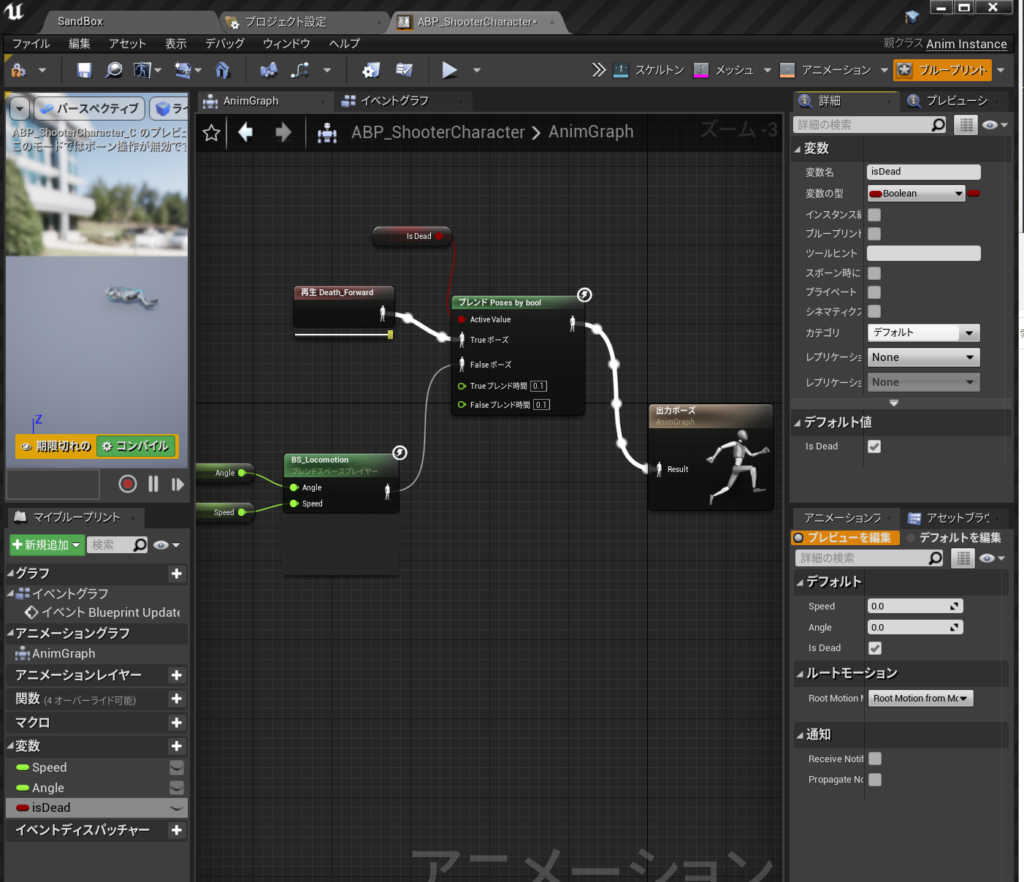
彼が死ぬまでこのキャラクターを撃つことができるようになったので

アニメーションBPのこのブール値をゲームプレイから自動的に設定する必要があります。

UFUNCTION()マクロ
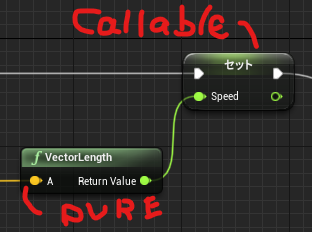
UFUNCTION(BluePrintCallable)//ブループリント呼び出し可能。
UFUNCTION(BluePrintPure)純粋ノード

それがブループリント呼び出し可能の実行ピンがある関数か、

それがブループリントピュア=純粋ノードで実行ピンが必要ない関数です。

ShooterCharacter.h

public:	
	UFUNCTION(BluePrintPure)
	bool IsDead() const;

ShooterCharacter.cpp

bool AShooterCharacter::IsDead() const
{
	return Health <= 0;
}

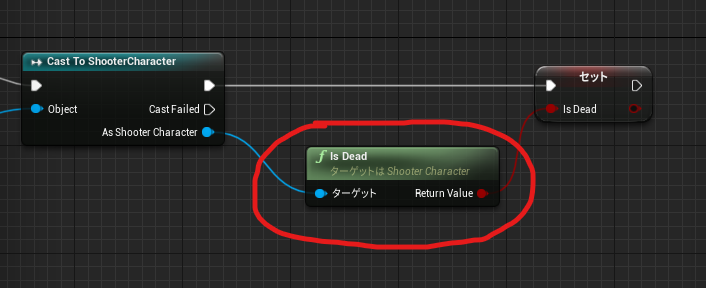
ブループリントで見てみると IsDead純粋関数としてノードが作られました。

ShooterCharacter.h 全文

// Fill out your copyright notice in the Description page of Project Settings.

#pragma once

#include "CoreMinimal.h"
#include "GameFramework/Character.h"
#include "ShooterCharacter.generated.h"

class AGun;


UCLASS()
class SIMPLESHOOTERCP2_API AShooterCharacter : public ACharacter
{
	GENERATED_BODY()

public:
	// Sets default values for this character's properties
	AShooterCharacter();

protected:
	// Called when the game starts or when spawned
	virtual void BeginPlay() override;

public:	
	UFUNCTION(BluePrintPure)
	bool IsDead() const;

	// Called every frame
	virtual void Tick(float DeltaTime) override;

	// Called to bind functionality to input
	virtual void SetupPlayerInputComponent(class UInputComponent* PlayerInputComponent) override;
	
	virtual float TakeDamage(float DamageAmount, struct FDamageEvent const& DamageEvent, class AController* EventInstigator, AActor* DamageCauser) override;

private:
	void MoveForward(float AxisValue);
	void MoveRight(float AxisValue);
	void LockUpRate(float AxisValue);
	void LockRightRate(float AxisValue);
	void Shoot();
	
	UPROPERTY(EditAnyWhere)
	float RotationRate = 10;

	UPROPERTY(EditDefaultsOnly)
	float MaxHealth=100;

	UPROPERTY(VisibleAnyWhere)
	float Health;

	UPROPERTY(EditDefaultsOnly)
	TSubclassOf<AGun> GunClass;

	UPROPERTY()
	AGun* Gun;


};

ShooterCharacter.cpp

// Fill out your copyright notice in the Description page of Project Settings.


#include "ShooterCharacter.h"
#include "Gun.h"
//#include "Engine/Engine.h"
// Sets default values
AShooterCharacter::AShooterCharacter()
{
 	// Set this character to call Tick() every frame.  You can turn this off to improve performance if you don't need it.
	PrimaryActorTick.bCanEverTick = true;

}

// Called when the game starts or when spawned
void AShooterCharacter::BeginPlay()
{
	Super::BeginPlay();
	
	Health = MaxHealth;

	Gun = GetWorld()->SpawnActor<AGun>(GunClass);
	GetMesh()->HideBoneByName(TEXT("weapon_r"),EPhysBodyOp::PBO_None );
	Gun->AttachToComponent(GetMesh(), FAttachmentTransformRules::KeepRelativeTransform, TEXT("weaponSocket"));
	Gun->SetOwner(this);
}
bool AShooterCharacter::IsDead() const
{
	return Health <= 0;
}
// Called every frame
void AShooterCharacter::Tick(float DeltaTime)
{
	Super::Tick(DeltaTime);

}

void AShooterCharacter::Shoot()
{
	Gun->PullTrigger();
}

// Called to bind functionality to input
void AShooterCharacter::SetupPlayerInputComponent(UInputComponent* PlayerInputComponent)
{
	Super::SetupPlayerInputComponent(PlayerInputComponent);

	PlayerInputComponent ->BindAxis(TEXT("MoveForward"),this,&AShooterCharacter::MoveForward);
	PlayerInputComponent ->BindAxis(TEXT("LockUp"),this,&APawn::AddControllerPitchInput);
	PlayerInputComponent ->BindAxis(TEXT("MoveRight"),this,&AShooterCharacter::MoveRight);
	PlayerInputComponent ->BindAxis(TEXT("LockRight"),this,&APawn::AddControllerYawInput);
	PlayerInputComponent ->BindAxis(TEXT("LockUpRate"),this,&AShooterCharacter::LockUpRate);
	PlayerInputComponent ->BindAxis(TEXT("LockRightRate"),this,&AShooterCharacter::LockRightRate);
	PlayerInputComponent ->BindAction(TEXT("Jump"),EInputEvent::IE_Pressed,this,&ACharacter::Jump);
	PlayerInputComponent ->BindAction(TEXT("Shoot"),EInputEvent::IE_Pressed,this,&AShooterCharacter::Shoot);
}

float AShooterCharacter::TakeDamage(float DamageAmount, struct FDamageEvent const& DamageEvent, class AController* EventInstigator, AActor* DamageCauser)
{
	float DamageToApply = Super::TakeDamage(DamageAmount,DamageEvent,EventInstigator,DamageCauser);
	DamageToApply = FMath::Min(Health,DamageToApply);
	Health -= DamageToApply;
	UE_LOG(LogTemp,Display,TEXT("Health Left %F"),Health);
	float TimeToDisplay =5.0f;
	FString Health_str = FString::SanitizeFloat(Health);
	FString TestHUDString =TEXT("Health Left")+	Health_str;
	GEngine->AddOnScreenDebugMessage(-1,TimeToDisplay,FColor::Green,TestHUDString);
	return DamageToApply;
}

void AShooterCharacter::MoveForward(float AxisValue)
{
	AddMovementInput(GetActorForwardVector() * AxisValue);
}
void AShooterCharacter::MoveRight(float AxisValue)
{
	AddMovementInput(GetActorRightVector() * AxisValue);
}

void AShooterCharacter::LockUpRate(float AxisValue)
{
	AddControllerPitchInput(AxisValue * RotationRate * GetWorld()->GetDeltaSeconds());
}
void AShooterCharacter::LockRightRate(float AxisValue)
{
	AddControllerYawInput(AxisValue * RotationRate * GetWorld()->GetDeltaSeconds());
}
// void AShooterCharacter::LockUp(float AxisValue)
// {
// 	AddControllerPitchInput(AxisValue);
// }

できたのがこれ

Unreal Engine C++ Developer: Learn C++ and Make Video Games | Udemy UE4.25 Simple Shooterで自分なりに理解したこと。00800 ~TakeDamageのオーバーライド ~

基本的にはデフォルトのTakeDamageが来た時に処理を追加したいのでオーバーライドします。

UE4/Engine/Sounce/Runtime/Engine/Classes/GameFramework/Actor.h

virtual float TakeDamage(float DamageAmount, struct FDamageEvent const& DamageEvent, class AController* EventInstigator, AActor* DamageCauser);
をコピーして

ShooterCharacter.h

にこれをペーストしてoverrideキーワードを追加しました。
    virtual float TakeDamage(float DamageAmount, struct FDamageEvent const& DamageEvent, class AController* EventInstigator, AActor* DamageCauser) override;

ShooterCharacter.cppはこうやって元のSuper::TakeDamegeを追加します

float AShooterCharacter::TakeDamage(float DamageAmount, struct FDamageEvent const& DamageEvent, class AController* EventInstigator, AActor* DamageCauser) ;
{
	float DamageApplied = Super::TakeDamage(DamageAmount,DamageEvent,EventInstigator,DamageCauser);
	
}

次に、ダメージを受けた時のヒットポイントを健康状態のとしてHealth変数を用意します。

ShooterCharacter.h

	UPROPERTY(EditDefaultsOnly)
	float MaxHealth=100;

	UPROPERTY(VisibleAnyWhere)
	float Health;

ShooterCharacter.cppでBeginPlayにHealth = MaxHealth;追加

void AShooterCharacter::BeginPlay()
{
	Super::BeginPlay();
	
	Health = MaxHealth;

	Gun = GetWorld()->SpawnActor<AGun>(GunClass);
	GetMesh()->HideBoneByName(TEXT("weapon_r"),EPhysBodyOp::PBO_None );
	Gun->AttachToComponent(GetMesh(), FAttachmentTransformRules::KeepRelativeTransform, TEXT("weaponSocket"));
	Gun->SetOwner(this);
}

ShooterCharacter.cppでTakeDamageに以下追加

DamageToApply = FMath::Min(Health,DamageToApply);   
Health -= DamageToApply;   
UE_LOG(LogTemp,Display,TEXT(“Health Left %F”),Health);

float TimeToDisplay =5.0f;   
FString Health_str = FString::SanitizeFloat(Health);   
(\UE_4.25\Engine\Source\Runtime\Core\Private\Containers\String.cppにある)
FString TestHUDString =TEXT(“Health Left”)+ Health_str;   

GEngine->AddOnScreenDebugMessage(-1,TimeToDisplay,FColor::Green,TestHUDString);
(\UE_4.25\Engine\Source\Runtime\Engine\Private\UnrealEngine.cppにある)
詳細は以下
FString | UnrealEngineのドキュメント

https://docs.unrealengine.com/4.27/ja/ProgrammingAndScripting/ProgrammingWithCPP/UnrealArchitecture/StringHandling/FString/

return DamageToApply;

float AShooterCharacter::TakeDamage(float DamageAmount, struct FDamageEvent const& DamageEvent, class AController* EventInstigator, AActor* DamageCauser)
{
	float DamageToApply = Super::TakeDamage(DamageAmount,DamageEvent,EventInstigator,DamageCauser);
	DamageToApply = FMath::Min(Health,DamageToApply);
	Health -= DamageToApply;
	UE_LOG(LogTemp,Display,TEXT("Health Left %F"),Health);
	float TimeToDisplay =5.0;
	FString Health_str = FString::SanitizeFloat(Health);
	FString TestHUDString =TEXT("Health Left")+	Health_str;
	GEngine->AddOnScreenDebugMessage(-1,TimeToDisplay,FColor::Green,TestHUDString);
	return DamageToApply;
}

ShooterCharacter.h 全文

// Fill out your copyright notice in the Description page of Project Settings.

#pragma once

#include "CoreMinimal.h"
#include "GameFramework/Character.h"
#include "ShooterCharacter.generated.h"

class AGun;


UCLASS()
class SIMPLESHOOTERCP2_API AShooterCharacter : public ACharacter
{
	GENERATED_BODY()

public:
	// Sets default values for this character's properties
	AShooterCharacter();

protected:
	// Called when the game starts or when spawned
	virtual void BeginPlay() override;

public:	
	// Called every frame
	virtual void Tick(float DeltaTime) override;

	// Called to bind functionality to input
	virtual void SetupPlayerInputComponent(class UInputComponent* PlayerInputComponent) override;
	
	virtual float TakeDamage(float DamageAmount, struct FDamageEvent const& DamageEvent, class AController* EventInstigator, AActor* DamageCauser) override;

private:
	void MoveForward(float AxisValue);
	void MoveRight(float AxisValue);
	void LockUpRate(float AxisValue);
	void LockRightRate(float AxisValue);
	void Shoot();
	
	UPROPERTY(EditAnyWhere)
	float RotationRate = 10;

	UPROPERTY(EditDefaultsOnly)
	float MaxHealth=100;

	UPROPERTY(VisibleAnyWhere)
	float Health;

	UPROPERTY(EditDefaultsOnly)
	TSubclassOf<AGun> GunClass;

	UPROPERTY()
	AGun* Gun;


};

ShooterCharacter.cpp 全文

// Fill out your copyright notice in the Description page of Project Settings.


#include "ShooterCharacter.h"
#include "Gun.h"
//#include "Engine/Engine.h"
// Sets default values
AShooterCharacter::AShooterCharacter()
{
 	// Set this character to call Tick() every frame.  You can turn this off to improve performance if you don't need it.
	PrimaryActorTick.bCanEverTick = true;

}

// Called when the game starts or when spawned
void AShooterCharacter::BeginPlay()
{
	Super::BeginPlay();
	
	Health = MaxHealth;

	Gun = GetWorld()->SpawnActor<AGun>(GunClass);
	GetMesh()->HideBoneByName(TEXT("weapon_r"),EPhysBodyOp::PBO_None );
	Gun->AttachToComponent(GetMesh(), FAttachmentTransformRules::KeepRelativeTransform, TEXT("weaponSocket"));
	Gun->SetOwner(this);
}

// Called every frame
void AShooterCharacter::Tick(float DeltaTime)
{
	Super::Tick(DeltaTime);

}

void AShooterCharacter::Shoot()
{
	Gun->PullTrigger();
}

// Called to bind functionality to input
void AShooterCharacter::SetupPlayerInputComponent(UInputComponent* PlayerInputComponent)
{
	Super::SetupPlayerInputComponent(PlayerInputComponent);

	PlayerInputComponent ->BindAxis(TEXT("MoveForward"),this,&AShooterCharacter::MoveForward);
	PlayerInputComponent ->BindAxis(TEXT("LockUp"),this,&APawn::AddControllerPitchInput);
	PlayerInputComponent ->BindAxis(TEXT("MoveRight"),this,&AShooterCharacter::MoveRight);
	PlayerInputComponent ->BindAxis(TEXT("LockRight"),this,&APawn::AddControllerYawInput);
	PlayerInputComponent ->BindAxis(TEXT("LockUpRate"),this,&AShooterCharacter::LockUpRate);
	PlayerInputComponent ->BindAxis(TEXT("LockRightRate"),this,&AShooterCharacter::LockRightRate);
	PlayerInputComponent ->BindAction(TEXT("Jump"),EInputEvent::IE_Pressed,this,&ACharacter::Jump);
	PlayerInputComponent ->BindAction(TEXT("Shoot"),EInputEvent::IE_Pressed,this,&AShooterCharacter::Shoot);
}

float AShooterCharacter::TakeDamage(float DamageAmount, struct FDamageEvent const& DamageEvent, class AController* EventInstigator, AActor* DamageCauser)
{
	float DamageToApply = Super::TakeDamage(DamageAmount,DamageEvent,EventInstigator,DamageCauser);
	DamageToApply = FMath::Min(Health,DamageToApply);
	Health -= DamageToApply;
	UE_LOG(LogTemp,Display,TEXT("Health Left %F"),Health);
	float TimeToDisplay =5.0f;
	FString Health_str = FString::SanitizeFloat(Health);
	FString TestHUDString =TEXT("Health Left")+	Health_str;
	GEngine->AddOnScreenDebugMessage(-1,TimeToDisplay,FColor::Green,TestHUDString);
	return DamageToApply;
}

void AShooterCharacter::MoveForward(float AxisValue)
{
	AddMovementInput(GetActorForwardVector() * AxisValue);
}
void AShooterCharacter::MoveRight(float AxisValue)
{
	AddMovementInput(GetActorRightVector() * AxisValue);
}

void AShooterCharacter::LockUpRate(float AxisValue)
{
	AddControllerPitchInput(AxisValue * RotationRate * GetWorld()->GetDeltaSeconds());
}
void AShooterCharacter::LockRightRate(float AxisValue)
{
	AddControllerYawInput(AxisValue * RotationRate * GetWorld()->GetDeltaSeconds());
}
// void AShooterCharacter::LockUp(float AxisValue)
// {
// 	AddControllerPitchInput(AxisValue);
// }

こうなった。

#UE4 #UE4Study https://github.com/EpicGames/UnrealEngine.git をクローンしようとしたら出たエラー 「remote: Support for password authentication was removed on August 13, 2021. Please use a personal access token instead.」を解決

SourceTreeでクローンしようとしたらこんなエラーが出たのでメモ

コマンド: git -c diff.mnemonicprefix=false -c core.quotepath=false --no-optional-locks ls-remote https://github.com/EpicGames/UnrealEngine.git
出力: 
エラー: remote: Support for password authentication was removed on August 13, 2021. Please use a personal access token instead.
remote: Please see https://github.blog/2020-12-15-token-authentication-requirements-for-git-operations/ for more information.
fatal: Authentication failed for 'https://github.com/EpicGames/UnrealEngine.git/'

翻訳すると

コマンド:git -c diff.mnemonicprefix = false -c core.quotepath = false --no-optional-locks ls-remote https://github.com/EpicGames/UnrealEngine.git
段:
エラー:リモート:パスワード認証のサポートは2021年8月13日に削除されました。代わりに、個人用アクセストークンを使用してください。
リモート:詳細については、https://github.blog/2020-12-15-token-authentication-requirements-for-git-operations/を参照してください。
致命的:「https://github.com/EpicGames/UnrealEngine.git/」の認証に失敗しました

調べてみると

GitHubのリポジトリにアクセス時に「remote: Support for password authentication was removed on August 13, 2021.」エラー さんがこんな感じで書いてた

https://note.kiriukun.com/entry/20210904-github-password-authentication-was-removed

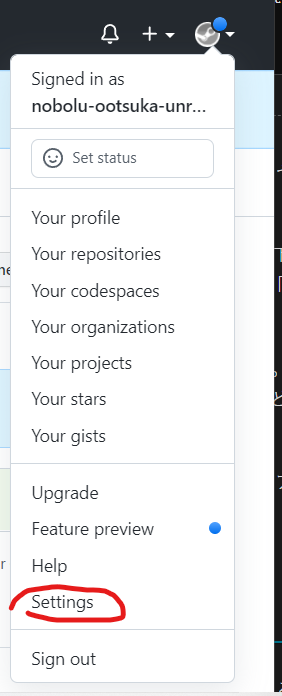
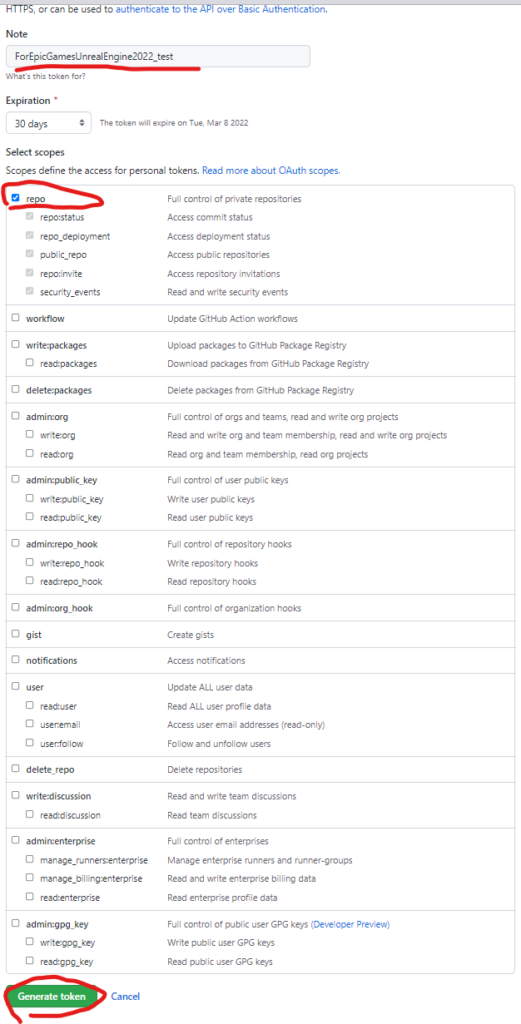
GitHubにログインして、右上の自分のアイコンをクリック → 「Settings」をクリック

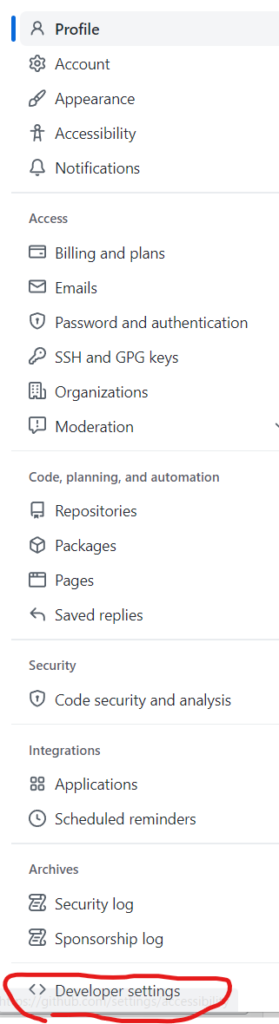
→ 左メニュー下部の「Developer settings」をクリック

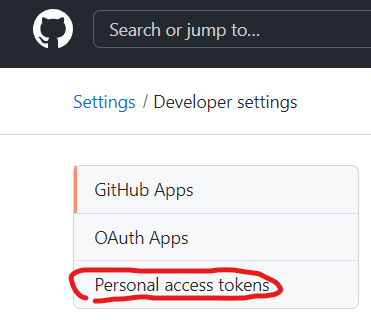
→ 左メニューの「Personal access tokens」をクリック

→ 右上の「Generate new token」をクリックしてアクセストークンを作成する。

アクセストークンを作成する時、「Select scopes」は少なくとも「repo」をチェックONにすること。

また、作成したトークンの値を後でもう一度確認することはできないので、作成後はその場ですぐにコピーしてどこかにとっておくこと。

こうして作成したアクセストークンをパスワードの代わりに入力することで、GitHubのリポジトリにアクセスできるようになる。

URLに付与する方法

パスワードの代わりに入力する他では、以下のようにGitリポジトリのURLに付与して使うこともできる。

git clone https://${アクセストークン}@${ユーザー名}/${リポジトリ名}.git

具体例

https://ghp_ooooooooooooooooooooooo@github.com/EpicGames/UnrealEngine.git

クローンできた!!!

Unreal Engine C++ Developer: Learn C++ and Make Video Games | Udemy UE4.25 Simple Shooterで自分なりに理解したこと。00600 ~Actorにダメージを与える~

今回はアクターにダメージを与えるので
UE4/Engine/Source/Runtime/Engine/Classes/GameFramwork/Actor.h

が持っているTakeDamageを使う

/ **
*このアクターにダメージを与えます。
* @see https://www.unrealengine.com/blog/damage-in-ue4
* @paramDamageAmount適用するダメージの量
* @paramDamageEvent受けたダメージを完全に説明するデータパッケージ。
* @paramEventInstigator損傷の原因となったコントローラー。
* @param DamageCauserダメージを直接引き起こしたアクター(爆発した発射物、着地した岩など)
* @ return実際に適用されたダメージの量。
* /
/**
	 * Apply damage to this actor.
	 * @see https://www.unrealengine.com/blog/damage-in-ue4
	 * @param DamageAmount		How much damage to apply
	 * @param DamageEvent		Data package that fully describes the damage received.
	 * @param EventInstigator	The Controller responsible for the damage.
	 * @param DamageCauser		The Actor that directly caused the damage (e.g. the projectile that exploded, the rock that landed on you)
	 * @return					The amount of damage actually applied.
	 */
	virtual float TakeDamage(float DamageAmount, struct FDamageEvent const& DamageEvent, class AController* EventInstigator, AActor* DamageCauser);

で引数にあるDamageEventはたくさん種類あるみたい。

今回は銃なのでFPointDamageEventを使った。

FPointDamageEvent DamageEvent(Damage,Hit,ShotDirection,nullptr);

でアクターにヒットしたときTakeDamageを呼ぶというのはこうなる。

		AActor* HitActor= Hit.GetActor();
		if (HitActor!=nullptr)
		{
			FPointDamageEvent DamageEvent(Damage,Hit,ShotDirection,nullptr);
			HitActor->TakeDamage(Damage,DamageEvent,OwnerController,this);
		}

絵的にはなにもかわりません。

Unreal Engine C++ Developer: Learn C++ and Make Video Games | Udemy UE4.25 Simple Shooterで自分なりに理解したこと。00500 ~ヒットした場所にパーティクル~

UE4/Engine/Source/Runtime/Engine/Classes/Kismet/GameplayStatics.h

static UParticleSystemComponent* SpawnEmitterAtLocation(const UObject* WorldContextObject, UParticleSystem* EmitterTemplate, FVector Location, FRotator Rotation = FRotator::ZeroRotator, FVector Scale = FVector(1.f), bool bAutoDestroy = true, EPSCPoolMethod PoolingMethod = EPSCPoolMethod::None, bool bAutoActivateSystem = true);

デフォルト引数あるやつ消すとこう

static UParticleSystemComponent* SpawnEmitterAtLocation(const UObject* WorldContextObject, UParticleSystem* EmitterTemplate, FVector Location);

をつかった

Gun.hに これを追加して

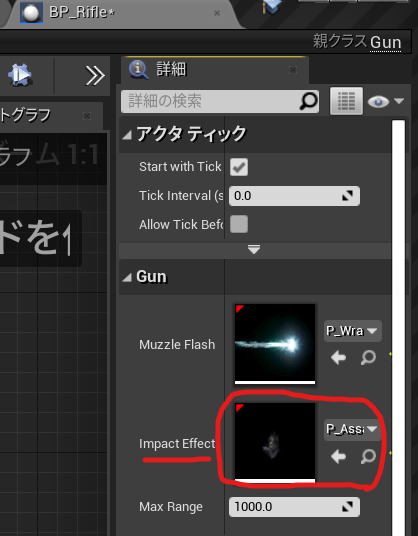
	UPROPERTY(EditAnyWhere)
	UParticleSystem* ImpactEffect;

Gun.cppに実際にはShotDirection でショット方向をコントロールしてる

FVector ShotDirection = -Rotation.Vector();
UGameplayStatics::SpawnEmitterAtLocation(GetWorld(), ImpactEffect, Hit.Location,ShotDirection.Rotation() );

	if(bSuccess==true)
	{
		UE_LOG(LogTemp,Warning,TEXT("HitWall!! "));
		DrawDebugPoint(GetWorld(), Hit.Location,40.0 ,FColor::Red , bPersistentLines2);
		FVector ShotDirection = -Rotation.Vector();
		UGameplayStatics::SpawnEmitterAtLocation(GetWorld(), ImpactEffect, Hit.Location,ShotDirection.Rotation() );

	}

で作ったプロパティ、ImpactEffectに設定

今回の状態 全文
Gun.h

// Fill out your copyright notice in the Description page of Project Settings.

#pragma once

#include "CoreMinimal.h"
#include "GameFramework/Actor.h"
#include "Gun.generated.h"

UCLASS()
class SIMPLESHOOTERCP2_API AGun : public AActor
{
	GENERATED_BODY()
	
public:	
	// Sets default values for this actor's properties
	AGun();

	void PullTrigger();

protected:
	// Called when the game starts or when spawned
	virtual void BeginPlay() override;

public:	
	// Called every frame
	virtual void Tick(float DeltaTime) override;
private:
	UPROPERTY(VisibleAnyWhere)
	USceneComponent* Root;

	UPROPERTY(VisibleAnyWhere)
	USkeletalMeshComponent* Mesh;

	UPROPERTY(EditAnyWhere)
	UParticleSystem* MuzzleFlash;

	UPROPERTY(EditAnyWhere)
	UParticleSystem* ImpactEffect;

	UPROPERTY(EditAnyWhere)
	float MaxRange = 1000;
};

Gun.cpp

// Fill out your copyright notice in the Description page of Project Settings.


#include "Gun.h"

#include "Components/SkeletalMeshComponent.h"
#include "Kismet/GameplayStatics.h"
#include "DrawDebugHelpers.h"
// Sets default values
AGun::AGun()
{
 	// Set this actor to call Tick() every frame.  You can turn this off to improve performance if you don't need it.
	PrimaryActorTick.bCanEverTick = true;

	Root = CreateDefaultSubobject<USceneComponent>(TEXT("Root"));
	SetRootComponent(Root);

	Mesh = CreateDefaultSubobject<USkeletalMeshComponent>(TEXT("Mesh"));
	Mesh->SetupAttachment(Root);


}
void AGun::PullTrigger()
{
	UE_LOG(LogTemp,Warning,TEXT("You have been shot!! "));
	//MuzzleFlashSocket
	UGameplayStatics::SpawnEmitterAttached(MuzzleFlash, Mesh, TEXT("MuzzleFlashSocket"));
    
	APawn* OwnerPawn = Cast<APawn>(GetOwner());
	if(OwnerPawn==nullptr)
	{
		return;
	}
	AController* OwnerController= OwnerPawn ->GetController();
	if(OwnerController==nullptr)
	{
		return;
	}
	FVector Location= OwnerPawn->GetActorLocation();
	FRotator Rotation;
	OwnerController->GetPlayerViewPoint(  Location, Rotation );
	FVector End = Location + Rotation.Vector() * MaxRange;
	// TOTO: LineTrace

	float FOVDeg=90;
	float Scale=2.f;
	FColor const& Color=FColor::Blue;
	bool bPersistentLines=true;
	float LifeTime=-1.f;
	uint8 DepthPriority = 0;
	//DrawDebugCamera(GetWorld(), Location, Rotation, FOVDeg, Scale, Color, bPersistentLines, LifeTime, DepthPriority);

	float Size2 = 20.0;
	FColor const& Color2= FColor::Green;
	bool bPersistentLines2 = true;
	float LifeTime2 = -1.f;
	uint8 DepthPriority2 = 0;
	//DrawDebugPoint(GetWorld(), Location,Size2 ,Color2 , bPersistentLines2, LifeTime2, DepthPriority2);
	//DrawDebugPoint(GetWorld(), Location,Size2 ,Color2 , bPersistentLines2);
    //DrawDebugDirectionalArrow(GetWorld(), Location, End, 3.0, FColor::Blue, bPersistentLines);

	FHitResult Hit;
	ECollisionChannel TraceChannel = ECollisionChannel::ECC_GameTraceChannel1;
	bool bSuccess = GetWorld()->LineTraceSingleByChannel(Hit,Location,End,TraceChannel);
	if(bSuccess==true)
	{
		UE_LOG(LogTemp,Warning,TEXT("HitWall!! "));
		//DrawDebugPoint(GetWorld(), Hit.Location,40.0 ,FColor::Red , bPersistentLines2);
		FVector ShotDirection = -Rotation.Vector();
		UGameplayStatics::SpawnEmitterAtLocation(GetWorld(), ImpactEffect, Hit.Location,ShotDirection.Rotation() );

	}
	//DrawDebugPoint(GetWorld(), End,Size2 ,FColor::Red , bPersistentLines2);
}

// Called when the game starts or when spawned
void AGun::BeginPlay()
{
	Super::BeginPlay();
	
}

// Called every frame
void AGun::Tick(float DeltaTime)
{
	Super::Tick(DeltaTime);

}

でできたのがこれ

#UE4 Png to TGA or TGA to Png

UE4を使っていると2DデザイナーはPNGを使ってくるけども

PNGの透過はUE4では使えない。

だからTGAに変換します。どんなかんじにこんな感じに

PNGのアルファ反転してtga保存


#target photoshop
//
// PNG_AlphaChannelInverse__Go__TGA.jsx
//

//
// Generated Wed Feb 02 2022 12:59:51 GMT+0900
//

cTID = function(s) { return app.charIDToTypeID(s); };
sTID = function(s) { return app.stringIDToTypeID(s); };

//
//==================== アルファ反転してtga保存 ==============
//
function ________tga() {
  //
  function step1(enabled, withDialog) {
    if (enabled != undefined && !enabled)
      return;
    var dialogMode = (withDialog ? DialogModes.ALL : DialogModes.NO);
    var desc1 = new ActionDescriptor();
    desc1.putInteger(cTID('Dpth'), 8);
    var desc2 = new ActionDescriptor();
    desc2.putInteger(cTID('Vrsn'), 6);
    desc2.putEnumerated(cTID('Mthd'), sTID("hdrToningMethodType"), sTID("hdrtype2"));
    desc2.putDouble(cTID('Exps'), 0);
    desc2.putDouble(cTID('Gmm '), 1);
    desc2.putBoolean(sTID("deghosting"), false);
    desc1.putObject(cTID('With'), sTID("hdrOptions"), desc2);
    executeAction(sTID('convertMode'), desc1, dialogMode);
  };

  //
  function step2(enabled, withDialog) {
    if (enabled != undefined && !enabled)
      return;
    var dialogMode = (withDialog ? DialogModes.ALL : DialogModes.NO);
    var desc1 = new ActionDescriptor();
    var ref1 = new ActionReference();
    ref1.putName(cTID('Chnl'), "アルファチャンネル 1");
    desc1.putReference(cTID('null'), ref1);
    executeAction(sTID('select'), desc1, dialogMode);
  };

  //
  function step3(enabled, withDialog) {
    if (enabled != undefined && !enabled)
      return;
    var dialogMode = (withDialog ? DialogModes.ALL : DialogModes.NO);
    executeAction(sTID('invert'), undefined, dialogMode);
  };

  //
  function step4(enabled, withDialog) {
    if (enabled != undefined && !enabled)
      return;
    var dialogMode = (withDialog ? DialogModes.ALL : DialogModes.NO);
    var desc1 = new ActionDescriptor();
    var desc2 = new ActionDescriptor();
    desc2.putInteger(cTID('BtDp'), 32);
    desc2.putInteger(cTID('Cmpr'), 0);
    desc1.putObject(cTID('As  '), cTID('TrgF'), desc2);
    desc1.putPath(cTID('In  '), new File("ファイルパス"));
    desc1.putInteger(cTID('DocI'), 223);
    executeAction(sTID('save'), desc1, dialogMode);
  };

  step1();      // 
  step2();      // 
  step3();      // 
  step4();      //
};


//=========================================
//                    ________tga.main
//=========================================
//

________tga.main = function () {
  ________tga();
};

________tga.main();

// EOF

"PNG_AlphaChannelInverse__Go__TGA.jsx"
// EOF

TGA 透過は削除してPNGへ

#target photoshop
//
// AlphaChannelDelete_Go_TGA_PNG.jsx
//

//
// Generated Wed Feb 02 2022 12:58:24 GMT+0900
//

cTID = function(s) { return app.charIDToTypeID(s); };
sTID = function(s) { return app.stringIDToTypeID(s); };

//
//==================== アルファチャンネルを無くしてPNG保存 ==============
//
function ______________PNG() {
  //
  function step1(enabled, withDialog) {
    if (enabled != undefined && !enabled)
      return;
    var dialogMode = (withDialog ? DialogModes.ALL : DialogModes.NO);
    var desc1 = new ActionDescriptor();
    desc1.putInteger(cTID('Dpth'), 16);
    var desc2 = new ActionDescriptor();
    desc2.putInteger(cTID('Vrsn'), 6);
    desc2.putEnumerated(cTID('Mthd'), sTID("hdrToningMethodType"), sTID("hdrtype2"));
    desc2.putDouble(cTID('Exps'), 0);
    desc2.putDouble(cTID('Gmm '), 1);
    desc2.putBoolean(sTID("deghosting"), false);
    desc1.putObject(cTID('With'), sTID("hdrOptions"), desc2);
    executeAction(sTID('convertMode'), desc1, dialogMode);
  };

  //
  function step2(enabled, withDialog) {
    if (enabled != undefined && !enabled)
      return;
    var dialogMode = (withDialog ? DialogModes.ALL : DialogModes.NO);
    var desc1 = new ActionDescriptor();
    var desc2 = new ActionDescriptor();
    desc2.putEnumerated(cTID('Mthd'), sTID("PNGMethod"), sTID("quick"));
    desc2.putEnumerated(sTID("PNGInterlaceType"), sTID("PNGInterlaceType"), sTID("PNGInterlaceNone"));
    desc2.putEnumerated(sTID("PNGFilter"), sTID("PNGFilter"), sTID("PNGFilterAdaptive"));
    desc2.putInteger(cTID('Cmpr'), 6);
    desc1.putObject(cTID('As  '), sTID("PNGFormat"), desc2);
    desc1.putPath(cTID('In  '), new File("ファイルパス"));
    desc1.putInteger(cTID('DocI'), 314);
    desc1.putBoolean(cTID('Cpy '), true);
    desc1.putBoolean(cTID('AlpC'), false);
    executeAction(sTID('save'), desc1, dialogMode);
  };

  //
  function step3(enabled, withDialog) {
    if (enabled != undefined && !enabled)
      return;
    var dialogMode = (withDialog ? DialogModes.ALL : DialogModes.NO);
    var desc1 = new ActionDescriptor();
    desc1.putEnumerated(cTID('Svng'), cTID('YsN '), cTID('N   '));
    desc1.putInteger(cTID('DocI'), 314);
    desc1.putBoolean(sTID("forceNotify"), true);
    executeAction(sTID('close'), desc1, dialogMode);
  };

  step1();      //
  step2();      //
  step3();      //
};


//=========================================
//                    ______________PNG.main
//=========================================
//

______________PNG.main = function () {
  ______________PNG();
};

______________PNG.main();

// EOF

"AlphaChannelDelete_Go_TGA_PNG.jsx"
// EOF

photoshop の Action の [.atn]をjsxへ変換する atn2js.jsx ActionToJavascript.jsxについて ~FurcraeaTokyo版~

photoshop の Action の [.atn]をjsxへ変換する atn2js.jsx ActionToJavascript.jsxについて 

ExtendScript Toolkit CC (ESTK CC 4.0.0.1)

http://sourceforge.net/projects/ps-scripts/files/xtools/v2.2betas/

がダウンロードできるが
Macだと直下にフォルダ作っていれとく。
/Developer/xtools/xapps/ActionToJavascript.jsx
そのままじゃ動かなかった件

頭に
#target photoshop
いれれば動く

入れないと
//@include “xlib/xml/atn2bin.jsx” がエラーとか
DescValueType.ALIASTYPE がみつかりません。とか

動けばこんな感じ

。。
修正したものおいておく。
xtools-2_2b1_furcraeaTokyo.zip

https://drive.google.com/file/d/11iejj87qI_DdIAbpvP6uWKUWyRAdFSoT/view?usp=sharing