Unreal Engine C++ Developer: Learn C++ and Make Video Games | Udemy UE4.26 Simple Shooterで自分なりに理解したこと。01300 ~NavMeshとAIの動き~

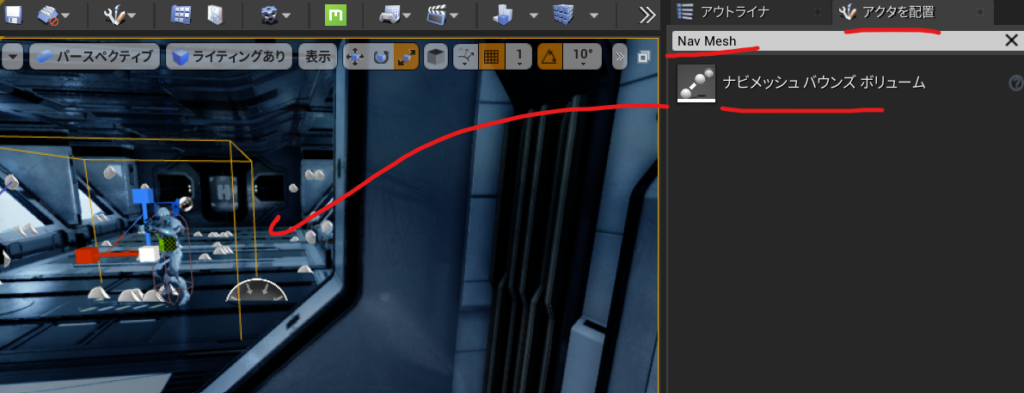
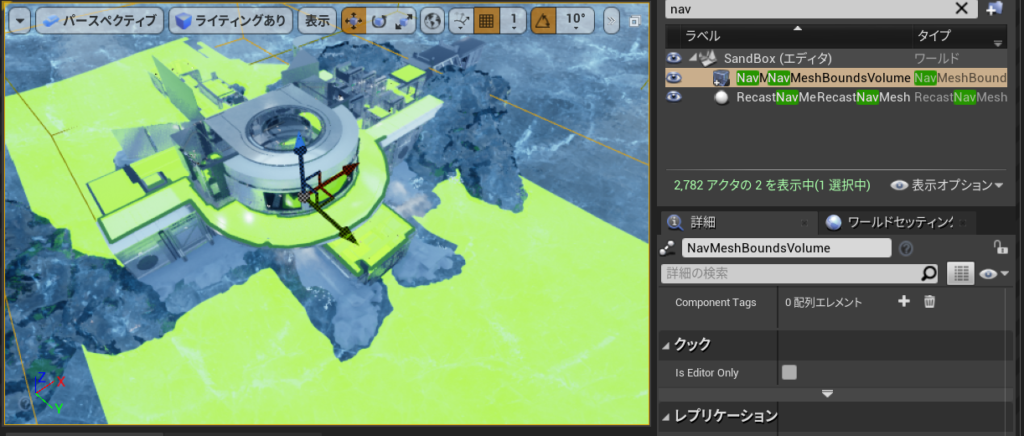
NavMeshを配置して

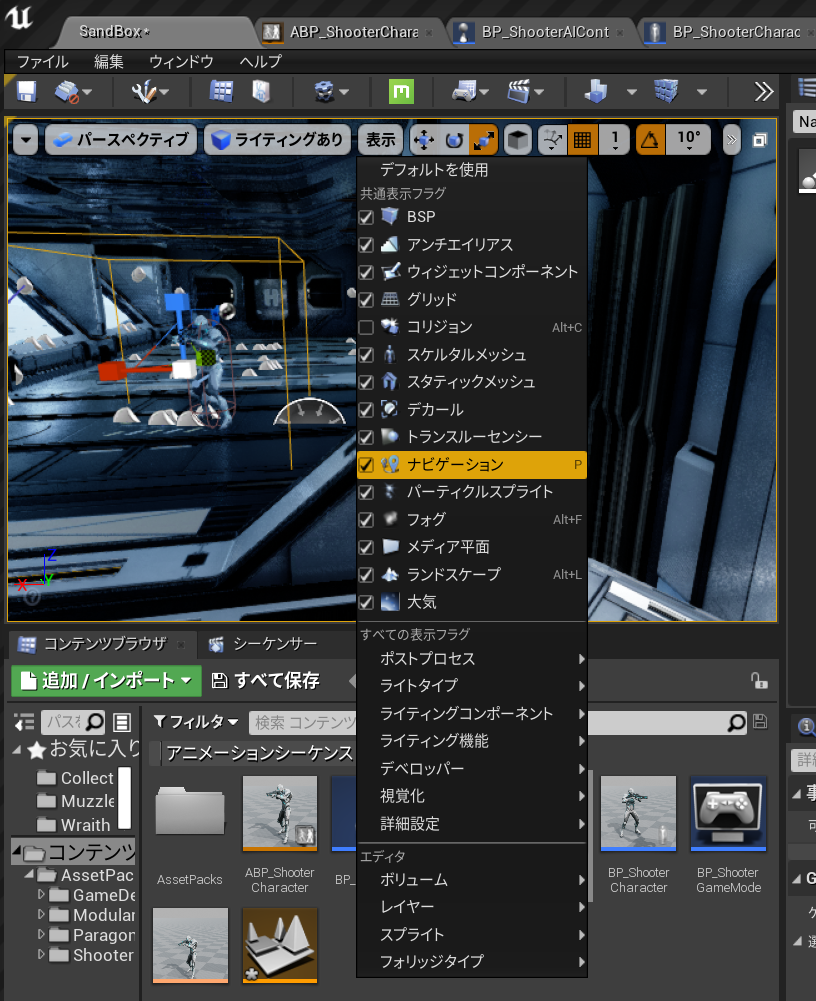
表示できるようにします。

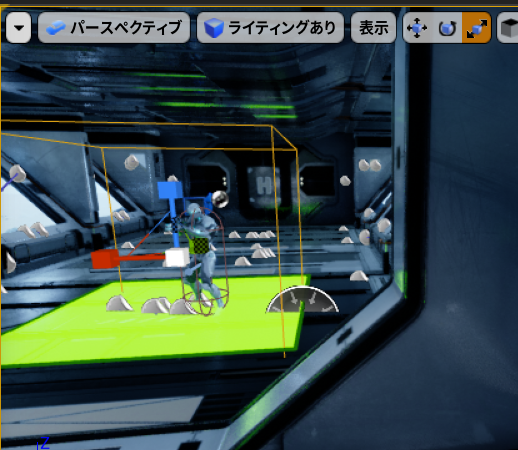
表示されました。

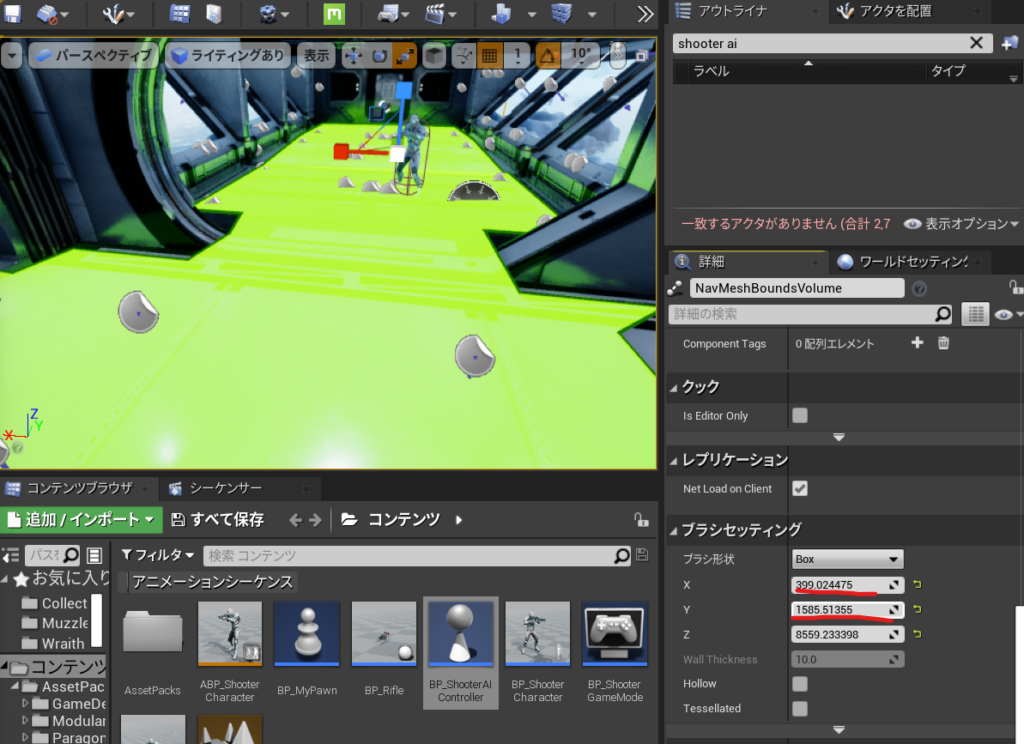
ブラシセッティングで広げます。

BP_ShooterAIControllerを開いてPathFollowingComponentが作用しているからです。

C:\Program Files\Epic Games\UE_4.26\Engine\Source\Runtime\AIModule\Classes\AIController.h

MoveToを見ると

MoveToActor

MoveToLocation

MoveTo

の3つがあります。

	/** AIを指定されたゴールアクターに向けて移動させ(宛先は継続的に更新されます)、
次のアクティブなパスを中止します
* @ paramAcceptanceRadius-ポーンが十分に近づいたら移動を終了します
* @ parambStopOnOverlap-ポーンの半径をAcceptanceRadiusに追加します
* @param bUsePathfinding-ナビゲーションデータを使用してパスを計算します
(そうでない場合は直線になります)
* @param bCanStrafe-フォーカス関連フラグを設定します:bAllowStrafe
* @ paramFilterClass-パスファインディング調整用のナビゲーションフィルター。
指定されていない場合、DefaultNavigationFilterClassが使用されます
* @ parambAllowPartialPath-目標に到達できない場合は不完全なパスを使用します
* @note AcceptanceRadiusは、ヘッダーパーサーが
UPathFollowingComponent :: DefaultAcceptanceRadiusを認識できないため、
デフォルト値または-1になります。*/
	UFUNCTION(BlueprintCallable, Category = "AI|Navigation", Meta = (AdvancedDisplay = "bStopOnOverlap,bCanStrafe,bAllowPartialPath"))
	EPathFollowingRequestResult::Type MoveToActor(AActor* Goal, float AcceptanceRadius = -1, bool bStopOnOverlap = true,
		bool bUsePathfinding = true, bool bCanStrafe = true,
		TSubclassOf<UNavigationQueryFilter> FilterClass = NULL, bool bAllowPartialPath = true);

なので

\ShooterAIController.cpp

// Fill out your copyright notice in the Description page of Project Settings.


#include "ShooterAIController.h"

#include "Kismet\GameplayStatics.h"

void AShooterAIController::BeginPlay()
{
    Super::BeginPlay();
    APawn* PlayerPawn= UGameplayStatics::GetPlayerPawn(GetWorld(),0);

    SetFocus(PlayerPawn);
    MoveToActor(PlayerPawn,200);

}

これでプレイしてみると一度動きます。が一度しかついてきません。

C:\Program Files\Epic Games\UE_4.26\Engine\Source\Runtime\Engine\Classes\GameFramework\Actor.h

	virtual void Tick( float DeltaSeconds );

をコピーしてShooterAIController.hにTickをオーバーライドしてこうしました。

// Fill out your copyright notice in the Description page of Project Settings.

#pragma once

#include "CoreMinimal.h"
#include "AIController.h"
#include "ShooterAIController.generated.h"

/**
 * 
 */
UCLASS()
class SIMPLESHOOTERCP2_API AShooterAIController : public AAIController
{
	GENERATED_BODY()
public:
	virtual void Tick( float DeltaSeconds ) override;

protected:
	virtual void BeginPlay() override;	
};

C:\Download\Game\SImpleShooter\SImpleShooterCp2 4.26\Source\SImpleShooterCp2\ShooterAIController.cpp

// Fill out your copyright notice in the Description page of Project Settings.


#include "ShooterAIController.h"

#include "Kismet\GameplayStatics.h"

void AShooterAIController::BeginPlay()
{
    Super::BeginPlay();
    //APawn* PlayerPawn= UGameplayStatics::GetPlayerPawn(GetWorld(),0);

    
}
void AShooterAIController::Tick(float DeltaSecond)
{
    APawn* PlayerPawn= UGameplayStatics::GetPlayerPawn(GetWorld(),0);
    SetFocus(PlayerPawn);
    MoveToActor(PlayerPawn,200);

}

NavMeshを広げておかないとAIキャラクターが歩きにくいみたいです

できたのがこれ、

AIキャラクターが回転しないバグは次のときに説明するみたい。

Unreal Engine C++ Developer: Learn C++ and Make Video Games | Udemy UE4.26 Simple Shooterで自分なりに理解したこと。01200 ~AI Aimining~

Control + P でAIControllerと入力して

UE_4.26\Engine\Source\Runtime\AIModule\Classes\AIController.h

を開きます。

    /* 特定の優先度にフォーカスアクター設定し、結果としてFocalPointを設定します。*/    virtual void SetFocus(AActor* NewFocus, EAIFocusPriority::Type InPriority = EAIFocusPriority::Gameplay);

/ *特定の優先度にフォーカスアクターを設定し、結果としてFocalPointを設定します。 * /
	/* Set Focus actor for given priority, will set FocalPoint as a result. */
	virtual void SetFocus(AActor* NewFocus, EAIFocusPriority::Type InPriority = EAIFocusPriority::Gameplay);


こっちは

指定された優先度のフォーカスをクリアし、結果としてFocalPointもクリアします@paramInPriorityフォーカス優先度をクリアします。 何を使用すればよいかわからない場合は、おそらくEAIFocusPriority :: Gameplay * /を意味します。

  virtual void ClearFocus(EAIFocusPriority::Type InPriority);

	/** 指定された優先度のフォーカスをクリアし、結果としてFocalPointもクリアします
* @paramInPriorityフォーカス優先度をクリアします。 何を使用すればよいかわからない場合は、おそらくEAIFocusPriority :: Gameplay * /を意味します。*/
	virtual void ClearFocus(EAIFocusPriority::Type InPriority);

フォーカスの優先度ってなによってなるので見てみると

その列挙型の定義を見てみると、デフォルトの動きMoveゲームプレイがあることがわかります

そしてそれらは基本的に優先順位の順にリストされています。

//これが通常の列挙型ではなく名前空間である理由は
//ゲーム固有のコードで拡張できるようにする
// @todoこれは少し面倒なので、リファクタリングする必要があります
namespace EAIFocusPriority
{
	typedef uint8 Type;

	const Type Default = 0;
	const Type Move = 1;
	const Type Gameplay = 2;

	const Type LastFocusPriority = Gameplay;
}

struct FFocusKnowledge
{
	struct FFocusItem
	{
		TWeakObjectPtr<AActor> Actor;
		FVector Position;

		FFocusItem()
		{
			Actor = nullptr;
			Position = FAISystem::InvalidLocation;
		}
	};
	
	TArray<FFocusItem> Priorities;
};

私たちは主にこのゲームプレイを使用するので、それらをあまり使用する必要はありませんでした

次に

UE_4.26\Engine\Source\Runtime\Engine\Classes\GameFramework\Actor.h

protected:
	/** Overridable native event for when play begins for this actor. */
	virtual void BeginPlay();

をコピーして

ShooterAIController.hにペーストしてオーバーライドします

// Fill out your copyright notice in the Description page of Project Settings.

#pragma once

#include "CoreMinimal.h"
#include "AIController.h"
#include "ShooterAIController.generated.h"

/**
 * 
 */
UCLASS()
class SIMPLESHOOTERCP2_API AShooterAIController : public AAIController
{
	GENERATED_BODY()
protected:
	virtual void BeginPlay() override;	
};

C:\Program Files\Epic Games\UE_4.26\Engine\Source\Runtime\Engine\Classes\Kismet\GameplayStatics.h

	/** 指定されたプレーヤーインデックスのプレーヤーポーンを返します */
	UFUNCTION(BlueprintPure, Category="Game", meta=(WorldContext="WorldContextObject", UnsafeDuringActorConstruction="true"))
	static class APawn* GetPlayerPawn(const UObject* WorldContextObject, int32 PlayerIndex);

をみると指定されたプレーヤーインデックスのプレーヤーポーンを返しますので

// Fill out your copyright notice in the Description page of Project Settings.


#include "ShooterAIController.h"

#include "Kismet\GameplayStatics.h"

void AShooterAIController::BeginPlay()
{
    Super::BeginPlay();
    APawn* PlayerPawn= UGameplayStatics::GetPlayerPawn(GetWorld(),0);

    SetFocus(PlayerPawn);

}

できたのがこれ

Unreal Engine C++ Developer: Learn C++ and Make Video Games | Udemy UE4.25 Simple Shooterで自分なりに理解したこと。01100 ~AIコントローラーを作成してセットアップ~

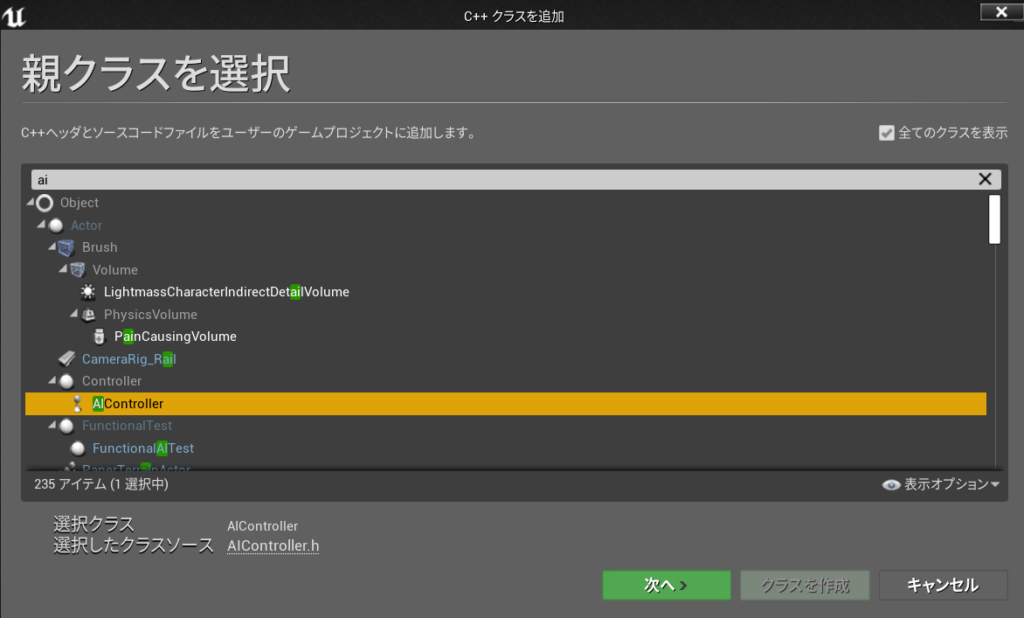
新規C++クラスを作る 親クラスにAIコントローラーを選ぶ

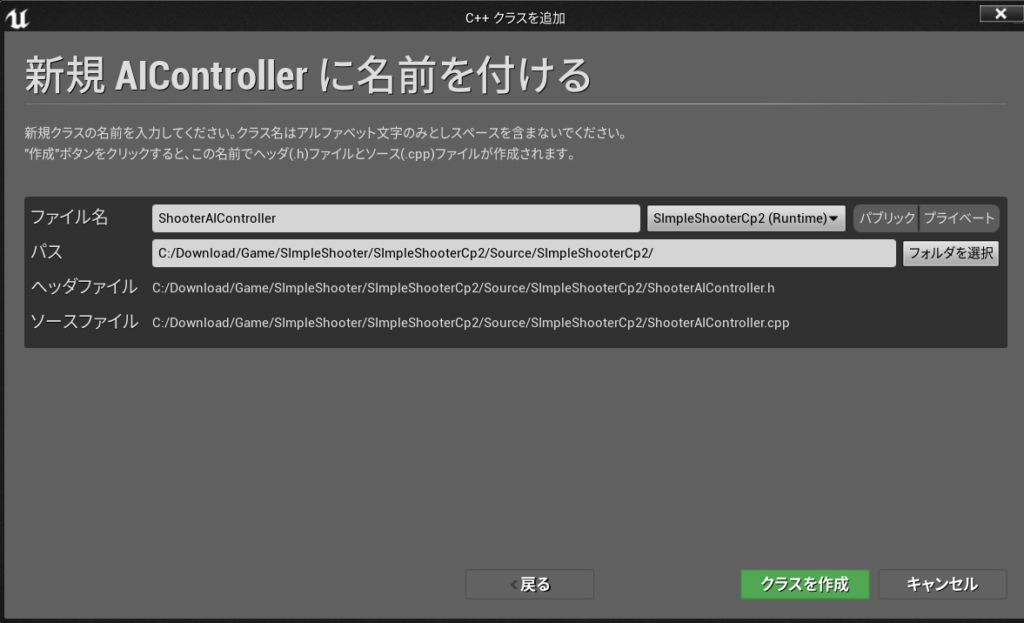
名前は ShooterAIController

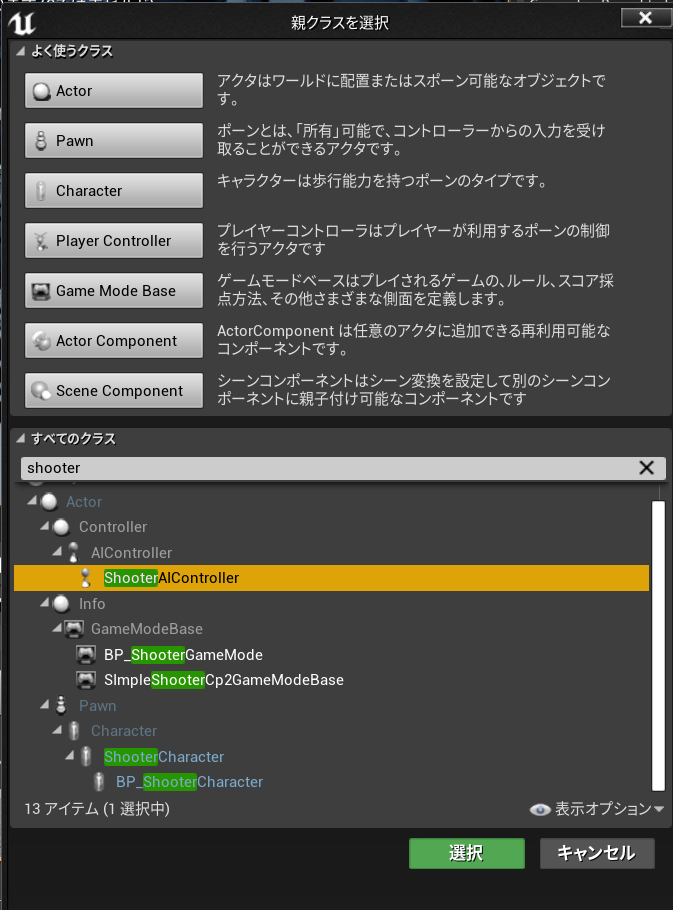
このクラスを使ってブループリントクラスを作る

名前を BP_ShooterAIController

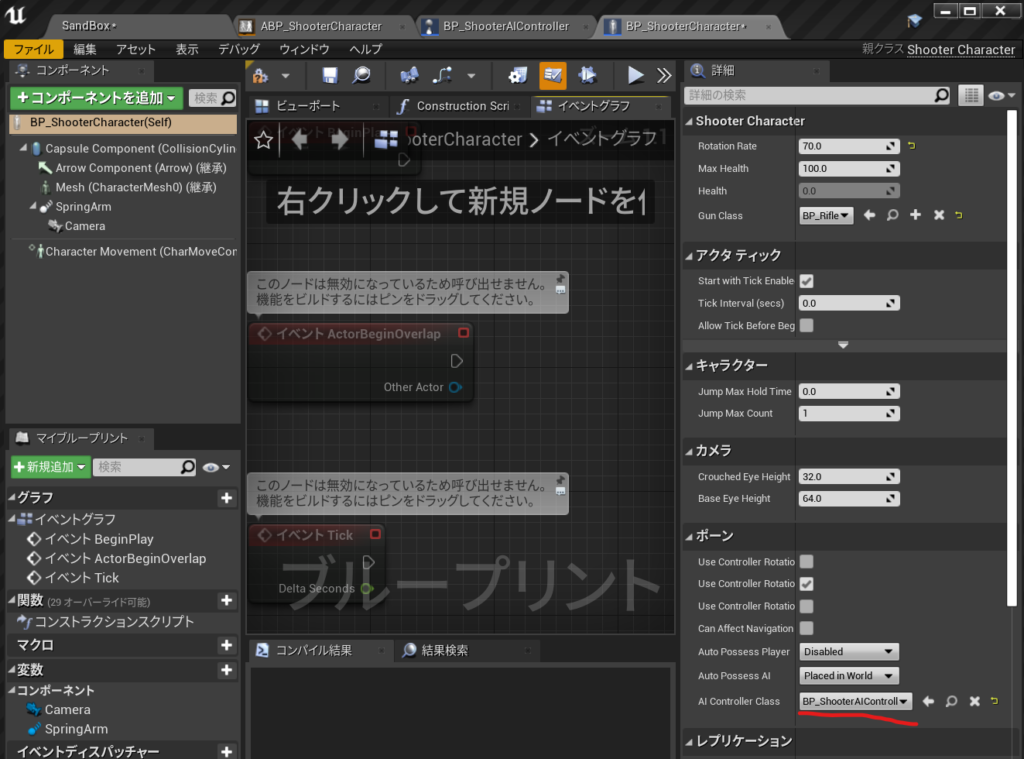
BP_ShooterCharacterを開いて ポーンのAI ContrallerClassにBP_ShooterAIControllerを設定

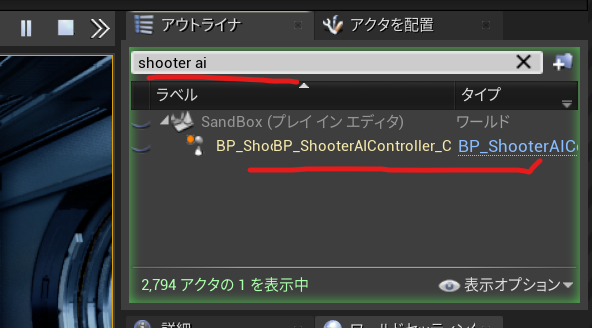
実行してBP_ShooterAIControllerがポーンされてるか確認する。

Unreal Engine C++ Developer: Learn C++ and Make Video Games | Udemy UE4.25 Simple Shooterで自分なりに理解したこと。01000 ~ブループリント純粋関数ノードを作る ~


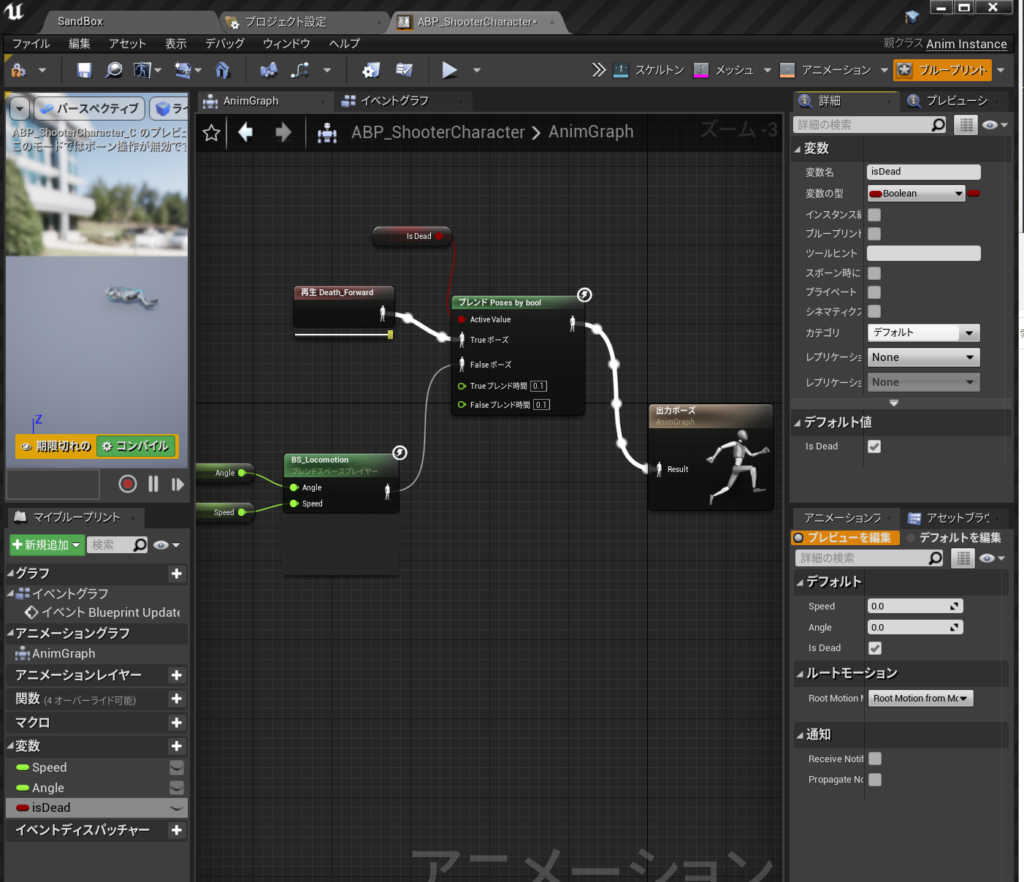
彼が死ぬまでこのキャラクターを撃つことができるようになったので

アニメーションBPのこのブール値をゲームプレイから自動的に設定する必要があります。

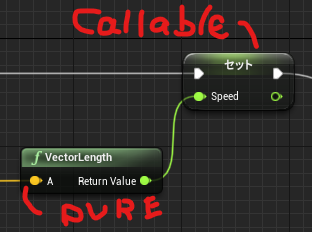
UFUNCTION()マクロ
UFUNCTION(BluePrintCallable)//ブループリント呼び出し可能。
UFUNCTION(BluePrintPure)純粋ノード

それがブループリント呼び出し可能の実行ピンがある関数か、

それがブループリントピュア=純粋ノードで実行ピンが必要ない関数です。

ShooterCharacter.h

public:	
	UFUNCTION(BluePrintPure)
	bool IsDead() const;

ShooterCharacter.cpp

bool AShooterCharacter::IsDead() const
{
	return Health <= 0;
}

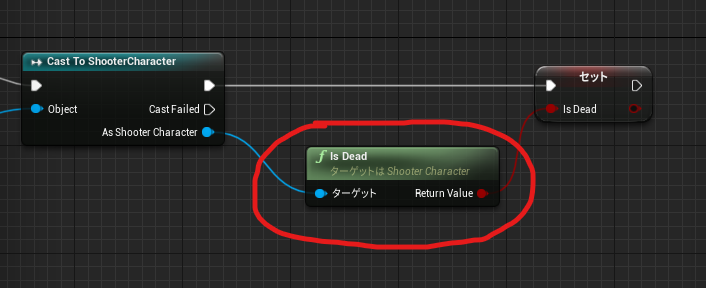
ブループリントで見てみると IsDead純粋関数としてノードが作られました。

ShooterCharacter.h 全文

// Fill out your copyright notice in the Description page of Project Settings.

#pragma once

#include "CoreMinimal.h"
#include "GameFramework/Character.h"
#include "ShooterCharacter.generated.h"

class AGun;


UCLASS()
class SIMPLESHOOTERCP2_API AShooterCharacter : public ACharacter
{
	GENERATED_BODY()

public:
	// Sets default values for this character's properties
	AShooterCharacter();

protected:
	// Called when the game starts or when spawned
	virtual void BeginPlay() override;

public:	
	UFUNCTION(BluePrintPure)
	bool IsDead() const;

	// Called every frame
	virtual void Tick(float DeltaTime) override;

	// Called to bind functionality to input
	virtual void SetupPlayerInputComponent(class UInputComponent* PlayerInputComponent) override;
	
	virtual float TakeDamage(float DamageAmount, struct FDamageEvent const& DamageEvent, class AController* EventInstigator, AActor* DamageCauser) override;

private:
	void MoveForward(float AxisValue);
	void MoveRight(float AxisValue);
	void LockUpRate(float AxisValue);
	void LockRightRate(float AxisValue);
	void Shoot();
	
	UPROPERTY(EditAnyWhere)
	float RotationRate = 10;

	UPROPERTY(EditDefaultsOnly)
	float MaxHealth=100;

	UPROPERTY(VisibleAnyWhere)
	float Health;

	UPROPERTY(EditDefaultsOnly)
	TSubclassOf<AGun> GunClass;

	UPROPERTY()
	AGun* Gun;


};

ShooterCharacter.cpp

// Fill out your copyright notice in the Description page of Project Settings.


#include "ShooterCharacter.h"
#include "Gun.h"
//#include "Engine/Engine.h"
// Sets default values
AShooterCharacter::AShooterCharacter()
{
 	// Set this character to call Tick() every frame.  You can turn this off to improve performance if you don't need it.
	PrimaryActorTick.bCanEverTick = true;

}

// Called when the game starts or when spawned
void AShooterCharacter::BeginPlay()
{
	Super::BeginPlay();
	
	Health = MaxHealth;

	Gun = GetWorld()->SpawnActor<AGun>(GunClass);
	GetMesh()->HideBoneByName(TEXT("weapon_r"),EPhysBodyOp::PBO_None );
	Gun->AttachToComponent(GetMesh(), FAttachmentTransformRules::KeepRelativeTransform, TEXT("weaponSocket"));
	Gun->SetOwner(this);
}
bool AShooterCharacter::IsDead() const
{
	return Health <= 0;
}
// Called every frame
void AShooterCharacter::Tick(float DeltaTime)
{
	Super::Tick(DeltaTime);

}

void AShooterCharacter::Shoot()
{
	Gun->PullTrigger();
}

// Called to bind functionality to input
void AShooterCharacter::SetupPlayerInputComponent(UInputComponent* PlayerInputComponent)
{
	Super::SetupPlayerInputComponent(PlayerInputComponent);

	PlayerInputComponent ->BindAxis(TEXT("MoveForward"),this,&AShooterCharacter::MoveForward);
	PlayerInputComponent ->BindAxis(TEXT("LockUp"),this,&APawn::AddControllerPitchInput);
	PlayerInputComponent ->BindAxis(TEXT("MoveRight"),this,&AShooterCharacter::MoveRight);
	PlayerInputComponent ->BindAxis(TEXT("LockRight"),this,&APawn::AddControllerYawInput);
	PlayerInputComponent ->BindAxis(TEXT("LockUpRate"),this,&AShooterCharacter::LockUpRate);
	PlayerInputComponent ->BindAxis(TEXT("LockRightRate"),this,&AShooterCharacter::LockRightRate);
	PlayerInputComponent ->BindAction(TEXT("Jump"),EInputEvent::IE_Pressed,this,&ACharacter::Jump);
	PlayerInputComponent ->BindAction(TEXT("Shoot"),EInputEvent::IE_Pressed,this,&AShooterCharacter::Shoot);
}

float AShooterCharacter::TakeDamage(float DamageAmount, struct FDamageEvent const& DamageEvent, class AController* EventInstigator, AActor* DamageCauser)
{
	float DamageToApply = Super::TakeDamage(DamageAmount,DamageEvent,EventInstigator,DamageCauser);
	DamageToApply = FMath::Min(Health,DamageToApply);
	Health -= DamageToApply;
	UE_LOG(LogTemp,Display,TEXT("Health Left %F"),Health);
	float TimeToDisplay =5.0f;
	FString Health_str = FString::SanitizeFloat(Health);
	FString TestHUDString =TEXT("Health Left")+	Health_str;
	GEngine->AddOnScreenDebugMessage(-1,TimeToDisplay,FColor::Green,TestHUDString);
	return DamageToApply;
}

void AShooterCharacter::MoveForward(float AxisValue)
{
	AddMovementInput(GetActorForwardVector() * AxisValue);
}
void AShooterCharacter::MoveRight(float AxisValue)
{
	AddMovementInput(GetActorRightVector() * AxisValue);
}

void AShooterCharacter::LockUpRate(float AxisValue)
{
	AddControllerPitchInput(AxisValue * RotationRate * GetWorld()->GetDeltaSeconds());
}
void AShooterCharacter::LockRightRate(float AxisValue)
{
	AddControllerYawInput(AxisValue * RotationRate * GetWorld()->GetDeltaSeconds());
}
// void AShooterCharacter::LockUp(float AxisValue)
// {
// 	AddControllerPitchInput(AxisValue);
// }

できたのがこれ

Unreal Engine C++ Developer: Learn C++ and Make Video Games | Udemy UE4.25 Simple Shooterで自分なりに理解したこと。00800 ~TakeDamageのオーバーライド ~

基本的にはデフォルトのTakeDamageが来た時に処理を追加したいのでオーバーライドします。

UE4/Engine/Sounce/Runtime/Engine/Classes/GameFramework/Actor.h

virtual float TakeDamage(float DamageAmount, struct FDamageEvent const& DamageEvent, class AController* EventInstigator, AActor* DamageCauser);
をコピーして

ShooterCharacter.h

にこれをペーストしてoverrideキーワードを追加しました。
    virtual float TakeDamage(float DamageAmount, struct FDamageEvent const& DamageEvent, class AController* EventInstigator, AActor* DamageCauser) override;

ShooterCharacter.cppはこうやって元のSuper::TakeDamegeを追加します

float AShooterCharacter::TakeDamage(float DamageAmount, struct FDamageEvent const& DamageEvent, class AController* EventInstigator, AActor* DamageCauser) ;
{
	float DamageApplied = Super::TakeDamage(DamageAmount,DamageEvent,EventInstigator,DamageCauser);
	
}

次に、ダメージを受けた時のヒットポイントを健康状態のとしてHealth変数を用意します。

ShooterCharacter.h

	UPROPERTY(EditDefaultsOnly)
	float MaxHealth=100;

	UPROPERTY(VisibleAnyWhere)
	float Health;

ShooterCharacter.cppでBeginPlayにHealth = MaxHealth;追加

void AShooterCharacter::BeginPlay()
{
	Super::BeginPlay();
	
	Health = MaxHealth;

	Gun = GetWorld()->SpawnActor<AGun>(GunClass);
	GetMesh()->HideBoneByName(TEXT("weapon_r"),EPhysBodyOp::PBO_None );
	Gun->AttachToComponent(GetMesh(), FAttachmentTransformRules::KeepRelativeTransform, TEXT("weaponSocket"));
	Gun->SetOwner(this);
}

ShooterCharacter.cppでTakeDamageに以下追加

DamageToApply = FMath::Min(Health,DamageToApply);   
Health -= DamageToApply;   
UE_LOG(LogTemp,Display,TEXT(“Health Left %F”),Health);

float TimeToDisplay =5.0f;   
FString Health_str = FString::SanitizeFloat(Health);   
(\UE_4.25\Engine\Source\Runtime\Core\Private\Containers\String.cppにある)
FString TestHUDString =TEXT(“Health Left”)+ Health_str;   

GEngine->AddOnScreenDebugMessage(-1,TimeToDisplay,FColor::Green,TestHUDString);
(\UE_4.25\Engine\Source\Runtime\Engine\Private\UnrealEngine.cppにある)
詳細は以下
FString | UnrealEngineのドキュメント

https://docs.unrealengine.com/4.27/ja/ProgrammingAndScripting/ProgrammingWithCPP/UnrealArchitecture/StringHandling/FString/

return DamageToApply;

float AShooterCharacter::TakeDamage(float DamageAmount, struct FDamageEvent const& DamageEvent, class AController* EventInstigator, AActor* DamageCauser)
{
	float DamageToApply = Super::TakeDamage(DamageAmount,DamageEvent,EventInstigator,DamageCauser);
	DamageToApply = FMath::Min(Health,DamageToApply);
	Health -= DamageToApply;
	UE_LOG(LogTemp,Display,TEXT("Health Left %F"),Health);
	float TimeToDisplay =5.0;
	FString Health_str = FString::SanitizeFloat(Health);
	FString TestHUDString =TEXT("Health Left")+	Health_str;
	GEngine->AddOnScreenDebugMessage(-1,TimeToDisplay,FColor::Green,TestHUDString);
	return DamageToApply;
}

ShooterCharacter.h 全文

// Fill out your copyright notice in the Description page of Project Settings.

#pragma once

#include "CoreMinimal.h"
#include "GameFramework/Character.h"
#include "ShooterCharacter.generated.h"

class AGun;


UCLASS()
class SIMPLESHOOTERCP2_API AShooterCharacter : public ACharacter
{
	GENERATED_BODY()

public:
	// Sets default values for this character's properties
	AShooterCharacter();

protected:
	// Called when the game starts or when spawned
	virtual void BeginPlay() override;

public:	
	// Called every frame
	virtual void Tick(float DeltaTime) override;

	// Called to bind functionality to input
	virtual void SetupPlayerInputComponent(class UInputComponent* PlayerInputComponent) override;
	
	virtual float TakeDamage(float DamageAmount, struct FDamageEvent const& DamageEvent, class AController* EventInstigator, AActor* DamageCauser) override;

private:
	void MoveForward(float AxisValue);
	void MoveRight(float AxisValue);
	void LockUpRate(float AxisValue);
	void LockRightRate(float AxisValue);
	void Shoot();
	
	UPROPERTY(EditAnyWhere)
	float RotationRate = 10;

	UPROPERTY(EditDefaultsOnly)
	float MaxHealth=100;

	UPROPERTY(VisibleAnyWhere)
	float Health;

	UPROPERTY(EditDefaultsOnly)
	TSubclassOf<AGun> GunClass;

	UPROPERTY()
	AGun* Gun;


};

ShooterCharacter.cpp 全文

// Fill out your copyright notice in the Description page of Project Settings.


#include "ShooterCharacter.h"
#include "Gun.h"
//#include "Engine/Engine.h"
// Sets default values
AShooterCharacter::AShooterCharacter()
{
 	// Set this character to call Tick() every frame.  You can turn this off to improve performance if you don't need it.
	PrimaryActorTick.bCanEverTick = true;

}

// Called when the game starts or when spawned
void AShooterCharacter::BeginPlay()
{
	Super::BeginPlay();
	
	Health = MaxHealth;

	Gun = GetWorld()->SpawnActor<AGun>(GunClass);
	GetMesh()->HideBoneByName(TEXT("weapon_r"),EPhysBodyOp::PBO_None );
	Gun->AttachToComponent(GetMesh(), FAttachmentTransformRules::KeepRelativeTransform, TEXT("weaponSocket"));
	Gun->SetOwner(this);
}

// Called every frame
void AShooterCharacter::Tick(float DeltaTime)
{
	Super::Tick(DeltaTime);

}

void AShooterCharacter::Shoot()
{
	Gun->PullTrigger();
}

// Called to bind functionality to input
void AShooterCharacter::SetupPlayerInputComponent(UInputComponent* PlayerInputComponent)
{
	Super::SetupPlayerInputComponent(PlayerInputComponent);

	PlayerInputComponent ->BindAxis(TEXT("MoveForward"),this,&AShooterCharacter::MoveForward);
	PlayerInputComponent ->BindAxis(TEXT("LockUp"),this,&APawn::AddControllerPitchInput);
	PlayerInputComponent ->BindAxis(TEXT("MoveRight"),this,&AShooterCharacter::MoveRight);
	PlayerInputComponent ->BindAxis(TEXT("LockRight"),this,&APawn::AddControllerYawInput);
	PlayerInputComponent ->BindAxis(TEXT("LockUpRate"),this,&AShooterCharacter::LockUpRate);
	PlayerInputComponent ->BindAxis(TEXT("LockRightRate"),this,&AShooterCharacter::LockRightRate);
	PlayerInputComponent ->BindAction(TEXT("Jump"),EInputEvent::IE_Pressed,this,&ACharacter::Jump);
	PlayerInputComponent ->BindAction(TEXT("Shoot"),EInputEvent::IE_Pressed,this,&AShooterCharacter::Shoot);
}

float AShooterCharacter::TakeDamage(float DamageAmount, struct FDamageEvent const& DamageEvent, class AController* EventInstigator, AActor* DamageCauser)
{
	float DamageToApply = Super::TakeDamage(DamageAmount,DamageEvent,EventInstigator,DamageCauser);
	DamageToApply = FMath::Min(Health,DamageToApply);
	Health -= DamageToApply;
	UE_LOG(LogTemp,Display,TEXT("Health Left %F"),Health);
	float TimeToDisplay =5.0f;
	FString Health_str = FString::SanitizeFloat(Health);
	FString TestHUDString =TEXT("Health Left")+	Health_str;
	GEngine->AddOnScreenDebugMessage(-1,TimeToDisplay,FColor::Green,TestHUDString);
	return DamageToApply;
}

void AShooterCharacter::MoveForward(float AxisValue)
{
	AddMovementInput(GetActorForwardVector() * AxisValue);
}
void AShooterCharacter::MoveRight(float AxisValue)
{
	AddMovementInput(GetActorRightVector() * AxisValue);
}

void AShooterCharacter::LockUpRate(float AxisValue)
{
	AddControllerPitchInput(AxisValue * RotationRate * GetWorld()->GetDeltaSeconds());
}
void AShooterCharacter::LockRightRate(float AxisValue)
{
	AddControllerYawInput(AxisValue * RotationRate * GetWorld()->GetDeltaSeconds());
}
// void AShooterCharacter::LockUp(float AxisValue)
// {
// 	AddControllerPitchInput(AxisValue);
// }

こうなった。

Unreal Engine C++ Developer: Learn C++ and Make Video Games | Udemy UE4.25 Simple Shooterで自分なりに理解したこと。00600 ~Actorにダメージを与える~

今回はアクターにダメージを与えるので
UE4/Engine/Source/Runtime/Engine/Classes/GameFramwork/Actor.h

が持っているTakeDamageを使う

/ **
*このアクターにダメージを与えます。
* @see https://www.unrealengine.com/blog/damage-in-ue4
* @paramDamageAmount適用するダメージの量
* @paramDamageEvent受けたダメージを完全に説明するデータパッケージ。
* @paramEventInstigator損傷の原因となったコントローラー。
* @param DamageCauserダメージを直接引き起こしたアクター(爆発した発射物、着地した岩など)
* @ return実際に適用されたダメージの量。
* /
/**
	 * Apply damage to this actor.
	 * @see https://www.unrealengine.com/blog/damage-in-ue4
	 * @param DamageAmount		How much damage to apply
	 * @param DamageEvent		Data package that fully describes the damage received.
	 * @param EventInstigator	The Controller responsible for the damage.
	 * @param DamageCauser		The Actor that directly caused the damage (e.g. the projectile that exploded, the rock that landed on you)
	 * @return					The amount of damage actually applied.
	 */
	virtual float TakeDamage(float DamageAmount, struct FDamageEvent const& DamageEvent, class AController* EventInstigator, AActor* DamageCauser);

で引数にあるDamageEventはたくさん種類あるみたい。

今回は銃なのでFPointDamageEventを使った。

FPointDamageEvent DamageEvent(Damage,Hit,ShotDirection,nullptr);

でアクターにヒットしたときTakeDamageを呼ぶというのはこうなる。

		AActor* HitActor= Hit.GetActor();
		if (HitActor!=nullptr)
		{
			FPointDamageEvent DamageEvent(Damage,Hit,ShotDirection,nullptr);
			HitActor->TakeDamage(Damage,DamageEvent,OwnerController,this);
		}

絵的にはなにもかわりません。

Unreal Engine C++ Developer: Learn C++ and Make Video Games | Udemy UE4.25 Simple Shooterで自分なりに理解したこと。00500 ~ヒットした場所にパーティクル~

UE4/Engine/Source/Runtime/Engine/Classes/Kismet/GameplayStatics.h

static UParticleSystemComponent* SpawnEmitterAtLocation(const UObject* WorldContextObject, UParticleSystem* EmitterTemplate, FVector Location, FRotator Rotation = FRotator::ZeroRotator, FVector Scale = FVector(1.f), bool bAutoDestroy = true, EPSCPoolMethod PoolingMethod = EPSCPoolMethod::None, bool bAutoActivateSystem = true);

デフォルト引数あるやつ消すとこう

static UParticleSystemComponent* SpawnEmitterAtLocation(const UObject* WorldContextObject, UParticleSystem* EmitterTemplate, FVector Location);

をつかった

Gun.hに これを追加して

	UPROPERTY(EditAnyWhere)
	UParticleSystem* ImpactEffect;

Gun.cppに実際にはShotDirection でショット方向をコントロールしてる

FVector ShotDirection = -Rotation.Vector();
UGameplayStatics::SpawnEmitterAtLocation(GetWorld(), ImpactEffect, Hit.Location,ShotDirection.Rotation() );

	if(bSuccess==true)
	{
		UE_LOG(LogTemp,Warning,TEXT("HitWall!! "));
		DrawDebugPoint(GetWorld(), Hit.Location,40.0 ,FColor::Red , bPersistentLines2);
		FVector ShotDirection = -Rotation.Vector();
		UGameplayStatics::SpawnEmitterAtLocation(GetWorld(), ImpactEffect, Hit.Location,ShotDirection.Rotation() );

	}

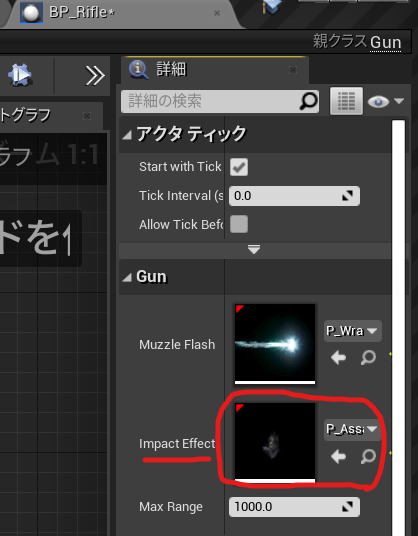
で作ったプロパティ、ImpactEffectに設定

今回の状態 全文
Gun.h

// Fill out your copyright notice in the Description page of Project Settings.

#pragma once

#include "CoreMinimal.h"
#include "GameFramework/Actor.h"
#include "Gun.generated.h"

UCLASS()
class SIMPLESHOOTERCP2_API AGun : public AActor
{
	GENERATED_BODY()
	
public:	
	// Sets default values for this actor's properties
	AGun();

	void PullTrigger();

protected:
	// Called when the game starts or when spawned
	virtual void BeginPlay() override;

public:	
	// Called every frame
	virtual void Tick(float DeltaTime) override;
private:
	UPROPERTY(VisibleAnyWhere)
	USceneComponent* Root;

	UPROPERTY(VisibleAnyWhere)
	USkeletalMeshComponent* Mesh;

	UPROPERTY(EditAnyWhere)
	UParticleSystem* MuzzleFlash;

	UPROPERTY(EditAnyWhere)
	UParticleSystem* ImpactEffect;

	UPROPERTY(EditAnyWhere)
	float MaxRange = 1000;
};

Gun.cpp

// Fill out your copyright notice in the Description page of Project Settings.


#include "Gun.h"

#include "Components/SkeletalMeshComponent.h"
#include "Kismet/GameplayStatics.h"
#include "DrawDebugHelpers.h"
// Sets default values
AGun::AGun()
{
 	// Set this actor to call Tick() every frame.  You can turn this off to improve performance if you don't need it.
	PrimaryActorTick.bCanEverTick = true;

	Root = CreateDefaultSubobject<USceneComponent>(TEXT("Root"));
	SetRootComponent(Root);

	Mesh = CreateDefaultSubobject<USkeletalMeshComponent>(TEXT("Mesh"));
	Mesh->SetupAttachment(Root);


}
void AGun::PullTrigger()
{
	UE_LOG(LogTemp,Warning,TEXT("You have been shot!! "));
	//MuzzleFlashSocket
	UGameplayStatics::SpawnEmitterAttached(MuzzleFlash, Mesh, TEXT("MuzzleFlashSocket"));
    
	APawn* OwnerPawn = Cast<APawn>(GetOwner());
	if(OwnerPawn==nullptr)
	{
		return;
	}
	AController* OwnerController= OwnerPawn ->GetController();
	if(OwnerController==nullptr)
	{
		return;
	}
	FVector Location= OwnerPawn->GetActorLocation();
	FRotator Rotation;
	OwnerController->GetPlayerViewPoint(  Location, Rotation );
	FVector End = Location + Rotation.Vector() * MaxRange;
	// TOTO: LineTrace

	float FOVDeg=90;
	float Scale=2.f;
	FColor const& Color=FColor::Blue;
	bool bPersistentLines=true;
	float LifeTime=-1.f;
	uint8 DepthPriority = 0;
	//DrawDebugCamera(GetWorld(), Location, Rotation, FOVDeg, Scale, Color, bPersistentLines, LifeTime, DepthPriority);

	float Size2 = 20.0;
	FColor const& Color2= FColor::Green;
	bool bPersistentLines2 = true;
	float LifeTime2 = -1.f;
	uint8 DepthPriority2 = 0;
	//DrawDebugPoint(GetWorld(), Location,Size2 ,Color2 , bPersistentLines2, LifeTime2, DepthPriority2);
	//DrawDebugPoint(GetWorld(), Location,Size2 ,Color2 , bPersistentLines2);
    //DrawDebugDirectionalArrow(GetWorld(), Location, End, 3.0, FColor::Blue, bPersistentLines);

	FHitResult Hit;
	ECollisionChannel TraceChannel = ECollisionChannel::ECC_GameTraceChannel1;
	bool bSuccess = GetWorld()->LineTraceSingleByChannel(Hit,Location,End,TraceChannel);
	if(bSuccess==true)
	{
		UE_LOG(LogTemp,Warning,TEXT("HitWall!! "));
		//DrawDebugPoint(GetWorld(), Hit.Location,40.0 ,FColor::Red , bPersistentLines2);
		FVector ShotDirection = -Rotation.Vector();
		UGameplayStatics::SpawnEmitterAtLocation(GetWorld(), ImpactEffect, Hit.Location,ShotDirection.Rotation() );

	}
	//DrawDebugPoint(GetWorld(), End,Size2 ,FColor::Red , bPersistentLines2);
}

// Called when the game starts or when spawned
void AGun::BeginPlay()
{
	Super::BeginPlay();
	
}

// Called every frame
void AGun::Tick(float DeltaTime)
{
	Super::Tick(DeltaTime);

}

でできたのがこれ

Unreal Engine C++ Developer: Learn C++ and Make Video Games | Udemy UE4.25 Simple Shooterで自分なりに理解したこと。00400 ~チャネルによるライントレース~

world.h>LineTraceTestと検索

LineTraceTestByChannel

/ **
*特定のチャネルを使用して世界に対して光線をトレースし、ブロッキングヒットが見つかった場合に戻ります。
* @paramStart光線の開始位置
* @paramEnd光線の終了位置
* @paramTraceChannelこの光線が含まれる「チャネル」。ヒットするコンポーネントを決定するために使用されます。
* @paramParamsトレースに使用される追加のパラメーター
*このトレースに使用される@paramResponseParam ResponseContainer
* @ returnブロッキングヒットが見つかった場合はTRUE
* /	

// LINE TRACE

	/**
	 *  Trace a ray against the world using a specific channel and return if a blocking hit is found.
	 *  @param  Start           Start location of the ray
	 *  @param  End             End location of the ray
	 *  @param  TraceChannel    The 'channel' that this ray is in, used to determine which components to hit
	 *  @param  Params          Additional parameters used for the trace
	 * 	@param 	ResponseParam	ResponseContainer to be used for this trace
	 *  @return TRUE if a blocking hit is found
	 */
	bool LineTraceTestByChannel(const FVector& Start,const FVector& End,ECollisionChannel TraceChannel, const FCollisionQueryParams& Params = FCollisionQueryParams::DefaultQueryParam, const FCollisionResponseParams& ResponseParam = FCollisionResponseParams::DefaultResponseParam) const;
	

LineTraceSingleByChannel

/ **
*特定のチャネルを使用して世界に対して光線をトレースし、最初のブロッキングヒットを返します
* @paramOutHit最初のブロッキングヒットが見つかりました
* @paramStart光線の開始位置
* @paramEnd光線の終了位置
* @paramTraceChannelこの光線が含まれる「チャネル」。ヒットするコンポーネントを決定するために使用されます。
* @paramParamsトレースに使用される追加のパラメーター
*このトレースに使用される@paramResponseParam ResponseContainer
* @ returnブロッキングヒットが見つかった場合はTRUE
* /	

/**
	 *  Trace a ray against the world using a specific channel and return the first blocking hit
	 *  @param  OutHit          First blocking hit found
	 *  @param  Start           Start location of the ray
	 *  @param  End             End location of the ray
	 *  @param  TraceChannel    The 'channel' that this ray is in, used to determine which components to hit
	 *  @param  Params          Additional parameters used for the trace
	 * 	@param 	ResponseParam	ResponseContainer to be used for this trace	 
	 *  @return TRUE if a blocking hit is found
	 */
	bool LineTraceSingleByChannel(struct FHitResult& OutHit,const FVector& Start,const FVector& End,ECollisionChannel TraceChannel,const FCollisionQueryParams& Params = FCollisionQueryParams::DefaultQueryParam, const FCollisionResponseParams& ResponseParam = FCollisionResponseParams::DefaultResponseParam) const;

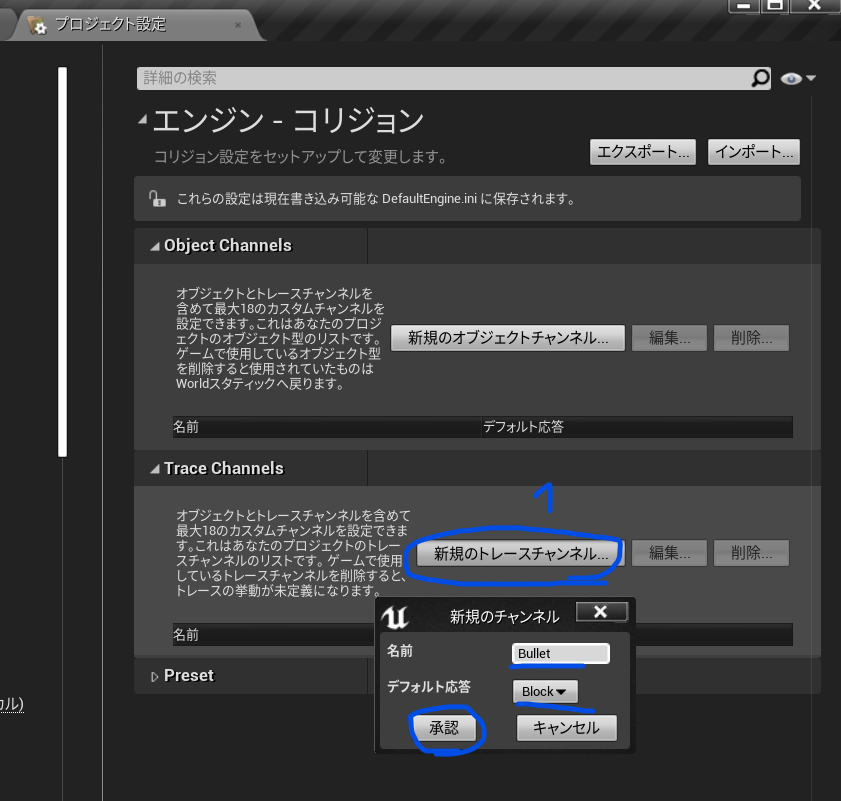
TraceChannelの設定はこう

LineTraceSingleByChannelの引数にはECollisionChannel がある

LineTraceSingleByChannel(struct FHitResult& OutHit,const FVector& Start,const FVector& End,ECollisionChannel TraceChannel,const FCollisionQueryParams& Params = FCollisionQueryParams::DefaultQueryParam, const FCollisionResponseParams& ResponseParam = FCollisionResponseParams::DefaultResponseParam) const;

ECollisionChannel の定義を開く

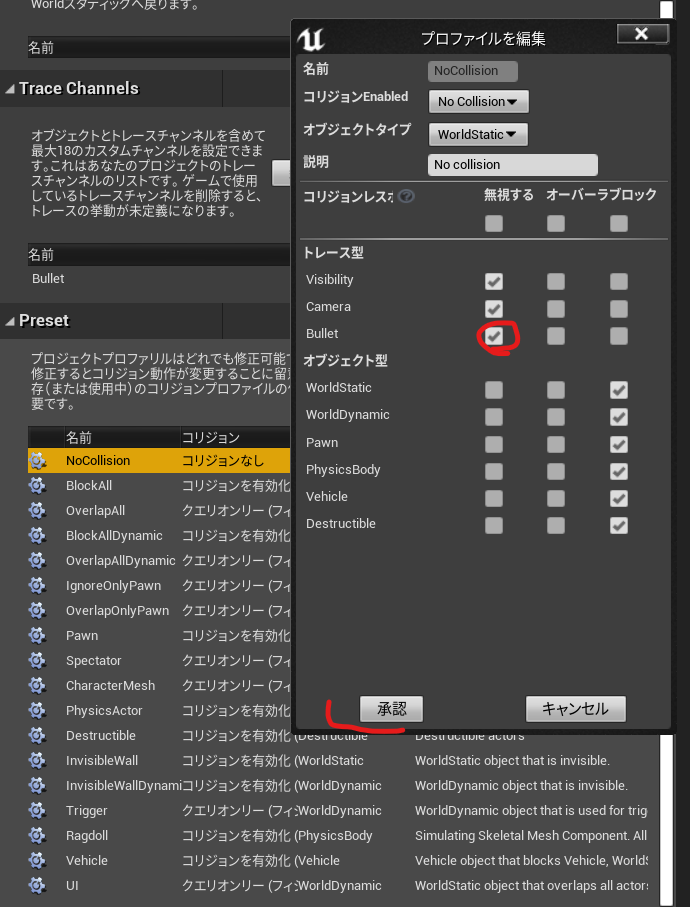
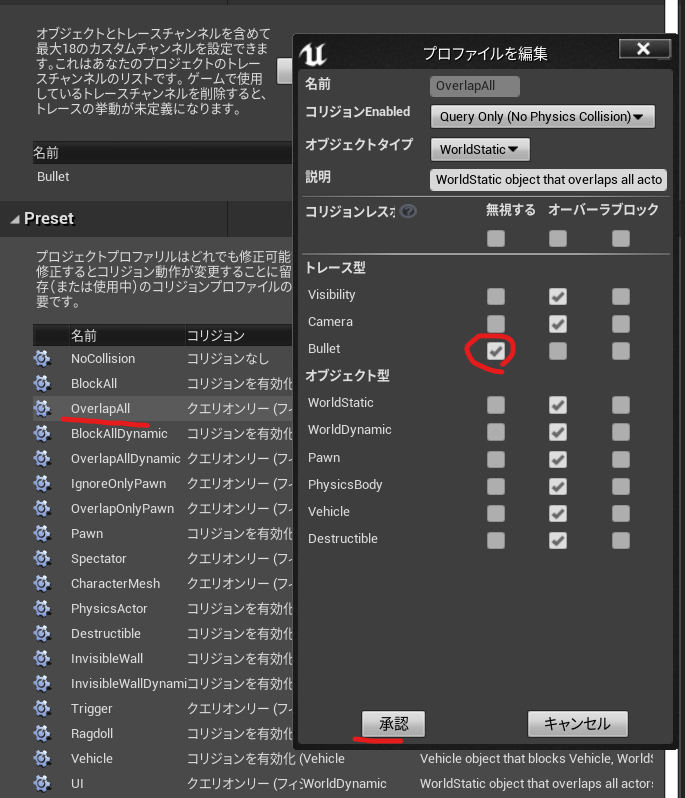
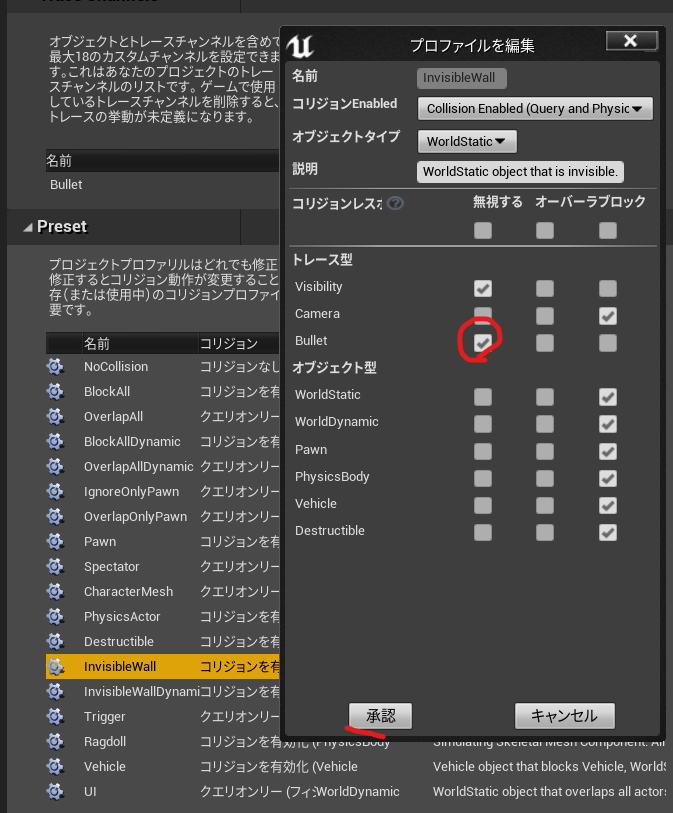
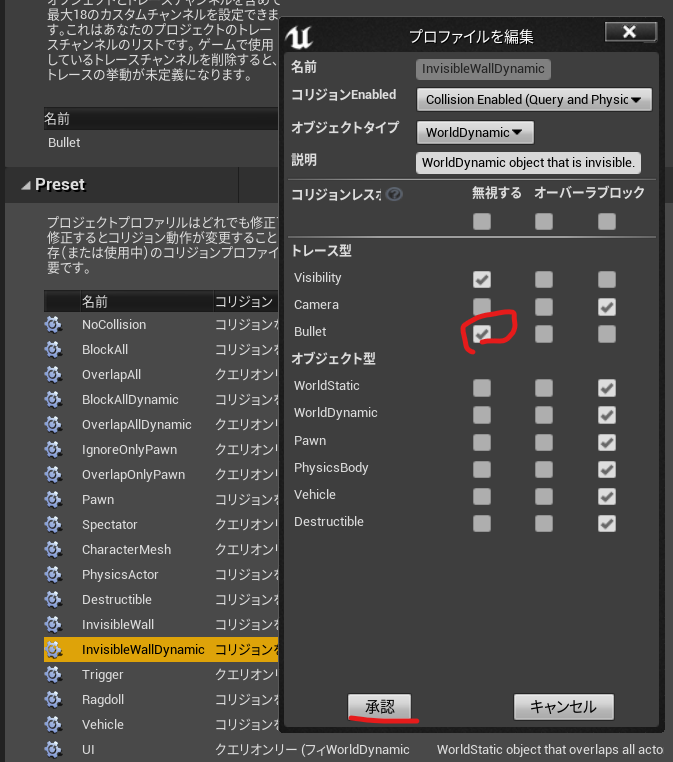
Config/DefaultEngine.ini ひらくとさっき設定したものがデータになってる

+EditProfiles=(Name="NoCollision",CustomResponses=((Channel="Bullet",Response=ECR_Ignore)))
+EditProfiles=(Name="OverlapAll",CustomResponses=((Channel="Bullet",Response=ECR_Ignore)))
+EditProfiles=(Name="InvisibleWall",CustomResponses=((Channel="Bullet",Response=ECR_Ignore)))
+EditProfiles=(Name="InvisibleWallDynamic",CustomResponses=((Channel="Bullet",Response=ECR_Ignore)))

Gun.hに

	UPROPERTY(EditAnyWhere)
	float MaxRange = 1000;

Gun.cppに戻る

UE4/Engine/Sounce/Runtime/Engine/Public/DrawDebugHelpers.h

DrawDebugPointを使う

	FVector End = Location + Rotation.Vector() * MaxRange;
	// TOTO: LineTrace
  / **デバッグポイントを描画します* /
  /** Draw a debug point */
	float Size=20.0;
	FColor PointColor::Red;
	bool bPersistentLines = true;
	float LifeTime = -1.f;
	uint8 DepthPriority = 0;
	DrawDebugPoint(GetWorld(), Location,Size ,Color , bPersistentLines, LifeTime, DepthPriority)
	

なんか右にでる

LineTraceSingleByChannelを使う

UE4/Engine/Source/Runtime/Engine/Classes/Engine/world.hにある

/ **
*特定のチャネルを使用して世界に対して光線をトレースし、最初のブロッキングヒットを返します
* @paramOutHit最初のブロッキングヒットが見つかりました
* @paramStart光線の開始位置
* @paramEnd光線の終了位置
* @paramTraceChannelこの光線が含まれる「チャネル」。ヒットするコンポーネントを決定するために使用されます。
* @paramParamsトレースに使用される追加のパラメーター
*このトレースに使用される@paramResponseParam ResponseContainer
* @ returnブロッキングヒットが見つかった場合はTRUE
* /	
/**
	 *  Trace a ray against the world using a specific channel and return the first blocking hit
	 *  @param  OutHit          First blocking hit found
	 *  @param  Start           Start location of the ray
	 *  @param  End             End location of the ray
	 *  @param  TraceChannel    The 'channel' that this ray is in, used to determine which components to hit
	 *  @param  Params          Additional parameters used for the trace
	 * 	@param 	ResponseParam	ResponseContainer to be used for this trace	 
	 *  @return TRUE if a blocking hit is found
	 */
	bool LineTraceSingleByChannel(struct FHitResult& OutHit,const FVector& Start,const FVector& End,ECollisionChannel TraceChannel,const FCollisionQueryParams& Params = FCollisionQueryParams::DefaultQueryParam, const FCollisionResponseParams& ResponseParam = FCollisionResponseParams::DefaultResponseParam) const;

Gun.hはこんなんで

// Fill out your copyright notice in the Description page of Project Settings.

#pragma once

#include "CoreMinimal.h"
#include "GameFramework/Actor.h"
#include "Gun.generated.h"

UCLASS()
class SIMPLESHOOTERCP2_API AGun : public AActor
{
	GENERATED_BODY()
	
public:	
	// Sets default values for this actor's properties
	AGun();

	void PullTrigger();

protected:
	// Called when the game starts or when spawned
	virtual void BeginPlay() override;

public:	
	// Called every frame
	virtual void Tick(float DeltaTime) override;
private:
	UPROPERTY(VisibleAnyWhere)
	USceneComponent* Root;

	UPROPERTY(VisibleAnyWhere)
	USkeletalMeshComponent* Mesh;

	UPROPERTY(EditAnyWhere)
	UParticleSystem* MuzzleFlash;

	UPROPERTY(EditAnyWhere)
	float MaxRange = 1000;
};

Gun.cppはこんな感じになった

// Fill out your copyright notice in the Description page of Project Settings.


#include "Gun.h"

#include "Components/SkeletalMeshComponent.h"
#include "Kismet/GameplayStatics.h"
#include "DrawDebugHelpers.h"
// Sets default values
AGun::AGun()
{
 	// Set this actor to call Tick() every frame.  You can turn this off to improve performance if you don't need it.
	PrimaryActorTick.bCanEverTick = true;

	Root = CreateDefaultSubobject<USceneComponent>(TEXT("Root"));
	SetRootComponent(Root);

	Mesh = CreateDefaultSubobject<USkeletalMeshComponent>(TEXT("Mesh"));
	Mesh->SetupAttachment(Root);


}
void AGun::PullTrigger()
{
	UE_LOG(LogTemp,Warning,TEXT("You have been shot!! "));
	//MuzzleFlashSocket
	UGameplayStatics::SpawnEmitterAttached(MuzzleFlash, Mesh, TEXT("MuzzleFlashSocket"));
    
	APawn* OwnerPawn = Cast<APawn>(GetOwner());
	if(OwnerPawn==nullptr)
	{
		return;
	}
	AController* OwnerController= OwnerPawn ->GetController();
	if(OwnerController==nullptr)
	{
		return;
	}
	FVector Location= OwnerPawn->GetActorLocation();
	FRotator Rotation;
	OwnerController->GetPlayerViewPoint(  Location, Rotation );
	FVector End = Location + Rotation.Vector() * MaxRange;
	// TOTO: LineTrace

	float FOVDeg=90;
	float Scale=2.f;
	FColor const& Color=FColor::Blue;
	bool bPersistentLines=true;
	float LifeTime=-1.f;
	uint8 DepthPriority = 0;
	DrawDebugCamera(GetWorld(), Location, Rotation, FOVDeg, Scale, Color, bPersistentLines, LifeTime, DepthPriority);

	float Size2 = 20.0;
	FColor const& Color2= FColor::Green;
	bool bPersistentLines2 = true;
	float LifeTime2 = -1.f;
	uint8 DepthPriority2 = 0;
	//DrawDebugPoint(GetWorld(), Location,Size2 ,Color2 , bPersistentLines2, LifeTime2, DepthPriority2);
	DrawDebugPoint(GetWorld(), Location,Size2 ,Color2 , bPersistentLines2);
    DrawDebugDirectionalArrow(GetWorld(), Location, End, 3.0, FColor::Blue, bPersistentLines);

	FHitResult Hit;
	ECollisionChannel TraceChannel = ECollisionChannel::ECC_GameTraceChannel1;
	bool bSuuccess = GetWorld()->LineTraceSingleByChannel(Hit,Location,End,TraceChannel);
	if(bSuuccess==true)
	{
		UE_LOG(LogTemp,Warning,TEXT("HitWall!! "));
		DrawDebugPoint(GetWorld(), Hit.Location,40.0 ,FColor::Red , bPersistentLines2);
	}
	DrawDebugPoint(GetWorld(), End,Size2 ,FColor::Red , bPersistentLines2);
}

// Called when the game starts or when spawned
void AGun::BeginPlay()
{
	Super::BeginPlay();
	
}

// Called every frame
void AGun::Tick(float DeltaTime)
{
	Super::Tick(DeltaTime);

}

Unreal Engine C++ Developer: Learn C++ and Make Video Games | Udemy UE4.25 Simple Shooterで自分なりに理解したこと。00300 ~プレイヤーの視点取得~

UEソースコードを読むためのC++の勉強なので、パスを書いておく

UE_4.25\Engine\Source\Runtime\Engine\Public\DrawDebugHelpers.h
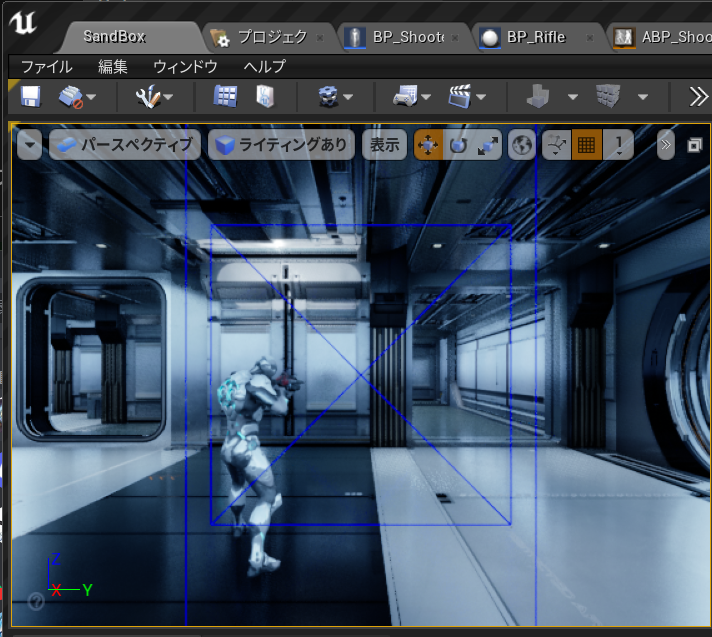
DrawDebugCamera()を使うための

/** Draw a debug camera shape.  FOV is full angle in degrees. */ENGINE_API void
/ **デバッグカメラの形状を描画します。 FOVは度単位の全角です。 * /エンジンのAPI
DrawDebugCamera(const UWorld* InWorld, FVector const& Location, FRotator const& Rotation, float FOVDeg, float Scale=1.f, FColor const& Color=FColor::White, bool bPersistentLines=false, float LifeTime=-1.f, uint8 DepthPriority = 0);

UE_4.25\Engine\Source\Runtime\Engine\Classes\GameFramework\Controller.hのGetPlayerViewPoint()

    /**     
* Returns Player’s Point of View     
* For the AI this means the Pawn’s ‘Eyes’ ViewPoint     
* For a Human player, this means the Camera’s ViewPoint     
*     
* @output  out_Location, view location of player     
* @output  out_rotation, view rotation of player     
*/   

/ *
プレイヤーの視点を返します
AIの場合、これはポーンの「目」ビューポイントを意味します
人間のプレイヤーの場合、これはカメラのビューポイントを意味します

@output out_Location、プレーヤーの場所を表示
@output out_rotation、プレーヤーの回転を表示
*/
virtual void GetPlayerViewPoint( FVector& Location, FRotator& Rotation ) const;

Gun.cpp

#include "DrawDebugHelpers.h"
void AGun::PullTrigger()
{
	UE_LOG(LogTemp,Warning,TEXT("You have been shot!! "));
	//MuzzleFlashSocket
	UGameplayStatics::SpawnEmitterAttached(MuzzleFlash, Mesh, TEXT("MuzzleFlashSocket"));
    
	APawn* OwnerPawn = Cast<APawn>(GetOwner());
	if(OwnerPawn==nullptr)
	{
		return;
	}
	AController* OwnerController= OwnerPawn ->GetController();
	if(OwnerController==nullptr)
	{
		return;
	}
	FVector Location;
	FRotator Rotation;
	OwnerController->GetPlayerViewPoint(  Location, Rotation );
	
	//DrawDebugCamera(UWorld, Location, Rotation, float FOVDeg, float Scale=1.f, FColor const& Color=FColor::White, bool bPersistentLines=false, float LifeTime=-1.f, uint8 DepthPriority = 0);
	float FOVDeg=90;
	float Scale=2.f;
	FColor const& Color=FColor::Blue;
	bool bPersistentLines=true;
	float LifeTime=-1.f;
	uint8 DepthPriority = 0;
	DrawDebugCamera(GetWorld(), Location, Rotation, FOVDeg, Scale, Color, bPersistentLines, LifeTime, DepthPriority);

	
}