
[maya] MEL To Python2 From pymel For Maya 2016

MEL To Python2

これがシンプルな状態
import pymel.tools.mel2py as mel2py

pyCmd = mel2py.mel2pyStr(melCmd,pymelNamespace=’pm‘)

pyCmd = mel2py.mel2pyStr(melCmd,pymelNamespace=’cmds‘)でいいのかも

# -*- coding: cp932 -*-
import pymel.core as pm
import pymel.tools.mel2py as mel2py
import re
import math
import random
melCmd = """
$value1 = `floatFieldGrp -q -label "Frame range" -v1`;
	"""
pyCmd =  mel2py.mel2pyStr(melCmd,pymelNamespace='pm')

melで改行をしてる「+”¥n”」と「¥n」を けしてから

あと、出力結果がPyMelにならないようにしてみたり。

# -*- coding: cp932 -*-
import pymel.core as pm
import pymel.tools.mel2py as mel2py
import re
import math
import random
melCmd = """
global proc Generic_modelFileOpen()
{
  string $workspaceRoot = `workspace -q -rootDirectory`;
    string $motionFileDir= $workspaceRoot+"scenes/Generic_model_wep.mb";
    file -f -options "v=0;"  -ignoreVersion  -typ "mayaBinary" -o $motionFileDir;
        if(`file -q -writable`==1){
            select `ls -type joint`;
    
    string $joints[] =`ls -type joint`;
   int $jointsLength=size($joints);
    if($jointsLength==0)
    {
      print ("-------------------------joint nothing-----------------------------");
    }else{
        for	($joint in $joints)
        {
            //setKeyframe 0 ,1
            currentTime 0 ;
            setKeyframe -breakdown 0 -hierarchy none -controlPoints 0 -shape 0 -time 0 $joint;
           currentTime 1 ;
            setKeyframe -breakdown 0 -hierarchy none -controlPoints 0 -shape 0 -time 0 $joint;
        }
    }
    print("-------------------------joint-----------------------------");
    print($joint);
    print ("\n-------------------------joint-----------------------------");
    if($joint=="")
    {
    print ("-------------------------joint nothing-----------------------------");
    }
    ////////////////////////////////////////////////////////joint select
            print("TstanceFBXExport()");
           TstanceFBXExport();
    }
}
$value1 = `floatFieldGrp -q -label "Frame range" -v1`;
	"""
		
print "----------------mel code replace----------------------------"
#melCmd = melCmd.replace('$writable_bool','`file -q -writable`')
melCmd = melCmd.replace('"\n--', '"--')
melCmd = melCmd.replace('+"\n"', '')
melCmd = melCmd.replace('\n"', '"')
print("melCmd="+melCmd)
print "------------------------------------------------"
# mel2py.mel2pyStr  
pyCmd =  mel2py.mel2pyStr(melCmd,pymelNamespace='pm')
pyFixed_Dest = ""
#pyFixed_Dest = pyFixed_Dest + "# -*- coding: cp932 -*- \n"
pyFixed_Dest = pyFixed_Dest + "# -*- coding: utf-8 -*- \n"
#pyFixed_Dest = pyFixed_Dest + "# -*- coding: shift-jis -*- \n"
pyFixed_Dest = pyFixed_Dest + "from maya import cmds \n"
pyFixed_Dest = pyFixed_Dest + "from python import Debug \n"
pyFixed = pyCmd.replace("pymel.all","pymel.core")
pyFixed = pyFixed.replace("pm.pm.cmds","cmds")
pyFixed_Dest = pyFixed_Dest + pyFixed+"\n"
print "----------------------python sorce replace----------------------"

pyFixed_Dest = pyFixed_Dest.replace('import pymel.core as pm', 'import pymel.core as pm \nDebug=Debug.Debug')
pyFixed_Dest = pyFixed_Dest.replace('pm.file', 'cmds.file')
pyFixed_Dest = pyFixed_Dest.replace('pm.ls', 'cmds.ls')
pyFixed_Dest = pyFixed_Dest.replace('pm.select', 'cmds.select')
pyFixed_Dest = pyFixed_Dest.replace('pm.internalVar', 'cmds.internalVar')
pyFixed_Dest = pyFixed_Dest.replace('pm.keyframe', 'cmds.keyframe')
pyFixed_Dest = pyFixed_Dest.replace('pm.workspace', 'cmds.workspace')
pyFixed_Dest = pyFixed_Dest.replace('pm.getFileList', 'cmds.getFileList')
pyFixed_Dest = pyFixed_Dest.replace('=="1"', '==1')
pyFixed_Dest = pyFixed_Dest.replace('== "1"', '== 1')
pyFixed_Dest = pyFixed_Dest.replace('print("', 'print(u"')
pyFixed_Dest = pyFixed_Dest.replace('print "', 'print u"')
pyFixed_Dest = pyFixed_Dest.replace('pm.flushUndo()', 'cmds.flushUndo()')
pyFixed_Dest = pyFixed_Dest.replace('pm.parent', 'cmds.parent')
pyFixed_Dest = pyFixed_Dest.replace('pm.objExists', 'cmds.objExists')
pyFixed_Dest = pyFixed_Dest.replace('pm.rename', 'cmds.rename')
pyFixed_Dest = pyFixed_Dest.replace('pm.playbackOptions', 'cmds.playbackOptions')
pyFixed_Dest = pyFixed_Dest.replace('pm.mel.DebugLog', 'self.DebugLog')
pyFixed_Dest = pyFixed_Dest.replace('pm.currentTime', 'cmds.currentTime')
pyFixed_Dest = pyFixed_Dest.replace('pm.setKeyframe', 'cmds.setKeyframe')
#pyFixed_Dest = pyFixed_Dest.replace('maya.mel.eval("listRelatives -pa -ad `ls -sl -l`"', 'cmds.listRelatives(path=True, allDescendents =True,cmds.ls(selection=True, long=True))'))
#for Class
pyFixed_Dest = pyFixed_Dest.replace('():', '(self):')
regex = r'print+'
#pattern = re.compile(regex)
#matchObj = pattern.match(pyFixed_Dest)
#matchObj = re.search(r'[a-z]+', pyFixed_Dest)

def repl(m):
    inner_word1 = list(m.group(1))  #prin(\w\W)    "prin" "t" " "    real ['t', ' ']
    #print("inner_word1= "+str(inner_word1))   
    inner_word2 = list(m.group(2))    #(.*)     something strings "----1-----" real ['u', '"', '-', '-', '-', '-', '1', '-', '-', '-', '-']
    #print("inner_word2= "+str(inner_word2))
    inner_word3 = list(m.group(3))
    #inner_word4 = list(m.group(4))    #(\")  double cout   real  ['"']
    print("inner_word123= "+str(inner_word1)+str(inner_word2)+str(inner_word3)+""+str(list(m.group(4)))+str(list(m.group(5)))+"")
    #print("inner_word2= "+str(inner_word1)+str(inner_word2)+str(inner_word3))
    #random.shuffle(inner_word)
    #back= m.group(1) + "".join(inner_word) + m.group(3)
    back="00000"+ str(m.end())
    back=m.group(1) +m.group(2)+"("+m.group(3)+m.group(4)+m.group(5)+")" #for print
    back=m.group(1) +"Debug.Log"+"("+m.group(3)+m.group(4)+m.group(5)+")"  #for Debug.Log  Debug Class is https://gist.github.com/whaison/fc625381dce126ca5d88d1f914ce89f0
    
    return back
#text = "Professor Abdolmalek, please report your absences promptly."
text = """
print "----1----"
print "----2----"
print "----3----"
print "----4----"
print "----5----"
print "----6----"
print "----7----"
	"""
#resub=re.sub(r"(\w)(\w+)(\w)", repl, text)
#resub=re.sub(r'(prin\w)', repl, text)
resub=re.sub(r'(.*)(prin\w\W)(.*)(\")(.*)', repl, text)

print("resub    --------------------output  start")
print resub 
#print resub[:m.start()]
#print resub[m.end():]
print("resub    --------------------output  end")
pyFixed_Dest=re.sub(r'(.*)(prin\w\W)(.*)(\")(.*)', repl, pyFixed_Dest)
print("resub  pyFixed_Dest  --------------------output  start")
print pyFixed_Dest 
#print resub[:m.start()]
#print resub[m.end():]
print("resub pyFixed_Dest   --------------------output  end")
print("search    --------------------output  start")
email = "tony@tiremove_thisger.net"
m = re.search(r'print*', text)
print text[:m.start()] +"print("+ text[m.end():]
print("search    --------------------output  end")
print "------------------------------------------------"
print pyFixed_Dest

出力結果

------------------------------------------------
# -*- coding: utf-8 -*- 
from maya import cmds 
from python import Debug 
import pymel.core as pm 
Debug=Debug.Debug

def Generic_modelFileOpen(self):
	
	workspaceRoot=str(cmds.workspace(q=1, rootDirectory=1))
	motionFileDir=workspaceRoot + "scenes/Generic_model_wep.mb"
	cmds.file(motionFileDir, ignoreVersion=1, typ="mayaBinary", options="v=0;", o=1, f=1)
	if cmds.file(q=1, writable=1) == 1:
		cmds.select(cmds.ls(type='joint'))
		joints=cmds.ls(type='joint')
		jointsLength=len(joints)
		if jointsLength == 0:
			Debug.Log(u"-------------------------joint nothing-----------------------------")
			
		
		else:
			for joint in joints:
				cmds.currentTime(0)
				#setKeyframe 0 ,1
				cmds.setKeyframe(joint, breakdown=0, hierarchy='none', shape=0, time=0, controlPoints=0)
				cmds.currentTime(1)
				cmds.setKeyframe(joint, breakdown=0, hierarchy='none', shape=0, time=0, controlPoints=0)
				
			
		Debug.Log(u"-------------------------joint-----------------------------")
		print joint
		Debug.Log(u"-------------------------joint-----------------------------")
		if joint == "":
			Debug.Log(u"-------------------------joint nothing-----------------------------")
			
		Debug.Log(u"TstanceFBXExport()")
		#//////////////////////////////////////////////////////joint select
		pm.mel.TstanceFBXExport()


value1=pm.floatFieldGrp("Frame range", q=1, v1=1, label=1)
maya ls python のまとめ

このごろサイトが丸ごとなくなったので置いておく

Top Node をとってくる

topNodeList=cmds.ls(assemblies=True)

dagObjects 階層をとってくる

topNodeList=cmds.ls( "root", dagObjects=True, type="transform" )

Python でUTF-8, shift_jis, euc_jp,など日本語を使う方法

ここ最近、サイトが無くなって困ったことがあったので記事にしておく

#!/usr/bin/env python
# -*- coding: utf-8 -*-

import codecs

fout = codecs.open('sjis.txt', 'w', 'shift_jis')
fout.write("abcdefg")
fout.close()

#または
fin  = codecs.open('utf_8.txt', 'r', 'utf_8')
file_txt = fin.read()
file_Arr = setting_file_txt.split("\n")

参考

https://osksn2.hep.sci.osaka-u.ac.jp/~taku/osx/python/encoding.html

[Maya] .offsetParentMatrixをmel/Pythonスクリプトで取り扱う場合の研究

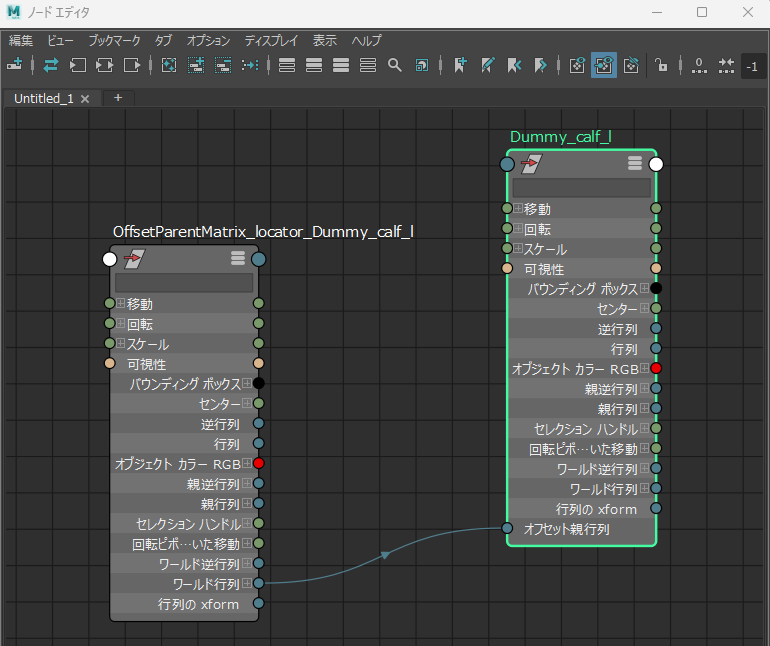
解決策から、、画像のような状態でよかった。関数はこんな感じ

global proc _Input_Lines(){
    print("_Input_Lines \n");
    
    _offsetParentMatrix_Value_Input("Dummy_calf_l",-15.216,0);
    _offsetParentMatrix_Value_Input("Dummy_calf_r",15.216,0);
    _offsetParentMatrix_Value_Input("Dummy_foot_l",-7.821,-0.047);
    _offsetParentMatrix_Value_Input("Dummy_foot_r",7.821,0.047);
}

global proc _offsetParentMatrix_Value_Input(string $NodeName,float $X,float $Y){
    print("_offsetParentMatrix_Value_Input \n");
    string $LocatorName="OffsetParentMatrix_locator_"+$NodeName;
    print("$LocatorName= "+$LocatorName+" \n");
    spaceLocator -position 0.0 0.0 0.0 -name $LocatorName;
    $LocatorNameTransX = $LocatorName+".translateX";
    print("$LocatorNameTransX= "+$LocatorNameTransX+" \n");
    setAttr $LocatorNameTransX $X;
    $LocatorNameTransY = $LocatorName+".translateY";
    print("$LocatorNameTransY= "+$LocatorNameTransY+" \n");
    setAttr $LocatorNameTransY $Y;
    $LocatorName_worldMatrix0 = $LocatorName+".worldMatrix[0]";
    print("$LocatorName_worldMatrix0= "+$LocatorName_worldMatrix0+" \n");
    $NodeName_offsetParentMatrix = $NodeName+".offsetParentMatrix";
    print("$NodeName_offsetParentMatrix= "+$NodeName_offsetParentMatrix+" \n");
    connectAttr -f $LocatorName_worldMatrix0 $NodeName_offsetParentMatrix;
}

で大丈夫そう

————————————————–下は参考サイトの例————————————————-

この関数を

import os
import stat
import maya.cmds as cmds
#import maya.OpenMaya as OpenMaya
import maya.api.OpenMaya as OpenMaya
def func_offsetParentMatrix(node,driver):
    mult = cmds.createNode("multMatrix")

    offset = matrix_to_list(
        OpenMaya.MMatrix(cmds.getAttr("{}.worldMatrix[0]".format(node)))
        * OpenMaya.MMatrix(cmds.getAttr("{}.matrix".format(node))).inverse()
        * OpenMaya.MMatrix(cmds.getAttr("{}.worldInverseMatrix[0]".format(driver)))
    )
    cmds.setAttr("{}.matrixIn[0]".format(mult), offset, type="matrix")

    cmds.connectAttr("{}.worldMatrix[0]".format(driver), "{}.matrixIn[1]".format(mult))

    parent = cmds.listRelatives(node, parent=True, path=True)
    if parent:
        cmds.connectAttr("{}.worldInverseMatrix[0]".format(parent[0]), "{}.matrixIn[2]".format(mult))

    cmds.connectAttr(
        "{}.matrixSum".format(mult), "{}.offsetParentMatrix".format(node)
    )
    
def matrix_to_list(mtx):
    lst=[]
    for row in range(0,4):
        for col in range(0,4):
            lst.append(mtx.getElement(row,col))
    return lst
    
def list_to_matrix(lst):
    mtx=OpenMaya.MMatrix(lst)
    # OpenMaya.MScriptUtil.createMatrixFromList(lst, mtx)
    return mtx

こう使った。

global proc Func_TEST_offsetParentMatrix_Proc(){    
    print("Func_TEST_offsetParentMatrix_Proc");
    spaceLocator -position -15.216 0.0 0.0 -name "calf_l_OffsetMatrix_locator_l" -absolute;
    func_offsetParentMatrix_Python_Proc("Dummy_calf_telescopic_l","calf_l_OffsetMatrix_locator_l");
}
    
global proc func_offsetParentMatrix_Python_Proc(string $node,string $driver){
    print("func_offsetParentMatrix");
    python("import func_offsetParentMatrix");
	python("import importlib");
	python("importlib.reload(func_offsetParentMatrix)");
    python("func_offsetParentMatrix.func_offsetParentMatrix('"+$node+"','"+$driver+"')");
}

参考

offsetParentMatrixの記事
https://www.chadvernon.com/blog/space-switching-offset-parent-matrix/

matrix_to_list
https://gist.github.com/rjmoggach/4ea80af3104a3517d3a2a46293acf043

MayaにChatGPT(openai)を追加インストールしてみる

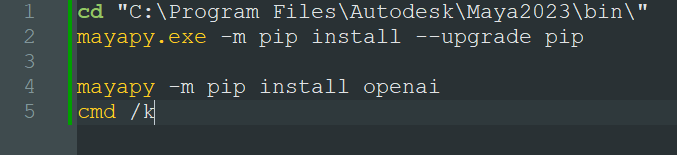
Mayaのpip書き換えちゃうので自己責任でというかMayaの再インスト―ルもする余裕があるときにやること

とりあえずpipでインストールする前にpipのバージョンがふるいのでUpgradeしてる。

cd "C:\Program Files\Autodesk\Maya2023\bin\"
mayapy.exe -m pip install --upgrade pip

mayapy -m pip install openai
cmd /k

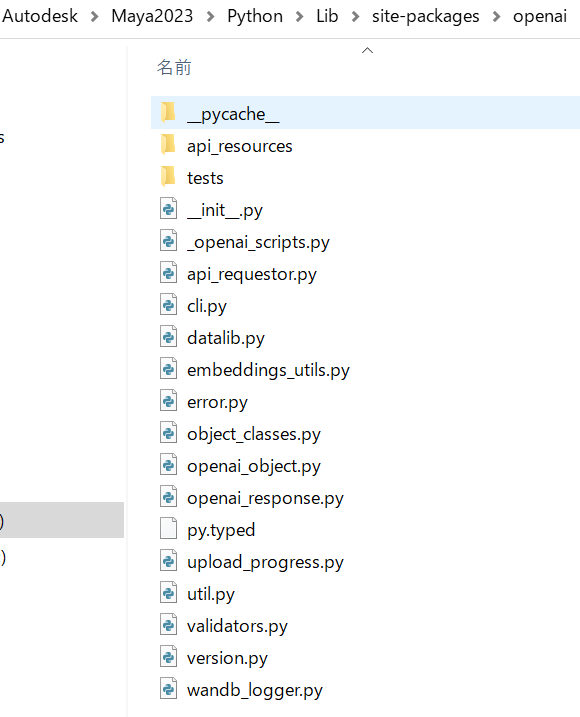
入った。

てかこの2フォルダをsitepackageにいれとくだけでも動くには動くはず
https://drive.google.com/file/d/12KGnpQAnkWn3wifXPsMehqZ5YFfeFhWe/view?usp=share_link

メインのPython

import os
import openai


print(os.getcwd())
#print(__file__)
MELpath=os.getcwd()
pythonPath= os.path.abspath(MELpath+"/../python/open_ai/")
pythonPath= pythonPath.replace('\\', '/')
print("pythonPath= "+pythonPath)

f = open(pythonPath+'/open_ai_api_key.txt', 'r', encoding='UTF-8')
open_ai_api_key = f.read()
f.close()

#openai.api_key = os.getenv("OPENAI_API_KEY")
openai.api_key = open_ai_api_key

# APIコールを行う関数
def completion(new_message_text:str, settings_text:str = '', past_messages:list = []):
    if len(past_messages) == 0 and len(settings_text) != 0:
        system = {"role": "system", "content": settings_text}
        past_messages.append(system)

    new_message = {"role": "user", "content": new_message_text}
    past_messages.append(new_message)

    result = openai.ChatCompletion.create(
        model="gpt-3.5-turbo",
        messages=past_messages
    )
    message_text = result.choices[0].message.content
    response_message = {"role": "assistant", "content": message_text}
    past_messages.append(response_message)
    
    return message_text, past_messages


import re
# 返答をPythonコードとその他の部分に分解
# reモジュールを使って```python~```で囲まれた部分とそれ以外の部分を切り出します。
def decompose_response(txt):
    pattern = r"```python([\s\S]*?)```"
    
    code_list = re.findall(pattern, txt)
    for i in range(int(len(code_list))):
        code_list[i] = re.sub('\A[\r?\n]', '', code_list[i])
        code_list[i] = re.sub('[\r?\n]\Z', '', code_list[i])
    
    comment = re.sub(pattern, '', txt)
    comment = re.sub('[\r?\n]+', '\n', comment)
    comment = re.sub('[\r?\n]\Z', '', comment)
    
    return comment, code_list


from maya import cmds

class ChatGPT_Maya(object):

    def __init__(self):
        self.system_settings = "質問に対して、MayaのPythonスクリプトを書いてください。スクリプト以外の文章は短めにまとめてください。"
        self.message_log = []
        self.at_first = True
        self.create_window()

    def reset_session(self, *args):
        self.message_log = []
        self.at_first = True
        cmds.scrollField(self.input_field, e=True, tx='')
        cmds.scrollField(self.ai_comment, e=True, tx='')
        cmds.cmdScrollFieldExecuter(self.script_field, e=True, t='')

    def call(self, *args):
        user_input = cmds.scrollField(self.input_field, q=True, tx=True)
        
        # APIコール
        if self.at_first:
            message_text, self.message_log = completion(user_input, self.system_settings, [])
            self.at_first = False
        else:
            message_text, self.message_log = completion(user_input, '', self.message_log)
            
        # 返答を分解
        comment, code_list = decompose_response(message_text)
        
        # Pythonコード以外の部分をai_commentに表示
        cmds.scrollField(self.ai_comment, e=True, tx=comment)

        # Pythonコードの1つ目をscript_fieldに表示。2つ目以降は無視(汗
        if code_list:
            cmds.cmdScrollFieldExecuter(self.script_field, e=True, t=code_list[0])
            # 実行
            if cmds.checkBox(self.script_exec, q=True, v=True):
                cmds.cmdScrollFieldExecuter(self.script_field, e=True, executeAll=True)
        else:
            cmds.cmdScrollFieldExecuter(self.script_field, e=True, t='')
    
    # UI作成
    def create_window(self, *args):
        cmds.window(title=u'ChatGPTがPythonスクリプトを書くよ!', width=600, sizeable=True)
        
        cmds.columnLayout(adj=True, cat=['both',5], rs=5)
        self.reset_button = cmds.button(label='Reset', c=self.reset_session) #セッションのリセット
        self.input_field = cmds.scrollField(h=50, ed=True, ww=True, tx='', ec=self.call) #テンキーのEnterで送信
        self.script_exec = cmds.checkBox(label=u'実行もする', align='left', v=True) #Checkが入っていたら返答と同時にスクリプトを実行
        cmds.separator(h=10, st='in')
        self.ai_comment = cmds.scrollField(h=100, ed=False, ww=True, tx='') #コードブロック以外の部分を表示する場所
        cmds.text(l='Script:', align='left')
        self.script_field = cmds.cmdScrollFieldExecuter(st='python', h=200) #Pythonコードを表示・実行する場所
        cmds.setParent('..')

        cmds.showWindow()


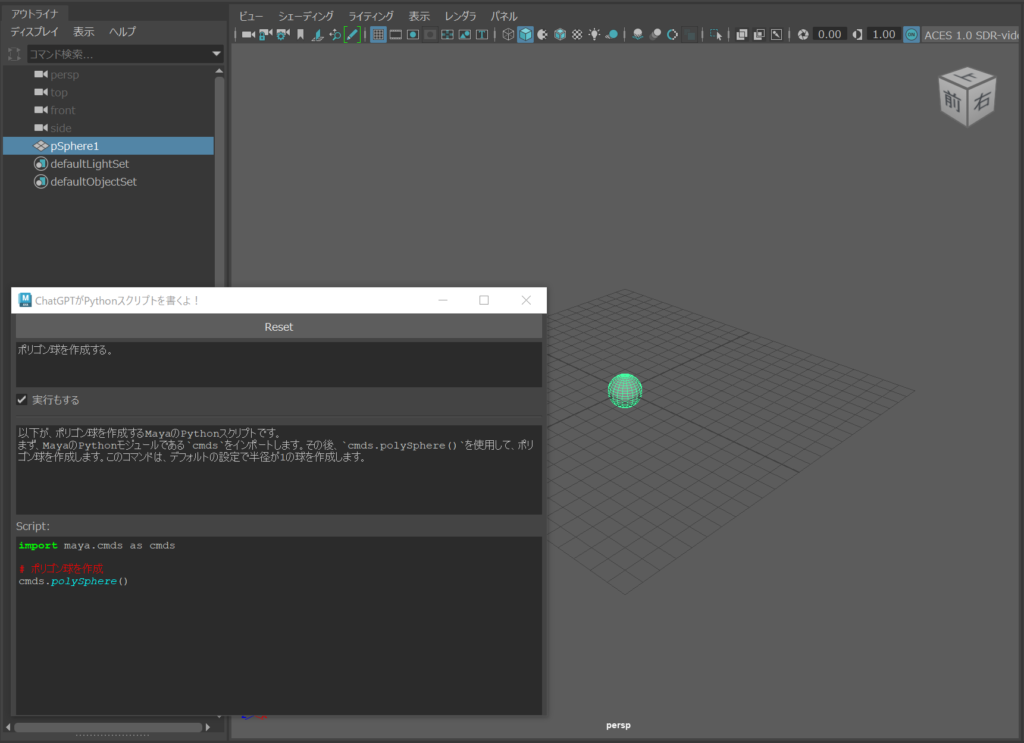
ChatGPT_Maya_ins=ChatGPT_Maya()

エラーが返ってくる

openai : error_code=None error_message=’You exceeded your current quota, please check your plan and billing details.’ error_param=None error_type=insufficient_quota message=’OpenAI API error received’ stream_error=False

エラー: RateLimitError: file C:\Program Files\Autodesk\Maya2023\Python\lib\site-packages\openai\api_requestor.py line 679: You exceeded your current quota, please check your plan and billing details.

このエラーは

https://platform.openai.com/account/billing/overview

で Payment methods と Billing preferencesPrimary business addressを設定したら動くようになった。

お世話になった記事

https://qiita.com/akasaki1211/items/34d0f89e0ae2c6efaf48

https://okumuralab.org/~okumura/python/openai_api.html

https://knowledge.autodesk.com/ja/support/maya/learn-explore/caas/CloudHelp/cloudhelp/2023/JPN/Maya-Scripting/files/GUID-72A245EC-CDB4-46AB-BEE0-4BBBF9791627-htm.html

https://qiita.com/sakasegawa/items/db2cff79bd14faf2c8e0

https://tomo-web.jp/chat-gpt-you-exceeded-your-current-quota/#index_id0

pythonの標準モジュールで windowsにクリップボードにコピーするには?

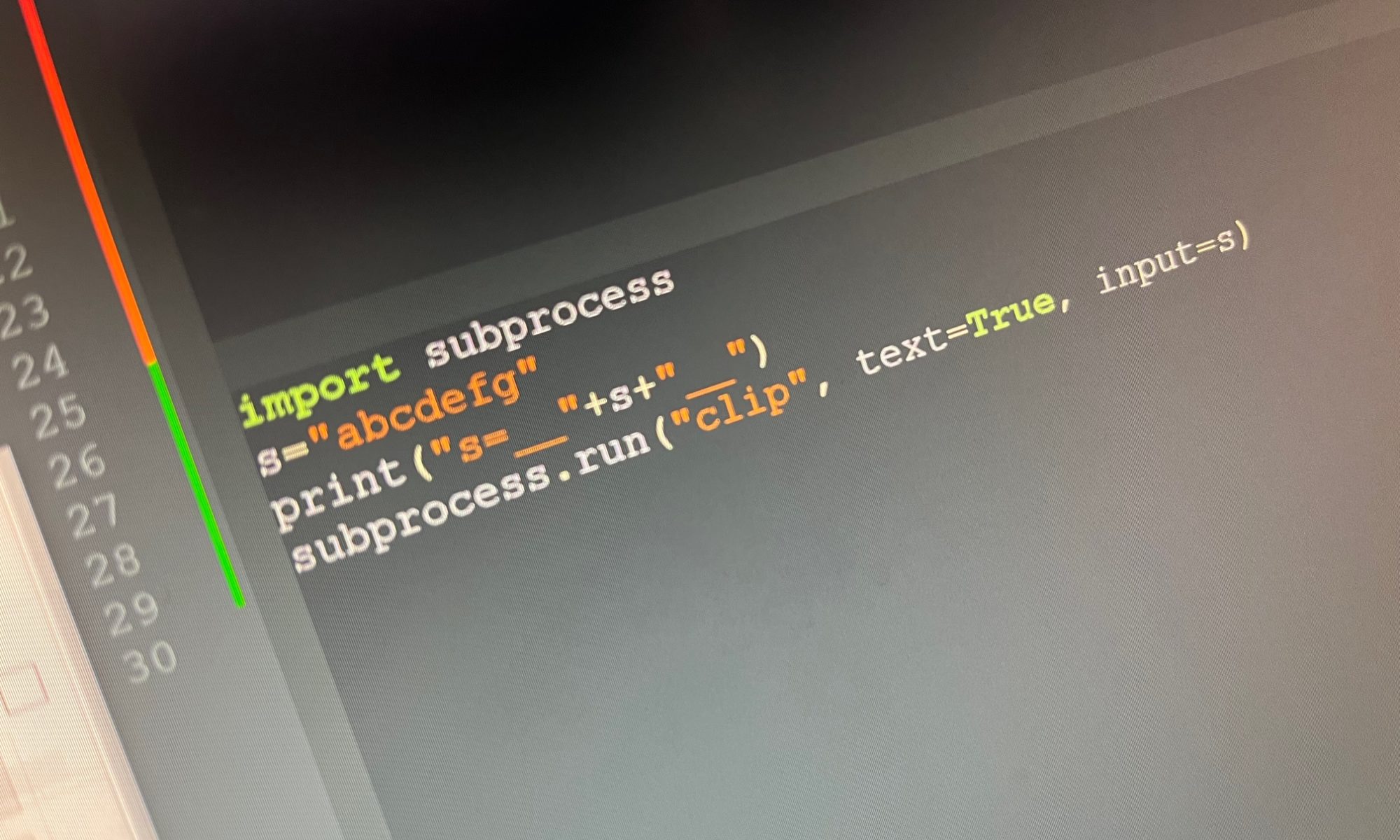
pyperclipを使わないで、pythonの標準モジュールで windowsにクリップボードにコピーするには?

import subprocess 
s="abcdefg"
print("s=__"+s+"__")
subprocess.run("clip", text=True, input=s)

参考

Python script to copy text to clipboard [duplicate]

https://stackoverflow.com/questions/11063458/python-script-to-copy-text-to-clipboard

[clip / pbcopy・pbpaste]クリップボードにコピー

https://xtech.nikkei.com/it/atcl/column/15/042000103/080400036/

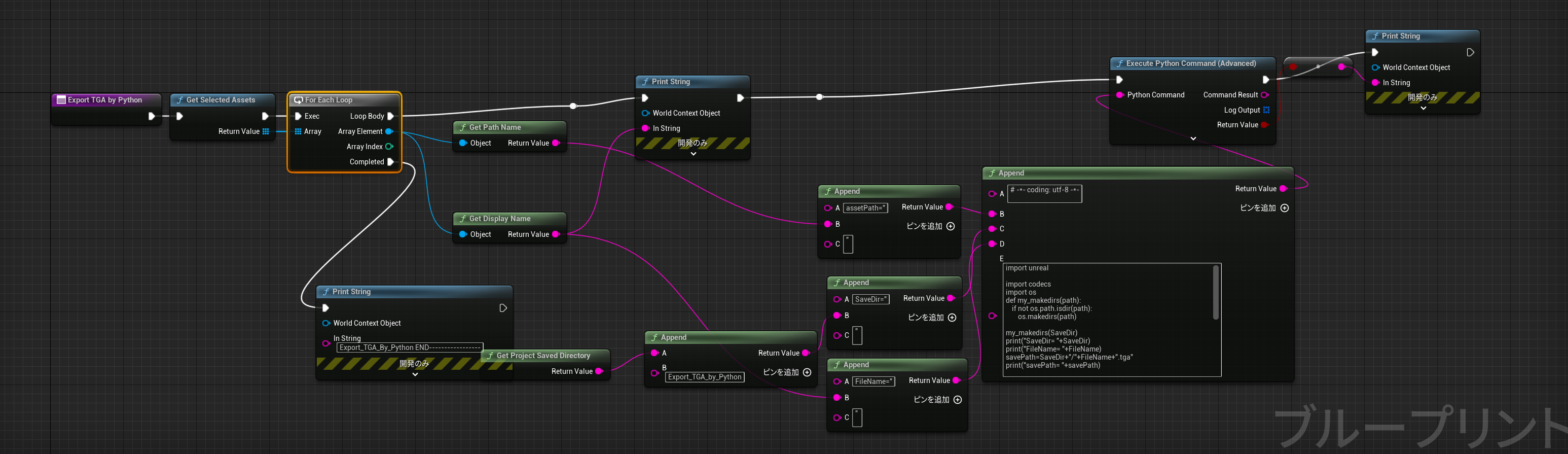
[UnrealEngine] Export TGA by Python

import unreal

import codecs
import os
def my_makedirs(path):
    if not os.path.isdir(path):
        os.makedirs(path)

my_makedirs(SaveDir)
print("SaveDir= "+SaveDir)
print("FileName= "+FileName)
savePath=SaveDir+"/"+FileName+".tga"
print("savePath= "+savePath)


editorAssetLib = unreal.EditorAssetLibrary()
texture2d=editorAssetLib.load_asset(assetPath) 
#canvasRenderTarget2D=editorAssetLib.load_asset(assetPath) 
#texture2d=unreal.Texture2D(canvasRenderTarget2D)
print("texture2d= "+str(texture2d))

task = unreal.AssetExportTask()
task.set_editor_property('automated', True)
task.set_editor_property('filename', savePath)
task.set_editor_property('object', texture2d)
task.set_editor_property('prompt', False)
task.set_editor_property('exporter', unreal.TextureExporterTGA())

check = unreal.Exporter.run_asset_export_task(task)


if check==True:
    pass
else:
    print(u"tga イメージの生成に失敗しました")

[maya]「スムーズ スキン サーフェスから未使用のインフルエンスを除去する」だけで、すごくいろんな動作が軽くなる。

Maya の処理スピードを向上させスキン ウェイト ペイント ツール(Paint Skin Weights Tool)を使いやすくするために、全てのスキン ウェイトが 0 であるスムーズ スキンから、ジョイントとインフルエンス オブジェクトを接続解除することができます。これにより未使用のインフルエンスがスキンのインフルエンス(Influence)リストに表示されなくなり、スキン ウェイト ペイント ツール(Paint Skin Weights Tool)が使いやすくなります。

たとえば、既定のオプションを使って、人間のスケルトンにストッキングをはいた左足をスムーズ スキニングするとします。スケルトン内のすべてのジョイントがポテンシャル インフルエンスとしてストッキングに接続されますが、ウェイトが 0 以外の値になるのは左足のストッキングに最も近いジョイントだけです。

肘を選択して回転させると、Maya はストッキングのスキンを計算して 0 以外の値をもつウェイトがないかどうかを調べます。ストッキングを未使用のインフルエンスから接続解除すると、肘とウェイトが 0 のその他のジョイントの回転を処理する必要がなくなり、パフォーマンスが向上します。

未使用のインフルエンスを除去するには

  1. スキンを選択します。
  2. スキン > 影響を編集 > 使われていないインフルエンスの除去(Skin > Edit Influences > Remove Unused Influences)を選択します。

[maya] pymel.tools.mel2py の python3版 変換できない問題がある20220926現在

簡単な解決策はmaya2022 以前の2020,2019バージョンを起動して そこでmel2pyを使うことだ。

A simple solution is to launch a maya2020 or maya2019 version prior to maya2022 and use mel2py there.

githubで解決していると思いダウンロードして試したが無理だった

https://github.com/LumaPictures/pymel/blob/master/pymel/tools/mel2py/melparse.py

import pymel_master.tools.mel2py as mel2py
mel_command = 'setDrivenKeyframe "-currentDriver pCube1.translateY pCube2.translateX";setDrivenKeyframe "-currentDriver pCube1.translateY pCube2.translateY";setDrivenKeyframe "-currentDriver pCube1.translateY pCube2.translateZ";'
pythonCode = mel2py.mel2pyStr(mel_command, pymelNamespace='pm')
print(pythonCode)


import pymel_master.tools.mel2py as mel2py
mel_command = '$currentNodes = `ls -sl -l`;'
pythonCode = mel2py.mel2pyStr(mel_command, pymelNamespace='pm')
print(pythonCode)

python3 Error: AttributeError: file C:\Program Files\Autodesk\Maya2023\Python\lib\site-packages\pymel\tools\mel2py\melparse.py line 438: ‘str’ object has no attribute ‘lineno

StackOverFlowのように

https://stackoverflow.com/questions/73656852/maya-2023-pymel-i-cant-access-mel2py-with-python3/73839888#73839888

上記エラーがでて無理だった。

1行ならどうにかなるが、関数などの複数行だとこのlinenoが取得できないようでバグるものしか作れなかった

        # cycle through our kwargs and format them
        for flag, value in kwargs.items():
            print("melparse.py  - format_command() - "+" flag= "+str(flag)+" ,value= "+str(value))
            if value is None:
                value = '1'

            # multi-use flag
            #    mel:     ls -type "transform" -type "camera"
            #    python:    ls( type=["transform", "camera"] )
            if isinstance(value, list):
                #sep = ', '
                # if len(value) > t.lexer.format_options['kwargs_newline_threshhold']:
                #    sep = ',\n\t'
                #pargs.append( '%s=[%s]' % ( flag, sep.join(value) )  )
                value = assemble(t, 'multiuse_flag', ', ', value, matchFormatting=True)
                #pargs.append(Token('%s=[%s]' % (flag, value), None, flag.lineno))
                pargs.append(Token('%s=[%s]' % (flag, value), None, 0))#mycode
            else:
                print("melparse.py  - format_command() -  flag= "+str(flag))
                #pargs.append(Token('%s=%s' % (flag, value), None, flag.lineno))
                pargs.append(Token('%s=%s' % (flag, value), None, 0))#mycode

本体の更新に期待する。

[maya] python prefixHierarchy remove suffix

Python

    def delete_suffixHierarchy_remove_suffix(self,suffix):
        print("-----------prefixHierarchy_remove_suffix-----------start")
        #suffix="fat:"
        # Get the prefix the user entered
        #
        # Get a list of all descendents (The nodes are ordered from
        # leaf to root
        #    
        currentNodes=pm.mel.eval("listRelatives -pa -ad `ls -sl -l`")
        print("currentNodes 1= "+str(currentNodes))
        # add the prefix to each descendent node
        #
        if len(currentNodes)>0:
            for i in range(0,len(currentNodes)):
                #pm.mel.prefixNode(prefix, currentNodes[i])
                newName=currentNodes[i].replace(suffix,"")
                print("newName= "+newName)
                cmds.rename(currentNodes[i], newName)

            
        currentNodes=cmds.ls(l=1, sl=1)
        print("currentNodes 2= "+str(currentNodes))
        # get a list of nodes on the list
        # add the prefix to each node on the active list
        #
        if len(currentNodes)>0:
            for i in range(0,len(currentNodes)):
                #pm.mel.prefixNode(prefix, currentNodes[i])
                newName=currentNodes[i].replace(suffix,"")
                print("newName= "+newName)
                cmds.rename(currentNodes[i], newName)
        print("-----------prefixHierarchy_remove_suffix-----------end")

mel

global proc prefixHierarchy( )
{
	string $ok		= (uiRes("m_prefixHierarchy.kOK"));
	string $cancel	= (uiRes("m_prefixHierarchy.kCancel"));
	string $result = `promptDialog
		-title (uiRes("m_prefixHierarchy.kPrefixHierarchy")) 
		-message (uiRes("m_prefixHierarchy.kEnterPrefix")) 
		-text "prefix_"
		-button $ok  
		-button $cancel 
		-defaultButton $ok  
		-cancelButton $cancel 
		-dismissString $cancel `;

	// If the result was "OK", then proceed
	//
	if ( $result == $ok ) {

		// Get the prefix the user entered
		//
		string $prefix = `promptDialog -q`;

		// Get a list of all descendents (The nodes are ordered from
		// leaf to root
		//	
		string $currentNodes[] = eval("listRelatives -pa -ad `ls -sl -l`");
	
		// add the prefix to each descendent node
		//
		if ( size( $currentNodes ) > 0 ) {
			for( $i=0; $i < size( $currentNodes ); $i++ ) {
				prefixNode( $prefix, $currentNodes[$i] );
			}
		}

		// get a list of nodes on the list
		$currentNodes = `ls -sl -l`;
	
		// add the prefix to each node on the active list
		//
		if ( size( $currentNodes ) > 0 ) {
			for( $i=0; $i < size( $currentNodes ); $i++ ) {
				prefixNode( $prefix, $currentNodes[$i] );
			}
		}
	}
}