この動画を参考にして作ったが
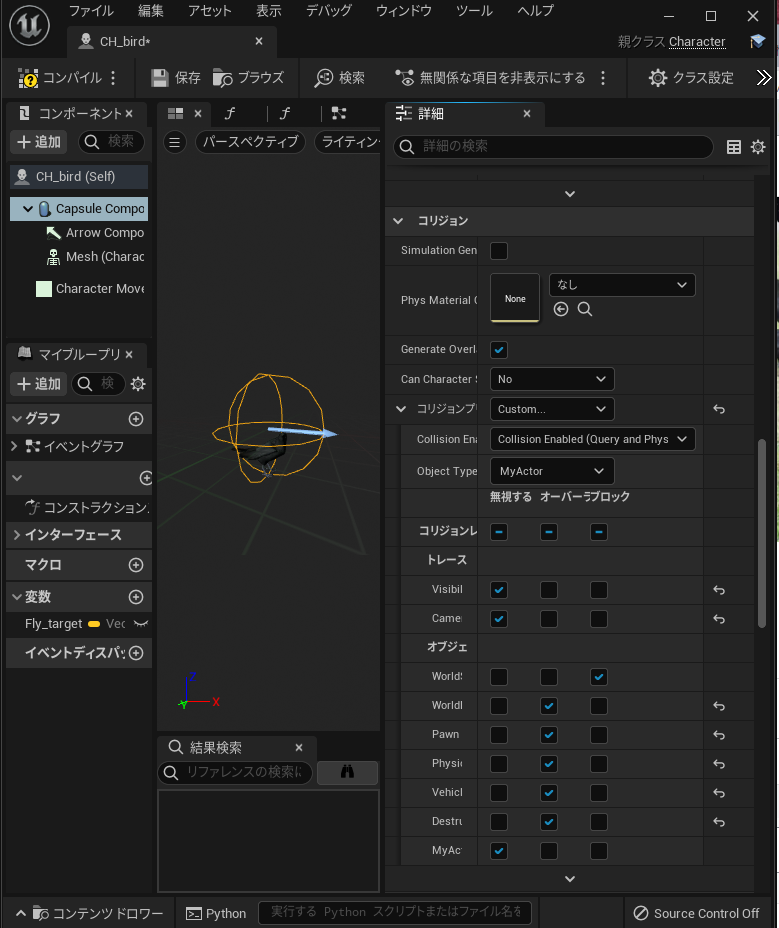
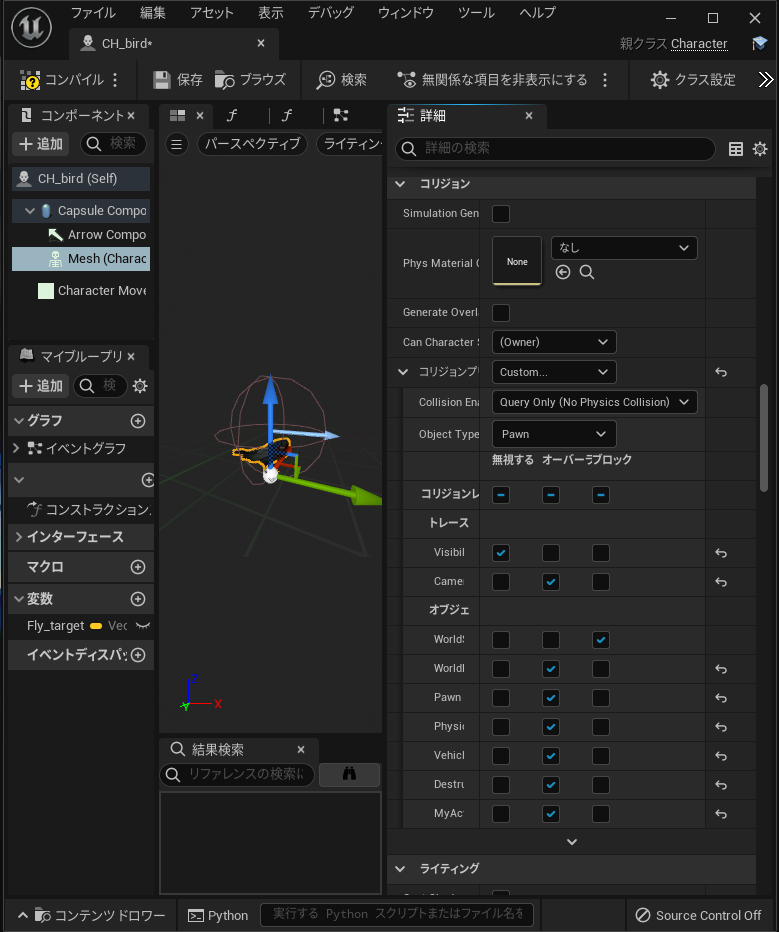
当たり判定の設定がおかしく鳥にキャラクターが乗りあがってしまうので修正したメモ
Capcel Componentのコリジョン設定がこんなかんじで重力Gravity有効
Meshのコリジョン設定もこんな感じで
Sea UnrealEngine


DESIGN AND FUTURE SCIENCE.
によると
コンソールコマンド『r.Streaming.PoolSize』を使用することにより、プールサイズ上限を引き上げることができるようです。これは一時的なものなので、永続的な設定が必要であればiniファイル内に記述しておく必要があります。
また
海外の掲示板で defaultscalability.ini 内のr.Streaming.PoolSizeを変更してみるやり方もあったので試していますが、 それ以降も続けて表示がでなくなるらしい。
Project\Saved\Temp\Win64\Engine\Config\BaseScalability.ini
307 line
r.Streaming.PoolSize=400
r.Streaming.PoolSize=800
にした
[ScalabilitySettings]
PerfIndexThresholds_ResolutionQuality="GPU 18 42 115"
PerfIndexThresholds_ViewDistanceQuality="Min 18 42 105"
PerfIndexThresholds_AntiAliasingQuality="GPU 18 42 115"
PerfIndexThresholds_ShadowQuality="Min 18 42 105"
PerfIndexThresholds_PostProcessQuality="GPU 18 42 115"
PerfIndexThresholds_TextureQuality="GPU 18 42 115"
PerfIndexThresholds_EffectsQuality="Min 18 42 105"
PerfIndexThresholds_FoliageQuality="GPU 18 42 115"
PerfIndexThresholds_ShadingQuality="GPU 18 42 115"

PerfIndexValues_ResolutionQuality="50 71 87 100 100"

[AntiAliasingQuality@0]
r.PostProcessAAQuality=0

[AntiAliasingQuality@1]
r.PostProcessAAQuality=2

[AntiAliasingQuality@2]
r.PostProcessAAQuality=3

[AntiAliasingQuality@3]
r.PostProcessAAQuality=4

[AntiAliasingQuality@Cine]
r.PostProcessAAQuality=6


[ViewDistanceQuality@0]
r.SkeletalMeshLODBias=2
r.ViewDistanceScale=0.4

[ViewDistanceQuality@1]
r.SkeletalMeshLODBias=1
r.ViewDistanceScale=0.6

[ViewDistanceQuality@2]
r.SkeletalMeshLODBias=0
r.ViewDistanceScale=0.8

[ViewDistanceQuality@3]
r.SkeletalMeshLODBias=0
r.ViewDistanceScale=1.0

[ViewDistanceQuality@Cine]
r.SkeletalMeshLODBias=0
r.ViewDistanceScale=10.0


[ShadowQuality@0]
r.LightFunctionQuality=0
r.ShadowQuality=0
r.Shadow.CSM.MaxCascades=1
r.Shadow.MaxResolution=512
r.Shadow.MaxCSMResolution=512
r.Shadow.RadiusThreshold=0.06
r.Shadow.DistanceScale=0.6
r.Shadow.CSM.TransitionScale=0
r.Shadow.PreShadowResolutionFactor=0.5
r.DistanceFieldShadowing=0
r.DistanceFieldAO=0
r.VolumetricFog=0
r.LightMaxDrawDistanceScale=0
r.CapsuleShadows=0

[ShadowQuality@1]
r.LightFunctionQuality=1
r.ShadowQuality=3
r.Shadow.CSM.MaxCascades=1
r.Shadow.MaxResolution=1024
r.Shadow.MaxCSMResolution=1024
r.Shadow.RadiusThreshold=0.05
r.Shadow.DistanceScale=0.7
r.Shadow.CSM.TransitionScale=0.25
r.Shadow.PreShadowResolutionFactor=0.5
r.DistanceFieldShadowing=0
r.DistanceFieldAO=0
r.VolumetricFog=0
r.LightMaxDrawDistanceScale=.5
r.CapsuleShadows=1

[ShadowQuality@2]
r.LightFunctionQuality=1
r.ShadowQuality=5
r.Shadow.CSM.MaxCascades=4
r.Shadow.MaxResolution=1024
r.Shadow.MaxCSMResolution=2048
r.Shadow.RadiusThreshold=0.04
r.Shadow.DistanceScale=0.85
r.Shadow.CSM.TransitionScale=0.8
r.Shadow.PreShadowResolutionFactor=0.5
r.DistanceFieldShadowing=1
r.DistanceFieldAO=1
r.AOQuality=1
r.VolumetricFog=1
r.VolumetricFog.GridPixelSize=16
r.VolumetricFog.GridSizeZ=64
r.VolumetricFog.HistoryMissSupersampleCount=4
r.LightMaxDrawDistanceScale=1
r.CapsuleShadows=1

[ShadowQuality@3]
r.LightFunctionQuality=1
r.ShadowQuality=5
r.Shadow.CSM.MaxCascades=10
r.Shadow.MaxResolution=2048
r.Shadow.MaxCSMResolution=2048
r.Shadow.RadiusThreshold=0.01
r.Shadow.DistanceScale=1.0
r.Shadow.CSM.TransitionScale=1.0
r.Shadow.PreShadowResolutionFactor=1.0
r.DistanceFieldShadowing=1
r.DistanceFieldAO=1
r.AOQuality=2
r.VolumetricFog=1
r.VolumetricFog.GridPixelSize=8
r.VolumetricFog.GridSizeZ=128
r.VolumetricFog.HistoryMissSupersampleCount=4
r.LightMaxDrawDistanceScale=1
r.CapsuleShadows=1

[ShadowQuality@Cine]
r.LightFunctionQuality=1
r.ShadowQuality=5
r.Shadow.CSM.MaxCascades=10
r.Shadow.MaxResolution=4096
r.Shadow.MaxCSMResolution=4096
r.Shadow.RadiusThreshold=0
r.Shadow.DistanceScale=1.0
r.Shadow.CSM.TransitionScale=1.0
r.Shadow.PreShadowResolutionFactor=1.0
r.DistanceFieldShadowing=1
r.DistanceFieldAO=1
r.AOQuality=2
r.VolumetricFog=1
r.VolumetricFog.GridPixelSize=4
r.VolumetricFog.GridSizeZ=128
r.VolumetricFog.HistoryMissSupersampleCount=16
r.LightMaxDrawDistanceScale=1
r.CapsuleShadows=1


[PostProcessQuality@0]
r.MotionBlurQuality=0
r.AmbientOcclusionMipLevelFactor=1.0
r.AmbientOcclusionMaxQuality=0
r.AmbientOcclusionLevels=0
r.AmbientOcclusionRadiusScale=1.2
r.DepthOfFieldQuality=0
r.RenderTargetPoolMin=300
r.LensFlareQuality=0
r.SceneColorFringeQuality=0
r.EyeAdaptationQuality=2
r.BloomQuality=4
r.FastBlurThreshold=0
r.Upscale.Quality=1
r.Tonemapper.GrainQuantization=0
r.LightShaftQuality=0
r.Filter.SizeScale=0.6
r.Tonemapper.Quality=0

[PostProcessQuality@1]
r.MotionBlurQuality=3
r.AmbientOcclusionMipLevelFactor=1.0
r.AmbientOcclusionMaxQuality=60
r.AmbientOcclusionLevels=-1
r.AmbientOcclusionRadiusScale=1.5
r.DepthOfFieldQuality=1
r.RenderTargetPoolMin=350
r.LensFlareQuality=0
r.SceneColorFringeQuality=0
r.EyeAdaptationQuality=2
r.BloomQuality=4
r.FastBlurThreshold=2
r.Upscale.Quality=2
r.Tonemapper.GrainQuantization=0
r.LightShaftQuality=0
r.Filter.SizeScale=0.7
r.Tonemapper.Quality=2

r.DOF.Gather.AccumulatorQuality=0        ; lower gathering accumulator quality
r.DOF.Gather.PostfilterMethod=2          ; Max3x3 postfilering method
r.DOF.Gather.EnableBokehSettings=0       ; no bokeh simulation when gathering
r.DOF.Gather.RingCount=3                 ; low number of samples when gathering
r.DOF.Scatter.ForegroundCompositing=0    ; no foreground scattering
r.DOF.Scatter.BackgroundCompositing=0    ; no foreground scattering
r.DOF.Recombine.Quality=0                ; no slight out of focus
r.DOF.TemporalAAQuality=0                ; faster temporal accumulation
r.DOF.Kernel.MaxForegroundRadius=0.006   ; required because low gathering and no scattering and not looking great at 1080p
r.DOF.Kernel.MaxBackgroundRadius=0.006   ; required because low gathering and no scattering and not looking great at 1080p

[PostProcessQuality@2]
r.MotionBlurQuality=3
r.AmbientOcclusionMipLevelFactor=0.6
r.AmbientOcclusionMaxQuality=100
r.AmbientOcclusionLevels=-1
r.AmbientOcclusionRadiusScale=1.5
r.DepthOfFieldQuality=2
r.RenderTargetPoolMin=400
r.LensFlareQuality=2
r.SceneColorFringeQuality=1
r.EyeAdaptationQuality=2
r.BloomQuality=5
r.FastBlurThreshold=3
r.Upscale.Quality=2
r.Tonemapper.GrainQuantization=1
r.LightShaftQuality=1
r.Filter.SizeScale=0.8
r.Tonemapper.Quality=5

r.DOF.Gather.AccumulatorQuality=0        ; lower gathering accumulator quality
r.DOF.Gather.PostfilterMethod=2          ; Max3x3 postfilering method
r.DOF.Gather.EnableBokehSettings=0       ; no bokeh simulation when gathering
r.DOF.Gather.RingCount=4                 ; medium number of samples when gathering
r.DOF.Scatter.ForegroundCompositing=1    ; additive foreground scattering
r.DOF.Scatter.BackgroundCompositing=1    ; no background occlusion
r.DOF.Scatter.EnableBokehSettings=0      ; no bokeh simulation when scattering
r.DOF.Scatter.MaxSpriteRatio=0.04        ; only a maximum of 4% of scattered bokeh
r.DOF.Recombine.Quality=0                ; no slight out of focus
r.DOF.TemporalAAQuality=0                ; faster temporal accumulation
r.DOF.Kernel.MaxForegroundRadius=0.012   ; required because of AccumulatorQuality=0
r.DOF.Kernel.MaxBackgroundRadius=0.012   ; required because of AccumulatorQuality=0

[PostProcessQuality@3]
r.MotionBlurQuality=4
r.AmbientOcclusionMipLevelFactor=0.4
r.AmbientOcclusionMaxQuality=100
r.AmbientOcclusionLevels=-1
r.AmbientOcclusionRadiusScale=1.0
r.DepthOfFieldQuality=2
r.RenderTargetPoolMin=400
r.LensFlareQuality=2
r.SceneColorFringeQuality=1
r.EyeAdaptationQuality=2
r.BloomQuality=5
r.FastBlurThreshold=100
r.Upscale.Quality=3
r.Tonemapper.GrainQuantization=1
r.LightShaftQuality=1
r.Filter.SizeScale=1
r.Tonemapper.Quality=5

r.DOF.Gather.AccumulatorQuality=1        ; higher gathering accumulator quality
r.DOF.Gather.PostfilterMethod=1          ; Median3x3 postfilering method
r.DOF.Gather.EnableBokehSettings=0       ; no bokeh simulation when gathering
r.DOF.Gather.RingCount=4                 ; medium number of samples when gathering
r.DOF.Scatter.ForegroundCompositing=1    ; additive foreground scattering
r.DOF.Scatter.BackgroundCompositing=2    ; additive background scattering
r.DOF.Scatter.EnableBokehSettings=1      ; bokeh simulation when scattering
r.DOF.Scatter.MaxSpriteRatio=0.1         ; only a maximum of 10% of scattered bokeh
r.DOF.Recombine.Quality=1                ; cheap slight out of focus
r.DOF.Recombine.EnableBokehSettings=0    ; no bokeh simulation on slight out of focus
r.DOF.TemporalAAQuality=1                ; more stable temporal accumulation
r.DOF.Kernel.MaxForegroundRadius=0.025
r.DOF.Kernel.MaxBackgroundRadius=0.025


[PostProcessQuality@Cine]
r.MotionBlurQuality=4
r.AmbientOcclusionMipLevelFactor=0.4
r.AmbientOcclusionMaxQuality=100
r.AmbientOcclusionLevels=-1
r.AmbientOcclusionRadiusScale=1.0
r.GTAO.Numangles=4
r.DepthOfFieldQuality=4
r.RenderTargetPoolMin=1000
r.LensFlareQuality=3
r.SceneColorFringeQuality=1
r.EyeAdaptationQuality=2
r.BloomQuality=5
r.FastBlurThreshold=100
r.Upscale.Quality=3
r.Tonemapper.GrainQuantization=1
r.LightShaftQuality=1
r.Filter.SizeScale=1
r.Tonemapper.Quality=5

r.DOF.Gather.AccumulatorQuality=1        ; higher gathering accumulator quality
r.DOF.Gather.PostfilterMethod=1          ; Median3x3 postfilering method
r.DOF.Gather.EnableBokehSettings=1       ; bokeh simulation when gathering
r.DOF.Gather.RingCount=5                 ; high number of samples when gathering
r.DOF.Scatter.ForegroundCompositing=1    ; additive foreground scattering
r.DOF.Scatter.BackgroundCompositing=2    ; background scattering occlusion
r.DOF.Scatter.EnableBokehSettings=1      ; no bokeh simulation when scattering
r.DOF.Scatter.MaxSpriteRatio=0.25        ; only a maximum of 10% of scattered bokeh
r.DOF.Recombine.Quality=2                ; highest slight out of focus
r.DOF.Recombine.EnableBokehSettings=1    ; bokeh simulation on slight out of focus
r.DOF.TemporalAAQuality=1                ; more stable temporal accumulation
r.DOF.Kernel.MaxForegroundRadius=0.025
r.DOF.Kernel.MaxBackgroundRadius=0.025


[TextureQuality@0]
r.Streaming.MipBias=16
r.Streaming.AmortizeCPUToGPUCopy=1
r.Streaming.MaxNumTexturesToStreamPerFrame=1
r.Streaming.Boost=0.3
r.MaxAnisotropy=0
r.VT.MaxAnisotropy=4
r.Streaming.LimitPoolSizeToVRAM=1
r.Streaming.PoolSize=400
r.Streaming.MaxEffectiveScreenSize=0

[TextureQuality@1]
r.Streaming.MipBias=1
r.Streaming.AmortizeCPUToGPUCopy=0
r.Streaming.MaxNumTexturesToStreamPerFrame=0
r.Streaming.Boost=1
r.MaxAnisotropy=2
r.VT.MaxAnisotropy=4
r.Streaming.LimitPoolSizeToVRAM=1
r.Streaming.PoolSize=600
r.Streaming.MaxEffectiveScreenSize=0

[TextureQuality@2]
r.Streaming.MipBias=0
r.Streaming.AmortizeCPUToGPUCopy=0
r.Streaming.MaxNumTexturesToStreamPerFrame=0
r.Streaming.Boost=1
r.MaxAnisotropy=4
r.VT.MaxAnisotropy=8
r.Streaming.LimitPoolSizeToVRAM=1
r.Streaming.PoolSize=800
r.Streaming.MaxEffectiveScreenSize=0

[TextureQuality@3]
r.Streaming.MipBias=0
r.Streaming.AmortizeCPUToGPUCopy=0
r.Streaming.MaxNumTexturesToStreamPerFrame=0
r.Streaming.Boost=1
r.MaxAnisotropy=8
r.VT.MaxAnisotropy=8
r.Streaming.LimitPoolSizeToVRAM=0
r.Streaming.PoolSize=1000
r.Streaming.MaxEffectiveScreenSize=0

[TextureQuality@Cine]
r.Streaming.MipBias=0
r.Streaming.AmortizeCPUToGPUCopy=0
r.Streaming.MaxNumTexturesToStreamPerFrame=0
r.Streaming.Boost=1
r.MaxAnisotropy=8
r.VT.MaxAnisotropy=8
r.Streaming.LimitPoolSizeToVRAM=0
r.Streaming.PoolSize=3000
r.Streaming.MaxEffectiveScreenSize=0


[EffectsQuality@0]
r.TranslucencyLightingVolumeDim=24
r.RefractionQuality=0
r.SSR.Quality=0
r.SSR.HalfResSceneColor=1
r.SceneColorFormat=3
r.DetailMode=0
r.TranslucencyVolumeBlur=0
r.MaterialQualityLevel=0 ; Low quality
r.AnisotropicMaterials=0
r.SSS.Scale=0
r.SSS.SampleSet=0
r.SSS.Quality=0
r.SSS.HalfRes=1
r.SSGI.Quality=0
r.EmitterSpawnRateScale=0.125
r.ParticleLightQuality=0
r.SkyAtmosphere.AerialPerspectiveLUT.FastApplyOnOpaque=1 ; Always have FastSkyLUT 1 in this case to avoid wrong sky
r.SkyAtmosphere.AerialPerspectiveLUT.SampleCountMaxPerSlice=1
r.SkyAtmosphere.AerialPerspectiveLUT.DepthResolution=8.0
r.SkyAtmosphere.FastSkyLUT=1
r.SkyAtmosphere.FastSkyLUT.SampleCountMin=2.0
r.SkyAtmosphere.FastSkyLUT.SampleCountMax=16.0
r.SkyAtmosphere.SampleCountMin=2.0
r.SkyAtmosphere.SampleCountMax=16.0
r.SkyAtmosphere.TransmittanceLUT.UseSmallFormat=1
r.SkyAtmosphere.TransmittanceLUT.SampleCount=10.0
r.SkyAtmosphere.MultiScatteringLUT.SampleCount=15.0
r.SkyLight.RealTimeReflectionCapture=0
fx.Niagara.QualityLevel=0

[EffectsQuality@1]
r.TranslucencyLightingVolumeDim=32
r.RefractionQuality=0
r.SSR.Quality=0
r.SSR.HalfResSceneColor=1
r.SceneColorFormat=3
r.DetailMode=1
r.TranslucencyVolumeBlur=0
r.MaterialQualityLevel=2 ; Medium quality
r.AnisotropicMaterials=0
r.SSS.Scale=0.75
r.SSS.SampleSet=0
r.SSS.Quality=0
r.SSS.HalfRes=1
r.SSGI.Quality=1
r.EmitterSpawnRateScale=0.25
r.ParticleLightQuality=0
r.SkyAtmosphere.AerialPerspectiveLUT.FastApplyOnOpaque=1 ; Always have FastSkyLUT 1 in this case to avoid wrong sky
r.SkyAtmosphere.AerialPerspectiveLUT.SampleCountMaxPerSlice=1
r.SkyAtmosphere.AerialPerspectiveLUT.DepthResolution=16.0
r.SkyAtmosphere.FastSkyLUT=1
r.SkyAtmosphere.FastSkyLUT.SampleCountMin=4.0
r.SkyAtmosphere.FastSkyLUT.SampleCountMax=32.0
r.SkyAtmosphere.SampleCountMin=4.0
r.SkyAtmosphere.SampleCountMax=32.0
r.SkyAtmosphere.TransmittanceLUT.UseSmallFormat=0
r.SkyAtmosphere.TransmittanceLUT.SampleCount=10.0
r.SkyAtmosphere.MultiScatteringLUT.SampleCount=15.0
r.SkyLight.RealTimeReflectionCapture=0
fx.Niagara.QualityLevel=1

[EffectsQuality@2]
r.TranslucencyLightingVolumeDim=48
r.RefractionQuality=2
r.SSR.Quality=2
r.SSR.HalfResSceneColor=1
r.SceneColorFormat=3
r.DetailMode=1
r.TranslucencyVolumeBlur=1
r.MaterialQualityLevel=1 ; High quality
r.AnisotropicMaterials=1
r.SSS.Scale=1
r.SSS.SampleSet=1
r.SSS.Quality=-1
r.SSS.HalfRes=1
r.SSGI.Quality=2
r.EmitterSpawnRateScale=0.5
r.ParticleLightQuality=1
r.SkyAtmosphere.AerialPerspectiveLUT.FastApplyOnOpaque=1 ; Always have FastSkyLUT 1 in this case to avoid wrong sky
r.SkyAtmosphere.AerialPerspectiveLUT.SampleCountMaxPerSlice=2
r.SkyAtmosphere.AerialPerspectiveLUT.DepthResolution=16.0
r.SkyAtmosphere.FastSkyLUT=1
r.SkyAtmosphere.FastSkyLUT.SampleCountMin=4.0
r.SkyAtmosphere.FastSkyLUT.SampleCountMax=64.0
r.SkyAtmosphere.SampleCountMin=4.0
r.SkyAtmosphere.SampleCountMax=64.0
r.SkyAtmosphere.TransmittanceLUT.UseSmallFormat=0
r.SkyAtmosphere.TransmittanceLUT.SampleCount=10.0
r.SkyAtmosphere.MultiScatteringLUT.SampleCount=15.0
fx.Niagara.QualityLevel=2

[EffectsQuality@3]
r.TranslucencyLightingVolumeDim=64
r.RefractionQuality=2
r.SSR.Quality=3
r.SSR.HalfResSceneColor=0
r.SceneColorFormat=4
r.DetailMode=2
r.TranslucencyVolumeBlur=1
r.MaterialQualityLevel=1 ; High quality
r.AnisotropicMaterials=1
r.SSS.Scale=1
r.SSS.SampleSet=2
r.SSS.Quality=1
r.SSS.HalfRes=0
r.SSGI.Quality=3
r.EmitterSpawnRateScale=1.0
r.ParticleLightQuality=2
r.SkyAtmosphere.AerialPerspectiveLUT.FastApplyOnOpaque=1 ; Always have FastSkyLUT 1 in this case to avoid wrong sky
r.SkyAtmosphere.AerialPerspectiveLUT.SampleCountMaxPerSlice=4
r.SkyAtmosphere.AerialPerspectiveLUT.DepthResolution=16.0
r.SkyAtmosphere.FastSkyLUT=1
r.SkyAtmosphere.FastSkyLUT.SampleCountMin=4.0
r.SkyAtmosphere.FastSkyLUT.SampleCountMax=128.0
r.SkyAtmosphere.SampleCountMin=4.0
r.SkyAtmosphere.SampleCountMax=128.0
r.SkyAtmosphere.TransmittanceLUT.UseSmallFormat=0
r.SkyAtmosphere.TransmittanceLUT.SampleCount=10.0
r.SkyAtmosphere.MultiScatteringLUT.SampleCount=15.0
fx.Niagara.QualityLevel=3

[EffectsQuality@Cine]
r.TranslucencyLightingVolumeDim=64
r.RefractionQuality=2
r.SSR.Quality=4
r.SSR.HalfResSceneColor=0
r.SceneColorFormat=4
r.DetailMode=2
r.TranslucencyVolumeBlur=1
r.MaterialQualityLevel=1 ; High quality
r.AnisotropicMaterials=1
r.SSS.Scale=1
r.SSS.SampleSet=2
r.SSS.Quality=1
r.SSS.HalfRes=0
r.SSGI.Quality=4
r.EmitterSpawnRateScale=1.0
r.ParticleLightQuality=2
r.SkyAtmosphere.AerialPerspectiveLUT.FastApplyOnOpaque=0
r.SkyAtmosphere.AerialPerspectiveLUT.SampleCountMaxPerSlice=8
r.SkyAtmosphere.AerialPerspectiveLUT.DepthResolution=32.0
r.SkyAtmosphere.FastSkyLUT=0
r.SkyAtmosphere.FastSkyLUT.SampleCountMin=4.0
r.SkyAtmosphere.FastSkyLUT.SampleCountMax=256.0
r.SkyAtmosphere.SampleCountMin=8.0
r.SkyAtmosphere.SampleCountMax=256.0
r.SkyAtmosphere.TransmittanceLUT.UseSmallFormat=0
r.SkyAtmosphere.TransmittanceLUT.SampleCount=30.0
r.SkyAtmosphere.MultiScatteringLUT.SampleCount=20.0
fx.Niagara.QualityLevel=4


[FoliageQuality@0]
foliage.DensityScale=0
grass.DensityScale=0

[FoliageQuality@1]
foliage.DensityScale=0.4
grass.DensityScale=0.4

[FoliageQuality@2]
foliage.DensityScale=0.8
grass.DensityScale=0.8

[FoliageQuality@3]
foliage.DensityScale=1.0
grass.DensityScale=1.0

[FoliageQuality@Cine]
foliage.DensityScale=1.0
grass.DensityScale=1.0


[ShadingQuality@0]
r.HairStrands.SkyLighting.IntegrationType=2
r.HairStrands.SkyAO.SampleCount=4
r.HairStrands.Visibility.MSAA.SamplePerPixel=1
r.HairStrands.Interpolation.UseSingleGuide=1

[ShadingQuality@1]
r.HairStrands.SkyLighting.IntegrationType=2
r.HairStrands.SkyAO.SampleCount=4
r.HairStrands.Visibility.MSAA.SamplePerPixel=1
r.HairStrands.Interpolation.UseSingleGuide=1

[ShadingQuality@2]
r.HairStrands.SkyLighting.IntegrationType=2
r.HairStrands.SkyAO.SampleCount=4
r.HairStrands.Visibility.MSAA.SamplePerPixel=4
r.HairStrands.Interpolation.UseSingleGuide=1

[ShadingQuality@3]
r.HairStrands.SkyLighting.IntegrationType=2
r.HairStrands.SkyAO.SampleCount=4
r.HairStrands.Visibility.MSAA.SamplePerPixel=4
r.HairStrands.Interpolation.UseSingleGuide=0

[ShadingQuality@Cine]
r.HairStrands.SkyLighting.IntegrationType=0
r.HairStrands.SkyAO.SampleCount=8
r.HairStrands.Visibility.MSAA.SamplePerPixel=8
r.HairStrands.Interpolation.UseSingleGuide=0
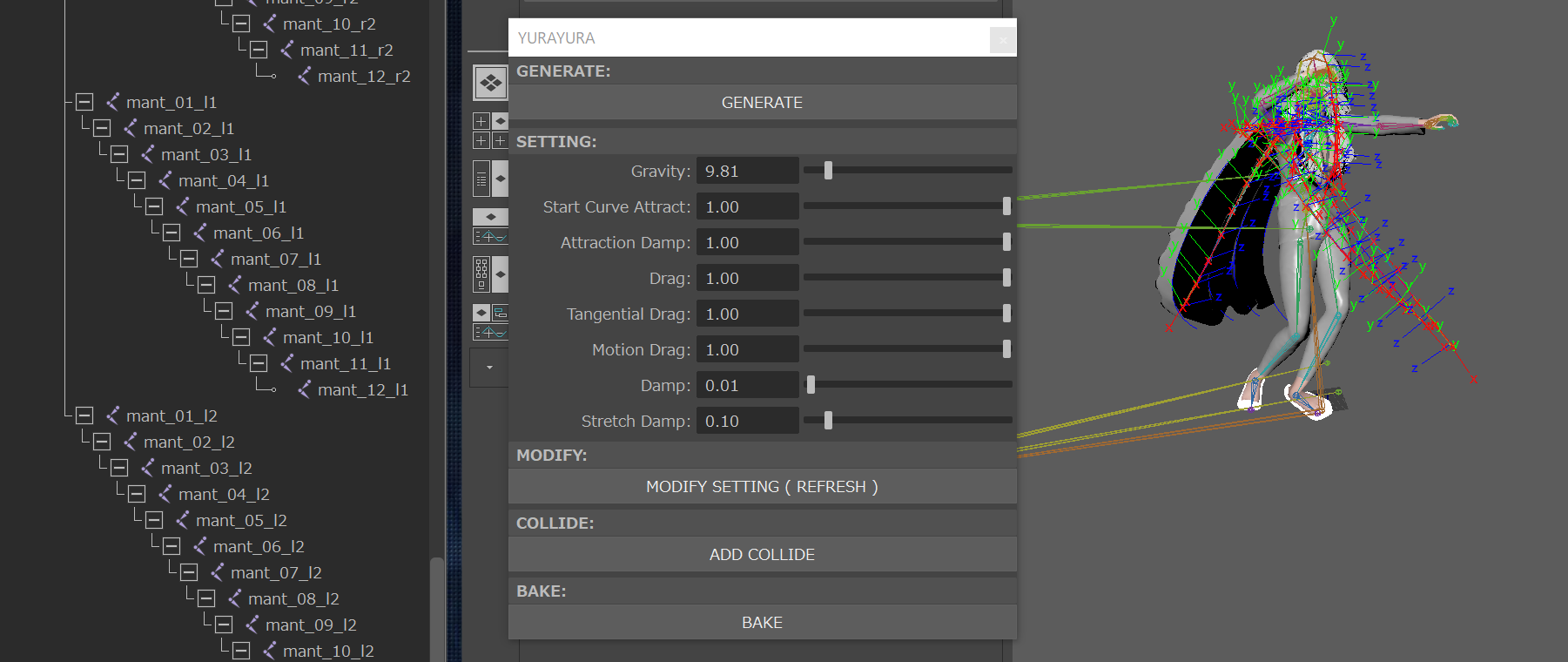
http://a-s-c-e-n-s-i-o-n.blogspot.com/2017/12/maya-yurayurapy.html
maya : 骨にヘアを揺れ物シミュレーションするツール YURAYURA.pyの説明
髪の毛などの数珠繋ぎ階層にヘアシミュレーションをかける揺れ物ツールです。
YURAYURAのおすすめ設定というか、揺れすぎていろんな破滅を起こすので
一番ゆれない状態から設定していくのがいいかもしれないと思い、
一番揺れない設定にしてみた。(ゆれるけど)
といってもnHAIRの設定を見たらわかる。
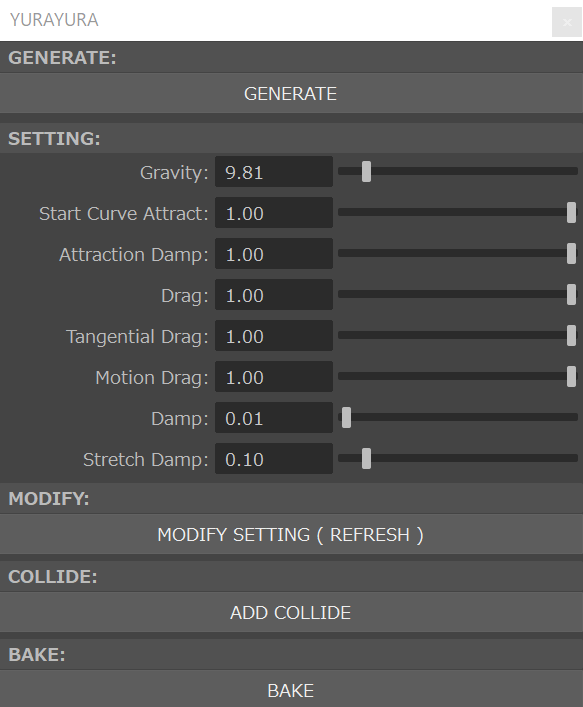
■■■GENERATE■■■:
髪の毛のルートを選択して、GENERATEボタンを押すと
YURAYURAシミュレーションセットが作られます。
複数選択でき、一度作成した後でも追加で使用できます。
■■■SETTING■■■:
■Gravity:
重力
■Start Curve Attract
開始カーブに引き付け(Start Curve Attract)
現在のヘアの位置を(変形する)開始位置へ引き付ける量を決定します。このアトリビュートは、たとえば、硬めのヘアやキャラクタとともに動くヘアの場合など、多くのヘア ワークフローで役立ちます。さらに、キーフレームを設定されたアニメーションを開始カーブに配置する場合、開始カーブに引き付け(Start Curve Attract)アトリビュートを使用して、シミュレーションと開始カーブ アニメーションをブレンドすることができます。
流れるような長いヘアの場合には、通常、開始カーブに引き付け(Start Curve Attract)の値はゼロのままにします。ただし、短いヘアの場合は、ヘアの十分な剛性を保つことが困難になる場合があります。ヘアの剛性を非常に大きくして、同時に、いくつかのダイナミックなプロパティを持たせる必要がある場合、ゼロより大きい値を使用します。1.0 の値のとき、ヘア位置はカーブ開始位置です(トランスフォームされる毛根からの相対位置になります)。衝突およびフォースだけは、ヘアを偏向させます。Start Curve Attract がない場合、Substep と Damp の値を増やす必要があります(特に、ヘアごとの CV の数が多いとき)。
■Attraction Damp:
引き付けのダンプ(Attraction Damp)
開始カーブに引き付け(Start Curve Attract)のエフェクトをダンプし、ヘアをカーブの開始位置の方に移動させて、ヘアの速度を遅くします。これは、ヘアの弾力性(開始カーブに引き付け(Start Curve Attract)の値が高い場合に発生)を小さくしたい場合や、アニメートされたヘアの頂点にダイナミック フィールドを適用したい場合に便利です。引き付けのダンプ(Attraction Damp)を 1 にすると、開始カーブの方に移動するヘアの動きは完全にダンプされ、開始位置(Start Positions)とフィールド フォースだけをそのままにして、後から任意でその動きにインフルエンスを及ぼせるようにします。
■Drag:
ドラッグ(Drag)
これは、シミュレーションを安定させるのに役立つだけではなく、空気摩擦をシミュレートします。ドラッグ(Drag)の値が 1.0 のとき、ヘアは慣性のモーションやフォロースルーがないように動作するため、粘度が高い液体の中にあるかのように動きます。
■Tangential Drag:
接線のドラッグ(Tangential Drag)
ヘアの方向に沿ってドラッグする量を指定します。0 に設定すると、ヘアは接線方向またはシェイプの方向に沿った移動において抵抗がなくなります。接線のドラッグ(Tangential Drag)を 1 に設定すると、ドラッグ(Drag)はすべての方向に均一になります。ドラッグ(Drag)のレベルが高く、接線のドラッグ(Tangential Drag)が低い場合、ヘアは水中を移動する蛇のような揺らぎモーションの動きをします。
■Motion Drag:
モーション ドラッグ(Motion Drag)
毛根の動きに相対的なヘア カーブの動きをダンプします。モーション ドラッグ(Motion Drag)の値は、ヘア カーブが毛根に合わせて動く量、またヘアのシェイプが他のフォースに影響される程度を決定します。これにより、Substeps の数を増やさなくても、ボビングやウィグルのようなヘアの余分な動きをダンプすることができます。
たとえば、モーション ドラッグ(Motion Drag)を 1.0 に設定すると、ヘアは毛根に合わせて動くので、周囲の大気をそれに合わせてドラッグしているように見えます。
■Damp:
ダンプ(Damp)
ヘアのベンドおよび伸長の方法に影響する個々のヘアの相対的シェイプの変化をダンピングします。
■Stretch Damp:
伸長のダンプ(Stretch Damp)
ヘア カーブ頂点間の伸長による速度がどのくらいダンピングされるかを指定します。伸長のダンプ(Stretch Damp)を大きくすると、ヘアは弾まずに伸長できます。
■■■MODIFY■■■:
SETTING欄の数値を変更して、下にあるMODIFY SETTING ( REFRESH )
ボタンで適用できます。
■■■COLLIDE■■■:
コリジョンをセットしたい場合は、コリジョンオブジェクトを選択して
ADD COLLIDEボタンを押します。
■■■BAKE■■■:
シミュレーション結果が良さそうであれば、BAKEボタンを押すと
元に選択していた階層すべてのRotateにBake Simulationをかけます。
YURAYURAシミュレーションセットは消去され、UIも閉じます。
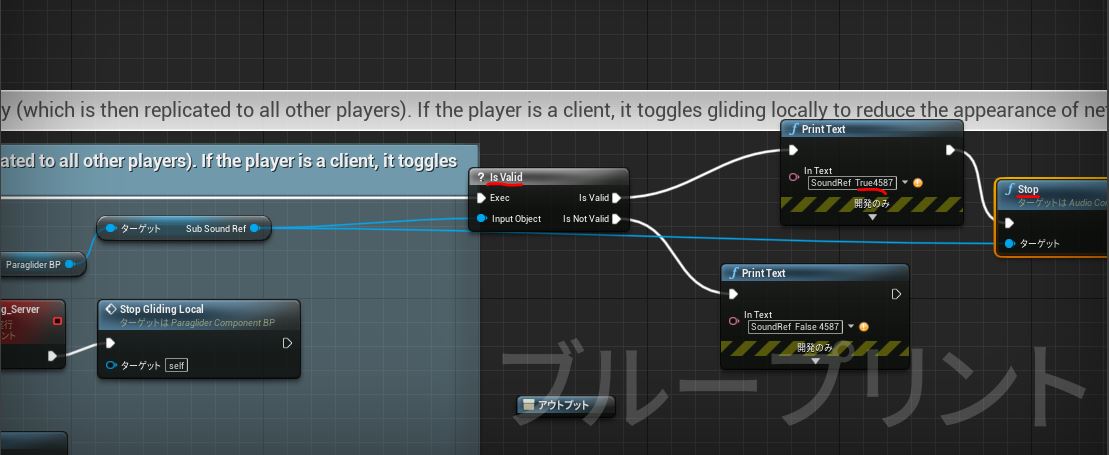
is Valid ノードを使ってオブジェクト参照を切り分ける。
参照
UE4 Blue Print Reference Null
スキンウェイトに詳しくなりたい
スキンウェイトの世界は自動化がまだ追いついてないっぽい。
スキンウェイトのコピーの中身は
copySkinWeights -sourceSkin skinCluster1 -destinationSkin skinCluster2 -noMirror;
http://me.autodesk.jp/wam/maya/docs/Maya2010/Commands/copySkinWeights.html
cmds.copySkinWeights( sourceSkin=’skinCluster1′, destinationSkin=’skinCluster2′, noMirror=True
http://me.autodesk.jp/wam/maya/docs/Maya2010/CommandsPython/copySkinWeights.html
解決できないエラー(モデルがわるかった。スキンバインド全体が壊れてた。)
cmds.copySkinWeights( sourceSkin=’group_mesh|Mesh|Genesis8FemaleSkin’, destinationSkin=’group_meshHIK|Mesh|Genesis8FemaleSkin’, noMirror=True )
エラー: line 1: RuntimeError: file line 1: skinCluster ノードは -sourceSkin/-ss フラグとともに指定する必要があります。 #
解決できないエラー(一般的)(モデルがわるかった。スキンバインド全体が壊れてた。)
copySkinWeights -noMirror -surfaceAssociation closestPoint -influenceAssociation closestJoint;
// 警告: line 0: スキン オブジェクトではないので ‘Genesis8FemaleSkinShape’ をスキップします。 //
// エラー: line 0: 1 つのソース スキンと 1 つの目的のスキン、もしくはソースと目的のスキン上のコンポーネントを選択する必要があります。 //
ーーーーーーーーーーーーーーーーーMaya2020でも解決できていない様子、(モデルがわるかった。スキンバインド全体が壊れてた。)
copySkinWeights -noMirror -surfaceAssociation closestPoint -influenceAssociation closestJoint;
// 警告: line 0: スキン オブジェクトではないので ‘Genesis8FemaleSkinShape’ をスキップします。 //
// エラー: line 0: 1 つのソース スキンと 1 つの目的のスキン、もしくはソースと目的のスキン上のコンポーネントを選択する必要があります。 //
cmds.copySkinWeights( sourceSkin=’group_mesh|Mesh|Genesis8FemaleSkin’, destinationSkin=’group_meshHIK|Mesh|Genesis8FemaleSkin’, noMirror=True )
エラー: RuntimeError: file line 1: skinCluster ノードは -sourceSkin/-ss フラグとともに指定する必要があります。 #
copySkinWeightsはそのコマンドの処理の中で、skinClusterコマンドを使っているみたいで
その引数部分にsourceSkinがうまくわたせてないみたいに見える。
モデルがわるかった。スキンバインド全体が壊れてた。
これも関係ありそう。
skinClusterは、一度に1つのジオメトリのみをバインドします。したがって、複数のジオメトリをバインドするには、複数のskinClusterコマンドを発行する必要があります。
https://help.autodesk.com/cloudhelp/2016/ENU/Maya-Tech-Docs/Commands/skinCluster.html
一旦1つの裸ジオメトリのスキンウェイトにしておいてそれを複数の服にコピーしていく流れをやったらいいのかもな。
ーーーーーーーーーーーーーーーーーーーーー
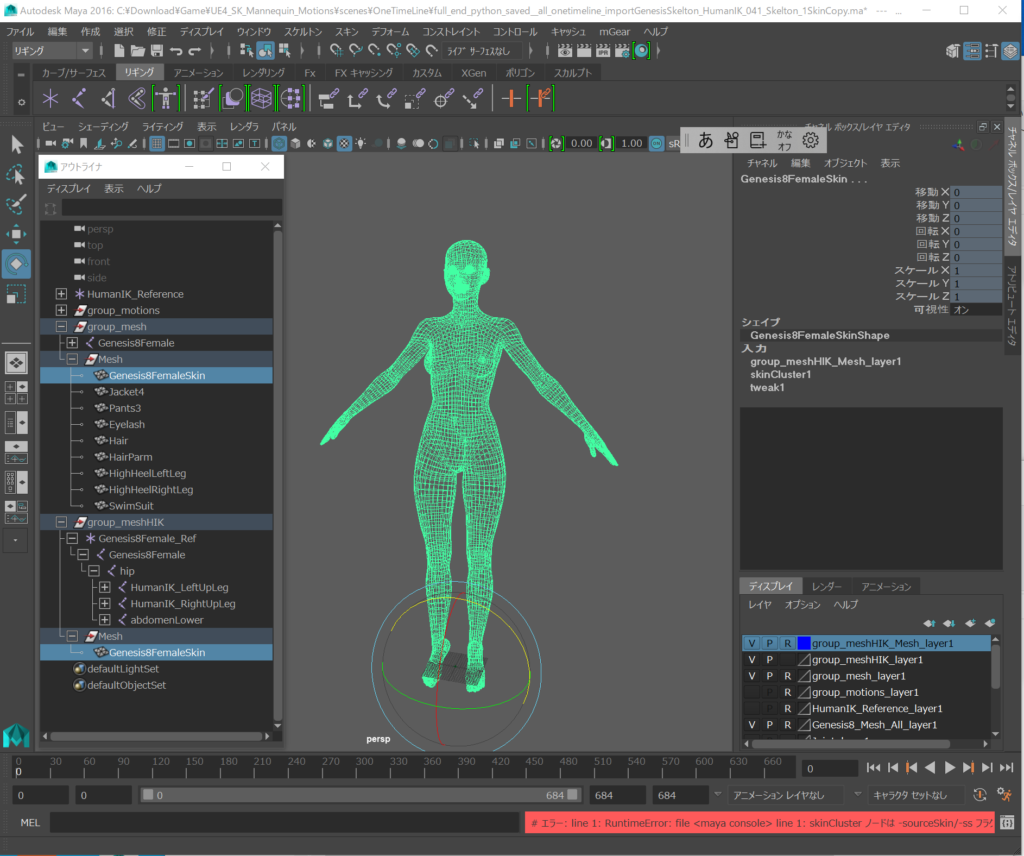
ダメだった。
cmds.copySkinWeights( sourceSkin=’group_mesh|Mesh|Genesis8FemaleSkin’, destinationSkin=’group_meshHIK|Mesh|Genesis8FemaleSkin’, noMirror=True )
エラー: line 1: RuntimeError: file line 1: skinCluster ノードは -sourceSkin/-ss フラグとともに指定する必要があります。 #
copySkinWeights -noMirror -surfaceAssociation closestPoint -influenceAssociation closestJoint;
// 警告: line 0: スキン オブジェクトではないので ‘Genesis8FemaleSkinShape’ をスキップします。 //
// エラー: line 0: 1 つのソース スキンと 1 つの目的のスキン、もしくはソースと目的のスキン上のコンポーネントを選択する必要があります。 //
Furcraea Green Plant.
Furcraea Plant 3D Data Download
2020.11.02 http://furcraea.tokyo/ のドメインをムームードメインで取得した。
WordPress へようこそ。こちらは最初の投稿です。編集または削除し、コンテンツ作成を始めてください。