


プラグインの作り方はこの記事から
https://furcraea.verse.jp/wp/2024/09/28/ue5-3-how-to-create-a-cpp-plugin
furcraeaUEOpenAI ってプラグイン作って
D:\Sandbox\UE53CratePlugin\UE53CreatePlugin\Plugins\furcraeaUEOpenAI\Source\furcraeaUEOpenAI\furcraeaUEOpenAI.Build.cs のPublicDependencyModuleNamesに
“HTTP”, “Json”,
を追加
furcraeaUEOpenAI.Build.cs
// Some copyright should be here...

using UnrealBuildTool;

public class furcraeaUEOpenAI : ModuleRules
{
	public furcraeaUEOpenAI(ReadOnlyTargetRules Target) : base(Target)
	{
		PCHUsage = ModuleRules.PCHUsageMode.UseExplicitOrSharedPCHs;

		PublicIncludePaths.AddRange(
			new string[] {
				// ... add public include paths required here ...
			}
			);


		PrivateIncludePaths.AddRange(
			new string[] {
				// ... add other private include paths required here ...
			}
			);


		PublicDependencyModuleNames.AddRange(
			new string[]
			{
				"Core","HTTP", "Json",
				// ... add other public dependencies that you statically link with here ...
			}
			);


		PrivateDependencyModuleNames.AddRange(
			new string[]
			{
				"CoreUObject",
				"Engine",
				"Slate",
				"SlateCore",
				// ... add private dependencies that you statically link with here ...
			}
			);


		DynamicallyLoadedModuleNames.AddRange(
			new string[]
			{
				// ... add any modules that your module loads dynamically here ...
			}
			);
	}
}
furcraeaOpenAILib2BPLibrary.h
// Copyright Epic Games, Inc. All Rights Reserved.

#pragma once

#include "Kismet/BlueprintFunctionLibrary.h"
#include "furcraeaOpenAILib2BPLibrary.generated.h"

/*
*	Function library class.
*	Each function in it is expected to be static and represents blueprint node that can be called in any blueprint.
*
*	When declaring function you can define metadata for the node. Key function specifiers will be BlueprintPure and BlueprintCallable.
*	BlueprintPure - means the function does not affect the owning object in any way and thus creates a node without Exec pins.
*	BlueprintCallable - makes a function which can be executed in Blueprints - Thus it has Exec pins.
*	DisplayName - full name of the node, shown when you mouse over the node and in the blueprint drop down menu.
*				Its lets you name the node using characters not allowed in C++ function names.
*	CompactNodeTitle - the word(s) that appear on the node.
*	Keywords -	the list of keywords that helps you to find node when you search for it using Blueprint drop-down menu.
*				Good example is "Print String" node which you can find also by using keyword "log".
*	Category -	the category your node will be under in the Blueprint drop-down menu.
*
*	For more info on custom blueprint nodes visit documentation:
*	https://wiki.unrealengine.com/Custom_Blueprint_Node_Creation
*/
UCLASS()
class UfurcraeaOpenAILib2BPLibrary : public UBlueprintFunctionLibrary
{
	GENERATED_UCLASS_BODY()

public:
	UFUNCTION(BlueprintCallable, meta = (DisplayName = "Sample Function", Keywords = "furcraeaOpenAILib2 sample"), Category = "furcraeaOpenAILib2")
	static float furcraeaOpenAILib2SampleFunction(float Param);

	UFUNCTION(BlueprintCallable, meta = (DisplayName = "Curl Send Request 4", Keywords = "furcraeaOpenAILib2 curl http request openai"), Category = "furcraeaOpenAILib2")
	static void CurlSendRequest4();
};
furcraeaOpenAILib2BPLibrary.cpp
// Copyright Epic Games, Inc. All Rights Reserved.

#include "furcraeaOpenAILib2BPLibrary.h"
#include "furcraeaOpenAILib2.h"
#include "HttpModule.h"
#include "Interfaces/IHttpRequest.h"
#include "Interfaces/IHttpResponse.h"

UfurcraeaOpenAILib2BPLibrary::UfurcraeaOpenAILib2BPLibrary(const FObjectInitializer& ObjectInitializer)
: Super(ObjectInitializer)
{

}

float UfurcraeaOpenAILib2BPLibrary::furcraeaOpenAILib2SampleFunction(float Param)
{
	return -1;
}


void UfurcraeaOpenAILib2BPLibrary::CurlSendRequest4()
{
	FString ApiKey = TEXT("sk-からはじまるKEY");

	TSharedRef<IHttpRequest, ESPMode::ThreadSafe> HttpRequest = FHttpModule::Get().CreateRequest();
	HttpRequest->SetURL("https://api.openai.com/v1/chat/completions");

	HttpRequest->SetVerb("POST");
	HttpRequest->SetHeader("Content-Type", "application/json");
	HttpRequest->SetHeader("Authorization", "Bearer " + ApiKey);

	// JSON Body
	FString Content = TEXT(R"(
    {
        "model": "gpt-4o-mini",
        "messages": [{"role": "user", "content": "Say this is a test!"}],
        "temperature": 0.7
    }
    )");

	HttpRequest->SetContentAsString(Content);
	//
	HttpRequest->OnProcessRequestComplete().BindLambda([](FHttpRequestPtr Request, FHttpResponsePtr Response, bool bWasSuccessful)
		{
			if (bWasSuccessful && Response.IsValid())
			{
				FString ResponseContent = Response->GetContentAsString();
				UE_LOG(LogTemp, Warning, TEXT("%s"), *ResponseContent);
			}
			else
			{
				UE_LOG(LogTemp, Error, TEXT("Request failed"));
			}
		});
	HttpRequest->ProcessRequest();
}
VSでbuild.
新規ブループリントから Widget BluePrint >User Widgetで作成 WBP_ApiTest

ボタン配置

ボタンに下記ノード作成
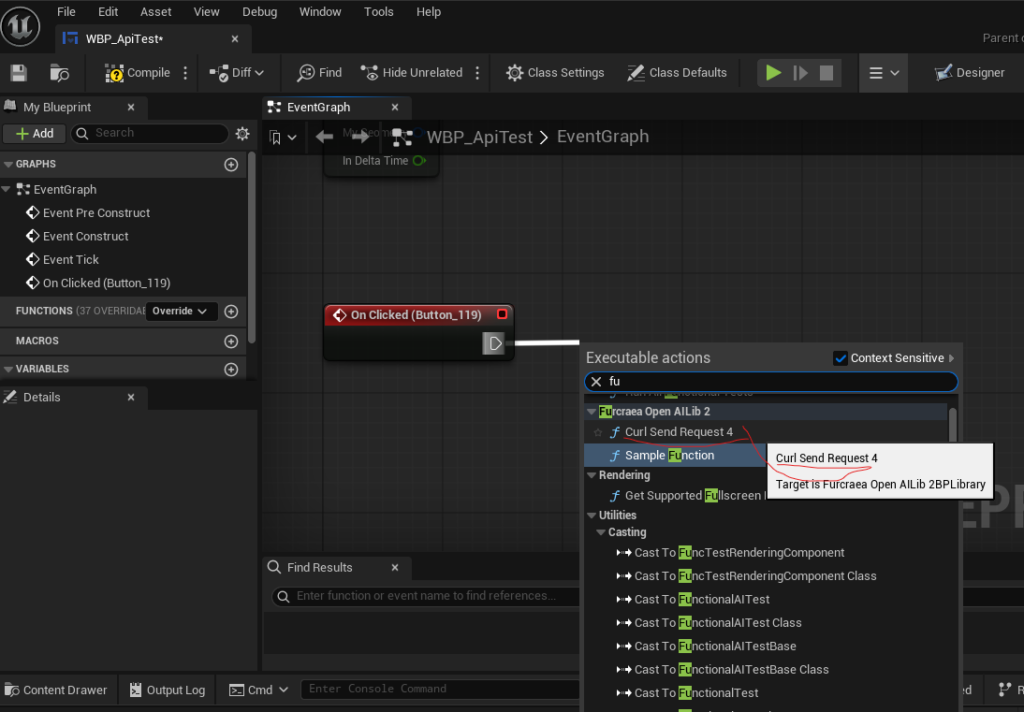

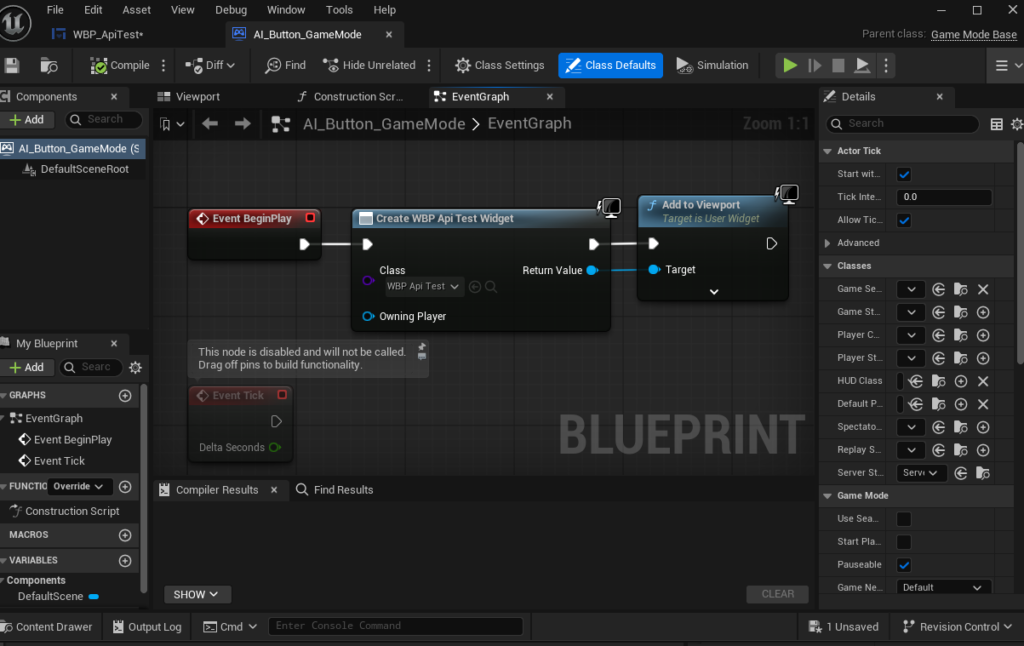
新規ブループリントから GameModeBase の 名前 AI_Button_GameModeで作成した
Create WBP からWBP Api Testを選びAdd Viewport
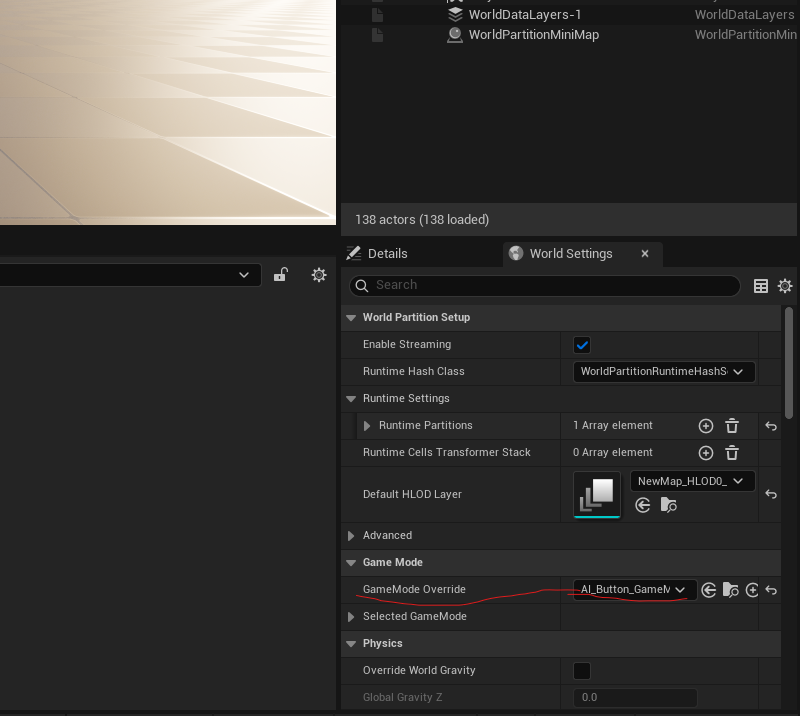
GameMode OverrideにAI_Button_GameMode選ぶ
で再生
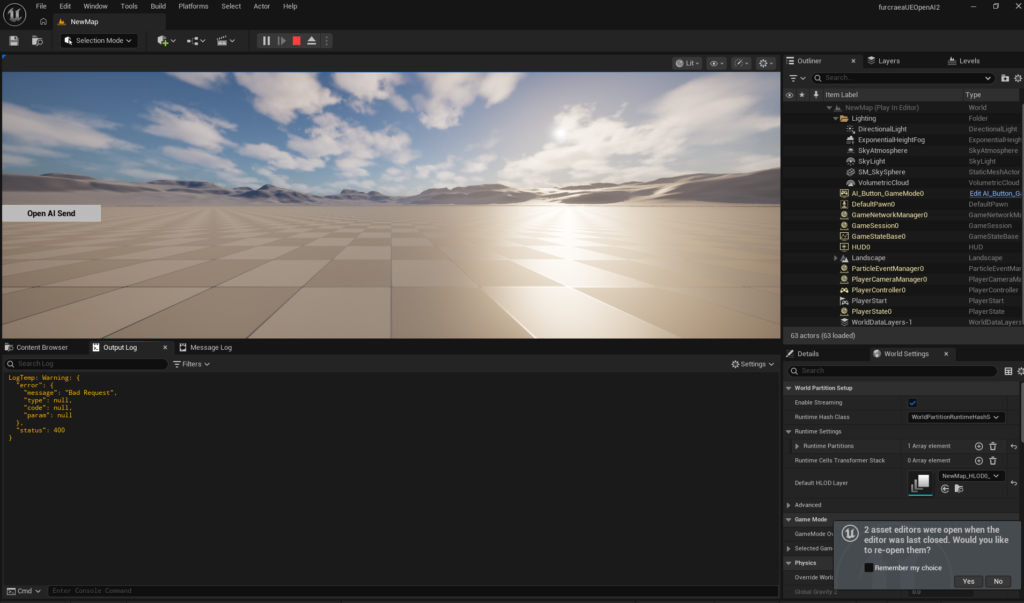
作ったボタンおしてみると!応答が返ってきた!!
“[UE5.7][VisualStudio][Cpp]UnrealEngineのCPPプラグインからOpenAI(ChatGPT4o)を呼んでみるのできた。2025/12/15再更新” への1件の返信